
If you found a CSC ServiceWork charge, CSC SERVICE WORK charge, CSC ServiceWorks charge, CTLP*CSC SERVICEWORK, or USA*CSC SERVICEWORK on your credit card, debit card, Apple Pay activity, or bank statement, it is usually connected to a machine operated by CSC ServiceWorks.
The transaction may have come from an apartment or dormitory laundry machine, the CSC GO or CSCPay Mobile app, a gas-station air pump, a vehicle vacuum, or another unattended payment terminal.
Quick answer: Compare the date and amount with recent laundry, air, vacuum, or mobile-app purchases. A reference to 35 Pinelawn Road or Melville, NY points to CSC ServiceWorks’ corporate headquarters and does not necessarily identify the physical machine location. If the charge includes CTLP or says via Cantaloupe, Cantaloupe may have provided the card reader or payment-processing technology.
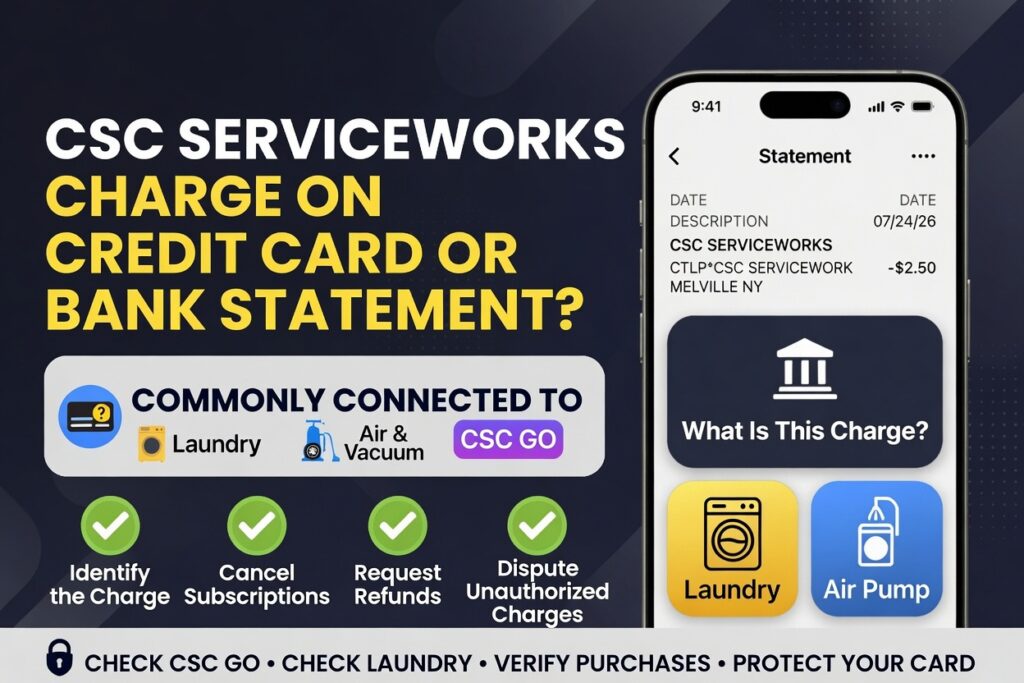
What Is a CSC ServiceWork Charge?
A CSC ServiceWork charge most commonly represents a small payment made at equipment operated or serviced by CSC ServiceWorks.
CSC provides commercial and community laundry services as well as air and vacuum equipment. Its machines are commonly found at:
- Apartment and condominium laundry rooms
- College and university dormitories
- Hotels and resorts
- Laundromats and community laundry facilities
- Gas stations and convenience stores
- Vehicle air and vacuum stations
- Properties using CSC GO or CSCPay Mobile
The statement may show CSC’s company name instead of the apartment community, gas station, college, hotel, or property where the machine was used. That mismatch is one of the main reasons cardholders do not immediately recognize the transaction.
What Is 35 Pinelawn Road Melville NY on a Credit Card?
A 35 Pinelawn Road Melville NY charge on a credit card is likely connected to CSC ServiceWorks because the company lists its corporate headquarters at:
CSC ServiceWorks
35 Pinelawn Road, Suite 120
Melville, NY 11747
A ServiceWorks Melville NY charge is another shortened way a bank or card issuer may display the same CSC ServiceWorks merchant information. The Melville address does not prove that the card was physically used in New York.
The address may appear in expanded card details, a digital-wallet description, merchant information supplied by the bank, or a payment-processor record.
Seeing Melville, New York does not necessarily mean the card was physically used there. The actual purchase may have taken place at a CSC laundry machine, air pump, vacuum, or other payment terminal in another city or state.
How to Verify a Melville NY CSC Charge
- Compare the amount and date with recent laundry, air, or vacuum use.
- Open the expanded transaction details in your banking app.
- Check whether the transaction includes CSC, CTLP, Cantaloupe, USA Technologies, or a machine-location reference.
- Review CSC GO, CSCPay Mobile, Apple Pay, or Google Pay activity.
- Ask other authorized card users whether they used a CSC machine.
- Contact CSC ServiceWorks if the charge still cannot be identified.
What Is CTLP CSC ServiceWorks?
A statement such as CTLP*CSC SERVICEWORK, CTLP CSC SERVICE WORKS, or CSC ServiceWorks via Cantaloupe may show two companies involved in the same transaction:
- CSC ServiceWorks: The company operating or servicing the laundry, air, vacuum, or other machine.
- Cantaloupe: The company providing cashless card-reader or payment-processing technology.
Cantaloupe was previously known as USA Technologies. When it changed its corporate name to Cantaloupe, it adopted CTLP as its stock-market ticker. Although Cantaloupe is now part of 365 Retail Markets, older payment systems and statement formats may continue to display CTLP, USAT, USA Technologies, or Cantaloupe-related wording.
CSC previously announced the use of USA Technologies’ ePort cashless-payment platform on its equipment. This makes a payment-processing connection plausible when both CSC and CTLP or Cantaloupe appear in the same transaction description.
The exact wording can vary by card issuer, processor, digital wallet, machine, and available statement space. Ask the bank for the complete merchant descriptor if the transaction remains unclear.
Common CTLP and Cantaloupe Variations
- CTLP*CSC SERVICEWORK
- CTLP CSC SERVICE WORK
- CTLP CSC SERVICEWORKS
- CTLP CSC SERVICE WORKS MELVILLE NY
- CSC SERVICEWORK VIA CANTALOUPE
- CSC SERVICEWORKS MELVILLE NY VIA CANTALOUPE
- CSC SERVICE MELVILLE NY VIA CANTALOUPE
- CANTALOUPE CSC SERVICEWORK
- USA TECHNOLOGIES CSC
- USAT CSC SERVICEWORK
These variations do not necessarily represent separate purchases. They may be different ways of describing CSC as the machine operator and Cantaloupe as the payment-technology provider.
Common CSC ServiceWorks Statement Descriptors
CSC transactions may appear under shortened, merged, or processor-generated descriptions such as:
- CSC SERVICE WORK
- CSC SERVICEWORK
- CSC SERVICEWORKS
- CSC SERVICE WORKS
- USA*CSC SERVICEWORK
- USA CSC SERVICEWORK
- POS DEBIT CSC SERVICE WORK
- CHECKCARD CSC SERVICE WORK
- CHKCARD CSC SERVICEWORK
- CSC SERVICEWORK MELVILLE NY
- CSC SERVICEWORKS MELVILLE NY
- 35 PINELAWN ROAD MELVILLE NY
- CSC SERVICE WORK $2.50
- CSC SERVICEWORK $2.00
- CSC SERVICEWORK $1.50
- CSC PAY MOBILE
- CSCPAY MOBILE
- CSC GO
- USA*CSC TEP CO
- PREAUTH USA*CSC TEP CO
- CTLP*CSC SERVICEWORK
- CSC SERVICEWORK VIA CANTALOUPE
A city, state, address, reference number, pending indicator, or payment-processor name may be added after the main descriptor.
What Is USA*CSC TEP CO?
USA*CSC TEP CO, CSC TEP CO, and similar entries are associated with CSC machine payments. They may appear after using a laundry machine, air pump, vacuum, mobile laundry app, card reader, or other unattended terminal.
Possible variations include:
- USA*CSC TEP CO
- USA CSC TEP CO
- CSC TEP CO
- PREAUTH USA*CSC TEP CO
- PENDING USA*CSC TEP CO
- POS DEBIT USA*CSC TEP CO
- CHECKCARD USA*CSC TEP CO
- CHKCARD USA*CSC TEP CO
- POS REFUND USA*CSC TEP CO
The wording does not normally mean that you purchased something from a retail store named TEP or Tepco. The attached location may identify the machine, property, gas station, college, or payment terminal.
Why Did CSC ServiceWorks Charge My Card?
Common explanations include:
- Laundry transaction: A washer or dryer was started using a physical card, mobile wallet, CSC GO, or CSCPay Mobile.
- Laundry-wallet reload: Money was added to a laundry application or card balance.
- Air-pump transaction: A vehicle tire-inflation machine accepted the card or digital wallet.
- Vehicle vacuum: A card was used at a self-service vacuum station.
- Multiple machine uses: Separate washer and dryer cycles created separate charges.
- Authorized card user: A family member or another person authorized to use the card made the purchase.
- Pending authorization: A temporary authorization appeared before the final amount posted.
- Duplicate or failed transaction: The machine processed more than one completed payment or charged without providing the service.
- Unauthorized use: Someone used the card or saved payment credentials without permission.
What Is a CSC ServiceWork $2.50 Charge?
A CSC ServiceWork $2.50 charge is often consistent with the price of a single washer, dryer, air-pump, vacuum, or similar machine transaction.
Machine pricing varies by property, location, equipment type, and service. Other common small amounts may include approximately $1.50, $2.00, $2.50, $3.00, or several separate charges made close together.
A $2.50 amount alone does not confirm that the transaction was authorized. Compare it with:
- The price displayed on the machine
- The date and time you used the service
- Your CSC GO or CSCPay Mobile history
- Apple Pay or Google Pay activity
- Transactions made by another card user
- A washer charge followed by a separate dryer charge
Why Are There Two CSC ServiceWorks Charges?
Two charges may represent:
- One washer and one dryer transaction
- Two separate laundry cycles
- More than one air or vacuum session
- A pending authorization and a completed payment
- A payment retry after the first attempt appeared to fail
- A duplicate completed transaction
Check whether both transactions have fully posted. A pending entry may disappear or adjust after processing. If two identical transactions both complete and only one service was provided, request a refund from CSC.
How to Identify a CSC ServiceWorks Charge
- Open the full transaction. Record the exact descriptor, amount, date, city, state, address, and reference number.
- Check the status. Determine whether the charge is pending, completed, reversed, or refunded.
- Review recent locations. Think about apartment laundry rooms, dormitories, hotels, laundromats, gas stations, and convenience stores.
- Check the applications. Review CSC GO, CSCPay Mobile, Apple Pay, and Google Pay transaction histories.
- Ask authorized card users. Another household member may have used a laundry machine, air pump, or vacuum.
- Look for a machine ID. The ID is generally displayed on the machine and can help CSC locate the transaction.
- Ask the property. An apartment office, dormitory, hotel, gas station, or laundromat may be able to confirm that CSC operates the equipment.
- Contact CSC. Provide the machine ID, property, date, amount, and exact descriptor.
- Contact the bank. Ask for the expanded merchant information if CSC cannot locate the payment.
CSC ServiceWorks Customer Service and Contact Information
Use CSC’s official contact options for transaction identification, refund requests, and machine problems:
- CSC ServiceWorks Customer Service: 1-844-272-9675
- Refund Support for Two or More Machines: 1-877-264-6622
- Corporate Headquarters: 35 Pinelawn Road, Suite 120, Melville, NY 11747
- Mailing Address: 1204 W. Bethel Road, Suite 160, Coppell, TX 75019
- Official Website: CSC ServiceWorks
- Official Contact Page: Contact CSC ServiceWorks
- Help and FAQs: CSC Help and FAQs
Cantaloupe Consumer Support
If the transaction specifically includes CTLP or Cantaloupe and CSC cannot identify it, Cantaloupe may be able to explain the cashless card-reader portion of the payment.
- Cantaloupe Consumer Assistance: 1-888-561-4748, option 1
- Cantaloupe Consumer FAQs: Cantaloupe Consumer Help
Start with CSC when CSC ServiceWorks appears in the descriptor, because CSC is generally the machine operator. Cantaloupe may be the technology or payment provider rather than the business responsible for the machine or refund.
Use only CSC’s official website or the official Cantaloupe consumer-help page when submitting machine, payment, or contact information. Avoid support numbers copied from advertisements, social posts, or unfamiliar websites, and never give an unsolicited caller your password, verification code, or full card number.
How to Request a CSC ServiceWorks Refund
Use CSC’s refund process if the machine accepted payment but:
- Did not start
- Stopped before completing the service
- Did not provide air or vacuum service
- Charged the wrong amount
- Processed a duplicate completed payment
- Removed funds without completing the transaction
Official refund resources:
- Submit a Refund Request: CSC ServiceWorks Refund Request
- Check Refund Status: Check an Existing CSC Refund
- Two or More Machines: Call 1-877-264-6622
CSC states that multiple transactions involving the same machine should be combined into one refund request. If money was lost in two or more machines, record each machine ID and call the refund-support number.
Have the following information available:
- Machine ID
- Property or business location
- Date and approximate time
- Charge amount
- Complete statement descriptor
- Explanation of what went wrong
- Refund-request or claim number, if already submitted
How to Report a Broken CSC Machine
A refund request addresses the lost payment. A machine-service request reports the equipment problem so that CSC can inspect or repair it.
- Machine Service Request: Report a CSC Machine Problem
- Customer Service: 1-844-272-9675
Look for the machine ID before starting the request. The machine ID helps CSC identify the exact washer, dryer, air pump, vacuum, or other device involved.
What to Do If You Do Not Recognize the CSC Charge
If neither you nor another authorized card user recognizes the transaction:
- Review all CSC, CTLP, Cantaloupe, Apple Pay, Google Pay, and laundry-app activity.
- Ask CSC to identify the machine or location connected to the transaction.
- Ask the bank for the full merchant descriptor and recurring-payment or card-present information.
- Lock or temporarily freeze the card if additional suspicious transactions are appearing.
- Dispute the transaction through the bank if it was not authorized.
- Ask whether the card number or digital-wallet token should be replaced.
- Continue monitoring the account for additional small charges.
A CSC refund request is intended for a machine problem or incorrect authorized payment. A bank dispute is more appropriate when the card was used without permission or neither CSC nor the cardholder can identify the transaction.
For a credit-card dispute, the Consumer Financial Protection Bureau recommends contacting the card issuer immediately and sending a written billing-error notice within 60 calendar days after the charge appeared on the statement. See the CFPB credit-card dispute guidance.
For an unauthorized debit-card transaction, notify the bank promptly because the applicable protections can depend on how quickly the transaction or a missing card is reported. See the CFPB debit-card guidance.
How to Stop Future CSC ServiceWorks Charges
CSC charges are generally individual machine purchases or laundry-wallet transactions rather than traditional monthly subscriptions. To prevent additional charges:
- Review and remove an unused saved payment method from CSC GO or CSCPay Mobile.
- Check the app for stored balance or payment settings.
- Change the app password if someone else may have accessed the account.
- Remove the card from an old phone or digital wallet.
- Ask authorized users not to use the card for additional machine payments.
- Ask the bank about blocking or replacing the card if the transaction was unauthorized.
Frequently Asked Questions About CSC SERVICE WORK Charges
What is a CSC ServiceWork charge on a bank statement or credit card?
A CSC ServiceWork charge on a bank statement or credit card is usually a payment for a CSC ServiceWorks laundry machine, air pump, vehicle vacuum, laundry app, or another unattended machine service.
What is 35 Pinelawn Road Melville NY on my card?
35 Pinelawn Road, Suite 120, Melville, NY 11747 is CSC ServiceWorks’ corporate headquarters. The address may appear in card details even when the machine was used somewhere else.
What is CTLP CSC ServiceWorks?
CTLP may refer to Cantaloupe, a self-service payment-technology company formerly known as USA Technologies. CSC may identify the machine operator while Cantaloupe identifies the card reader or payment-processing platform.
What is a CSC ServiceWork $2.50 charge?
A $2.50 CSC ServiceWork charge may be for one washer, dryer, air pump, vehicle vacuum, or similar machine transaction. Compare the amount with the machine price and your app or digital-wallet history.
Why do I have two CSC ServiceWorks charges?
Two charges may represent separate washer and dryer uses, multiple machine sessions, a pending authorization and final payment, a payment retry, or a duplicate completed transaction.
How do I request a refund from CSC ServiceWorks?
Use CSC ServiceWorks’ official refund-request page. If funds were lost in two or more machines, record the machine IDs and call 1-877-264-6622.
Is CSC SERVICE WORK a scam?
CSC ServiceWorks is a legitimate machine-service company, but a legitimate descriptor can still appear on an unauthorized transaction. Verify the machine or account and dispute the charge if nobody authorized it.
Is Coinmach related to CSC ServiceWorks?
Yes. Coinmach and Mac-Gray were combined and rebranded as CSC ServiceWorks. Older equipment, laundry cards, records, or statement descriptions may still refer to Coinmach.
Related Machine and Payment Charges
- Cantaloupe Charge on a Credit Card or Bank Statement
- USA Technologies and Cantaloupe Vending Charge
- AUTO AIR & VACUUM SERV Charge
- What to Do About an Unrecognized Card or Bank Charge
- Credit Card Charge Codes and Statement Descriptor Directory
Privacy and Safety Warning
Do not post your full card number, bank account number, CSC application login, email address, telephone number, home address, machine-account information, password, security code, verification code, or complete transaction reference in the comments.
Disclaimer
ChargeOnMyCard.com is an independent informational website and is not affiliated with CSC ServiceWorks, CSC GO, CSCPay Mobile, Cantaloupe, USA Technologies, 365 Retail Markets, Coinmach, any apartment property, gas station, college, hotel, bank, card network, payment processor, machine operator, or cardholder. Statement descriptors, addresses, payment systems, company relationships, support options, and refund procedures can change. Confirm information through the official company or your financial institution.
Consumer Reports and Experiences
Reader reports can help identify a machine or statement variation, but individual reports are unverified unless supported by a receipt, app history, machine record, or other reliable documentation.
Did you identify a CSC SERVICE WORK, CSC ServiceWork, 35 Pinelawn Road Melville NY, CTLP*CSC SERVICEWORK, USA*CSC TEP CO, or CSC ServiceWorks via Cantaloupe charge?
Share the general descriptor, amount, city or state, machine type, and whether it was connected to laundry, air, vacuum, CSC GO, CSCPay Mobile, Cantaloupe, or another service. Also let readers know whether CSC issued a refund or whether a bank dispute was required.
Remove all private payment, account, property, and transaction-reference information before posting.