
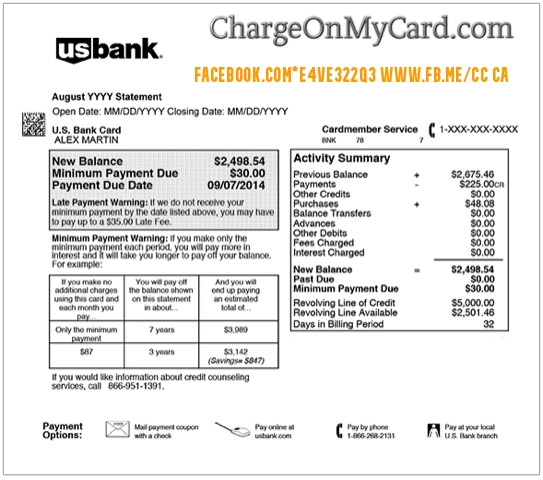
A FACEBK charge, FACEBK*PAYMENT charge, or FACEBK*ADS charge on a credit card, debit card, or bank statement usually relates to a payment processed through Meta, the company behind Facebook and Instagram.
Meta officially uses FACEBK* for some advertising charges. Other FACEBK payments may involve Meta Pay, Stars, subscriptions, creator support, games, Marketplace checkout, donations, or another purchase made through a Facebook or Instagram account. The letters and numbers after the asterisk may be a transaction reference rather than the name of the product purchased.
What Is the FACEBK Charge?
FACEBK is a shortened form of Facebook that Meta may use in credit-card and bank-statement descriptions.
The charge may represent:
- A Facebook advertising campaign
- An Instagram advertising campaign
- A Meta Ads Manager payment
- A Meta Pay transaction
- A Facebook Stars purchase
- Creator or fan support
- A Facebook or Instagram subscription
- A Meta Verified subscription
- A game or in-app purchase
- A Facebook Marketplace or shop checkout
- A fundraiser or charitable donation
- A purchase made by another authorized account user
- An unauthorized use of a saved payment method
The descriptor alone does not identify the Facebook profile, Instagram account, ad account, Page, creator, fundraiser, application, item, or person responsible for the transaction.
Is FACEBK an Official Meta Advertising Descriptor?
Yes. Meta officially says some advertising payments appear on card statements as:
- FACEBK* followed by a reference number
- FACEBOOK INC. followed by a reference number
The reference generally contains ten characters and can be compared with the payment information in Meta Ads Manager.
A descriptor such as:
FACEBK*AD2HJQ5LE2
may therefore represent a Facebook or Instagram advertising payment rather than an ordinary personal Facebook purchase.
Common FACEBK Statement Variations
The exact wording can vary by bank, account, product, payment method, and country.
- FACEBK
- FACEBK*PAYMENT
- FACEBK * PAYMENT
- FACEBK*ADS
- FACEBK *AD2HJQ5LE2
- FACEBK*REFERENCE
- FACEBOOK INC.*REFERENCE
- FACEBOOK.COM*REFERENCE
- FACEBOOK.COM*E4VE322Q3
- FACEBK*PAYMENT FB.ME/CC US
- FACEBK*PAYMENT MENLO PARK USA
- FACEBK*FAN_FUNDING FB.ME/CC CA
- FACEBK*MV4B FB.ME/CC CA
- FB.ME/CC
- FB.ME/ADS
- FACEBOOK.COM/CC
- PENDING FACEBK
- CHECKCARD FACEBK*PAYMENT
- CHKCARD FACEBK
- POS DEBIT FACEBK*PAYMENT
- RECURRING PAYMENT FACEBK
A suffix such as MV4B, FAN_FUNDING, or a random-looking character sequence may be an internal reference, campaign code, payment category, creator-support label, or transaction identifier. Do not assume its meaning without checking the matching Meta account.
How to Check Whether FACEBK Is a Meta Advertising Charge
- Copy the complete FACEBK descriptor from the statement.
- Record the amount and transaction date.
- Open Meta Ads Manager on a desktop computer.
- Go to Billing & payments.
- Open Payment activity.
- Select a date range covering the card charge.
- Compare the amount and date.
- Look for the reference number shown in the payment-method column.
- Compare it with the characters following FACEBK on the statement.
- Open the transaction and download the receipt when available.
Official Meta advertising billing:
Review Meta Ads Manager billing and payment activity
Check Every Meta Advertising Account
A business may have more than one advertising account connected with the same card.
Review:
- Personal Facebook ad accounts
- Business Manager accounts
- Meta Business Portfolio accounts
- Facebook Page advertising
- Instagram advertising
- Ads managed by an employee
- Ads managed by an agency or contractor
- Old or inactive business accounts
- Accounts shared with another administrator
A former employee, agency, or Page administrator may still have advertising access even when the cardholder does not personally remember launching the campaign.
Why Are There Several FACEBK Ad Charges?
Multiple Meta advertising charges are not automatically duplicates.
Meta may charge an advertising payment method:
- When the account reaches its payment threshold
- Again after the next payment threshold is reached
- On the monthly bill date for remaining advertising costs
- After a failed payment is retried
- Across several separate ad accounts
An advertiser who reaches the payment threshold several times may receive several card charges during one month.
Add the completed payments shown in Ads Manager and compare the total with the campaign spending and statement entries.
What Is FACEBK*PAYMENT or FB.ME/CC?
A descriptor containing FACEBK*PAYMENT or FB.ME/CC may relate to a payment processed through Facebook or Meta’s payment system.
Possible explanations include:
- A Meta Pay purchase
- A Facebook or Instagram shop transaction
- A Marketplace checkout payment
- A game or application purchase
- A creator subscription
- Facebook Stars
- Meta Verified
- A fundraiser or donation
- A payment made through another connected Meta account
The `fb.me/cc` portion is associated with Facebook payment and charge help. It does not identify the underlying product by itself.
How to Find the Transaction in Meta Pay
- Sign in to the Facebook account.
- Open Settings & privacy.
- Open Orders and payments.
- Review Activity.
- Select the transaction for more details.
- Compare its amount, date, recipient, product, and payment method with the bank statement.
Official Meta Pay transaction help:
Also repeat the review for any connected Instagram account, alternate Facebook profile, business account, or account used by another authorized person.
Could the Charge Be Facebook Stars or Creator Support?
It may be.
Facebook users can purchase Stars and use them to support participating creators. Depending on the device and payment method, Stars may be billed through:
- Meta Pay
- Apple
- Google Play
A Meta-processed purchase may use FACEBK or Meta wording. An Apple- or Google-processed purchase may instead display an Apple or Google descriptor.
A descriptor containing FAN_FUNDING may indicate creator support, but the wording should be verified through payment activity before drawing a conclusion.
Could FACEBK Be a Meta Verified Subscription?
Meta Verified is a recurring subscription for eligible Facebook and Instagram profiles.
Meta says the subscription generally renews on the same date as the original purchase until it is canceled.
Check:
- The Facebook account’s Meta Verified settings
- The connected Instagram account
- Apple subscriptions if purchased through iOS
- Google Play subscriptions if purchased through Android
- The original enrollment email
- The next renewal date
To avoid another renewal, Meta generally requires cancellation at least 24 hours before the next payment date. Ordinary cancellation usually leaves the benefits active through the current paid period and does not automatically refund that period.
Official Meta Verified help:
Manage a Meta Verified subscription
Could the Charge Be a Donation?
A FACEBK entry may occasionally involve a fundraiser or payment made through Facebook’s charitable tools.
However, many Facebook and Instagram donation transactions use separate descriptors involving:
- META PPGF
- PayPal Giving Fund
- A fundraiser name
- A nonprofit name
Check Facebook payment activity, donation receipts, PayPal activity, and email confirmations.
For a statement specifically showing META PPGF, use the dedicated guide linked near the bottom of this page.
What Is a Pending FACEBK Charge?
A pending FACEBK entry may be:
- An advertising payment waiting to complete
- A temporary payment-method authorization
- A Meta Pay purchase that has not settled
- A failed payment that may later disappear
- A transaction that will update with a longer description
Do not automatically count a pending entry and its completed replacement as two settled payments.
Contact the card issuer when:
- Both entries become completed
- The amount changes unexpectedly
- Several unfamiliar FACEBK payments appear
- No Meta account contains a matching transaction
Why Does the Statement Mention Menlo Park or California?
Menlo Park and California wording may reflect Meta’s corporate, historical merchant, or payment-processing information.
It does not necessarily mean:
- The cardholder visited California
- The purchase occurred in a physical Facebook office
- The Facebook Page or advertiser is located in Menlo Park
- The payment is fraudulent
A statement specifically displaying 1601 Willow Road Menlo Park CA should be compared with the separate address-descriptor guide linked below.
How to Report an Unrecognized FACEBK Payment to Meta
For a non-advertising Meta payment:
- Open Facebook.
- Go to Orders and payments.
- Open Activity.
- Select the unrecognized transaction.
- Select Get Help with this Payment.
- Choose the available contact option, which may include email or live chat.
- Save the case number and Meta’s response.
Official unauthorized-payment help:
Report an unrecognized Meta charge
For unrecognized advertising activity, open Billing and payments in Ads Manager and select the related transaction or use Meta Business support.
What If the Facebook or Business Account Was Hacked?
Take these steps promptly:
- Visit Facebook’s hacked-account recovery page.
- Change the Facebook password.
- Change the associated email password.
- Review logged-in devices and sessions.
- Enable two-factor authentication.
- Review Pages, business portfolios, ad accounts, and administrators.
- Remove users or partners you do not recognize.
- Review saved payment methods.
- Pause unauthorized advertising campaigns.
- Report the transactions to Meta.
- Contact the bank or card issuer promptly.
Official account recovery:
Recover a hacked Facebook account
Should You Remove the Payment Method?
Removing a saved card may help prevent additional use, but it does not replace:
- Canceling an active subscription
- Stopping an advertising campaign
- Removing an unauthorized account administrator
- Paying a legitimate outstanding advertising balance
- Reporting account compromise
Meta may not allow an ad-account payment method to be removed while an outstanding balance exists or when it is the only available payment method.
Review every connected Meta account before assuming the card has been completely removed.
What If No Meta Account Shows the Charge?
- Save the complete descriptor, amount, and date.
- Ask household members, employees, agencies, and authorized card users.
- Review all Facebook, Instagram, and Meta business accounts.
- Search email for Meta, Facebook, Instagram, advertising, receipt, Stars, subscription, and fundraiser.
- Check Apple, Google Play, PayPal, and digital-wallet activity.
- Report the payment through Meta’s official help process.
- Lock the card if additional suspicious activity appears.
- Notify the financial institution promptly.
- Ask whether the card number or payment token should be replaced.
A legitimate Meta descriptor does not prove that the cardholder authorized the transaction.
Credit Card Dispute Guidance
Contact the credit-card issuer promptly when:
- No authorized Meta payment can be identified
- The card was used without permission
- An actual duplicate completed charge remains unresolved
- Unauthorized advertising continues
- The amount differs from Meta’s payment records
- Meta cannot locate the transaction
- An approved refund does not appear
Keep:
- Ads Manager receipts
- Meta Pay activity
- Subscription records
- Account-security notices
- Cancellation confirmations
- Meta support messages
Official consumer guidance:
CFPB credit-card dispute guidance
Debit Card and Bank Account Guidance
Report an unauthorized debit-card or bank transaction immediately.
Ask the financial institution:
- Whether another FACEBK authorization is pending
- Whether the transaction is marked as recurring
- Whether a saved card or payment token was used
- Whether future merchant debits can be blocked
- Whether the card should be replaced
- What documentation is required for the claim
Official consumer guidance:
CFPB unauthorized debit and bank-transaction guidance
Credit-card and debit-card dispute procedures, protections, and deadlines differ.
Watch Out for Fake Facebook or Meta Support
Use Facebook.com, Meta’s official Help Center, Meta Business support, Accounts Center, or the telephone number printed on the payment card.
Be suspicious of anyone who:
- Calls unexpectedly claiming to be Facebook support
- Requests payment to cancel a Meta charge
- Asks for the complete card number
- Requests a password, PIN, CVV, or authentication code
- Wants remote access to a phone or computer
- Requests gift cards or cryptocurrency
- Claims money must be transferred to a safe account
Do not rely on unofficial Facebook support telephone numbers displayed in ads, comments, forums, or unverified search results.
Consumer Reports and Experiences
There is currently one visible public report on this ChargeOnMyCard.com page.
The commenter reported seeing:
VISA PURCHASE FACEBK *PAYMENT FB.ME/CC US
The report does not disclose:
- The amount
- Whether the cardholder reviewed Meta Pay activity
- Whether a Facebook or Instagram ad account existed
- Whether a family or business user made the payment
- Whether the Meta account was compromised
- Whether Meta identified or refunded the transaction
- Whether the card issuer approved a dispute
- The final resolution
This report does not independently establish fraud or wrongdoing by Meta.
ChargeOnMyCard.com cannot:
- Access Facebook or Instagram accounts
- Identify an ad campaign from a card number
- Cancel advertising
- Cancel Meta Verified or creator subscriptions
- Issue a refund
- Recover a hacked account
- Replace a payment card
- Submit a bank dispute
Frequently Asked Questions About FACEBK Charges
What is FACEBK on my credit card?
FACEBK usually identifies a payment connected with Meta or Facebook. It may involve advertising, Meta Pay, Stars, a subscription, creator support, a game, a shop order, or another transaction.
Is FACEBK an advertising charge?
It often is. Meta officially says some advertising charges begin with FACEBK* followed by a 10-character reference number.
What is FACEBK*PAYMENT?
It may identify a payment processed through Facebook or Meta Pay. Review Orders and payments, Ads Manager, subscriptions, Stars, and connected Instagram accounts.
What does FB.ME/CC mean?
It is associated with Facebook payment and charge help. It does not identify the underlying purchase by itself.
Why are there several FACEBK charges?
Meta advertisers may be charged whenever they reach a payment threshold and again on the monthly bill date. Multiple accounts, subscriptions, or actual unauthorized payments are also possible.
Could FACEBK be Meta Verified?
It may be. Review Meta Verified subscriptions on Facebook, Instagram, Apple, and Google Play.
Could FACEBK be a donation?
Possibly, although many Meta donations use separate META PPGF or PayPal Giving Fund descriptors.
How do I report an unfamiliar charge?
Open Orders and payments, select the transaction, choose Get Help with this Payment, and follow the available Meta support route.
What if the charge is not in my Meta account?
Check all Facebook, Instagram, advertising, business, Apple, Google, PayPal, and household accounts. Notify the issuer promptly if no authorized payment can be found.
Can ChargeOnMyCard.com cancel the payment?
No. ChargeOnMyCard.com cannot access Meta, Facebook, Instagram, advertising, payment, subscription, or banking systems.
Related Meta and Facebook Charge Guides
- MetaPay Charge on Credit Card or Bank Statement: What Is It?
- 1601 Willow Road Menlo Park CA Charge: Meta or Facebook?
- META PPGF Charge: Facebook Donation or PayPal Giving Fund?
- How to Investigate an Unrecognized Credit Card, Debit Card, or Bank Charge
The MetaPay guide covers the broader Meta payment system. The 1601 Willow Road article covers the legacy Meta address descriptor. META PPGF focuses specifically on Facebook or Instagram donation transactions.
Help Other Cardholders Identify FACEBK
If you saw FACEBK, FACEBK*PAYMENT, FACEBK*ADS, FACEBK*FAN_FUNDING, FB.ME/CC, or another variation, please share what the transaction represented.
Helpful details include:
- The descriptor without private reference numbers
- The general amount
- Whether it involved ads, Meta Pay, Stars, a subscription, or another purchase
- Whether the payment was pending or completed
- Whether a matching Meta transaction was found
- Whether the account had been compromised
- Whether Meta issued a refund
- How the issuer resolved an unauthorized payment
Do not post card numbers, card digits, ad-account IDs, transaction reference numbers, Facebook or Instagram login details, account emails, passwords, PINs, CVV codes, or authentication codes.
Why Rely on ChargeOnMyCard.com?
ChargeOnMyCard.com researches confusing credit-card, debit-card, social-media, advertising, Meta Pay, subscription, creator-support, donation, app, and bank-statement descriptors using current merchant guidance, official support resources, consumer-protection information, statement patterns, and visible cardholder reports.
We distinguish the verified use of FACEBK for some Meta advertising transactions from the separate question of which ad account, Meta Pay purchase, subscription, creator payment, fundraiser, authorized user, duplicate transaction, or unauthorized person caused a particular charge.
Last reviewed: July 2026.
Disclaimer
ChargeOnMyCard.com is not affiliated with Meta Platforms, Inc., Facebook, Instagram, Messenger, Meta Pay, Meta Ads, Meta Verified, any creator, fundraiser, advertiser, seller, cardholder, bank, credit union, card network, payment processor, or financial institution. This article is provided for informational purposes only and is not financial, legal, advertising, subscription, refund, privacy, cybersecurity, dispute, or fraud-prevention advice. Contact Meta and the financial institution directly regarding a specific transaction.