
If you found an AMZN.COM/BILL WA charge on your credit card, debit card, or bank statement, it is usually connected to an Amazon purchase, Amazon Prime membership, digital order, subscription, or Amazon Pay transaction.
The charge may also appear as amazon bill wa, amazon bill WAUS, amazon billwa, amzn.com/bill, or another shortened Amazon billing descriptor. The “WA” or “WAUS” portion usually points to Amazon’s Washington-based billing information, not necessarily the location where your item was shipped from.
Consumer Reports and Experiences
Consumers often report seeing AMZN.COM/BILL WA after ordering from Amazon, renewing Prime, renting or buying Prime Video content, subscribing to a digital service, or using Amazon Pay on a third-party website.
The charge can be confusing because the card statement may not show the item, seller, subscription, or Amazon account that created the transaction. In many cases, the amount matches an Amazon order once the cardholder checks order history, archived orders, digital purchases, subscriptions, or Amazon Pay activity.
Have you seen this charge? Share the amount, complete descriptor, whether it matched an Amazon order, and how you confirmed or disputed it in the comments below. Do not post your full card number, Amazon login, order number, address, phone number, or other private information.
What Is AMZN.COM/BILL WA?
AMZN.COM/BILL WA is a common Amazon billing descriptor that can appear when Amazon or an Amazon-related service charges your payment method.
This may include:
- Amazon.com retail orders
- Amazon Marketplace purchases from third-party sellers
- Amazon Prime membership renewals
- Prime Video rentals or purchases
- Prime Video channel subscriptions
- Kindle books or Kindle Unlimited
- Audible subscriptions or audiobook purchases
- Amazon Music subscriptions
- Amazon Kids+ or other digital subscriptions
- Subscribe & Save orders
- Amazon Pay purchases made on another website
- Amazon Business purchases
- Seller, advertising, or business-account charges
The charge is usually legitimate when it matches an Amazon order, subscription, digital transaction, or Amazon Pay purchase. It should be investigated if no authorized user can identify it.
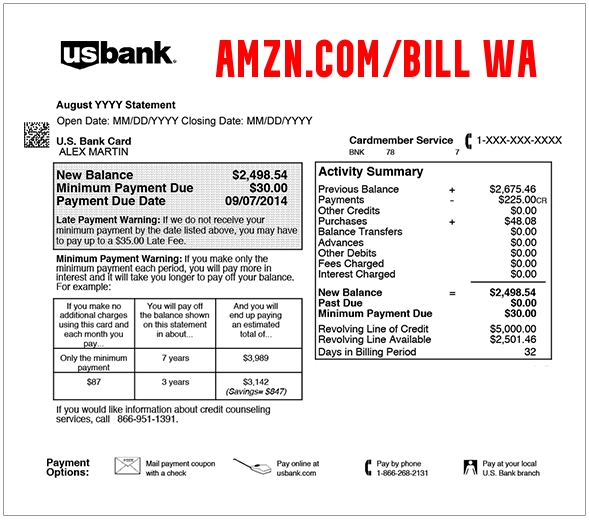
Common AMZN.COM/BILL WA Statement Variations
The same type of Amazon billing activity may appear in several different ways depending on your bank or card issuer:
- AMZN.COM/BILL WA
- AMZN.COM/BILL WAUS
- Amazon bill WA
- Amazon bill WA charge
- Amazon bill WA meaning
- Amazon billwa
- Amazon billwa charge
- Amazon billwaus
- Amazon.com/bill
- AMAZON.COM SEATTLE WAUS
- AMAZON PRIME AMZN.COM/BILL WA
- AMAZON MKTPLACE PMTS AMZN.COM/BILL WA
- PAYMENT DEBIT AMAZON.COM
- AmazonPrimePmts
- Audible
- Amazon Digital
- Amazon Pay
Some statements also include a long reference number, partial transaction ID, or digital account number. Do not post those identifiers publicly.
Amazon Bill WA Meaning
The phrase Amazon bill WA generally means that Amazon or an Amazon-related billing service processed a payment connected to your account, order, subscription, or payment method.
In this context:
- Amazon or AMZN identifies the Amazon-related merchant or billing system.
- BILL indicates that the transaction is being billed to your payment method.
- WA or WAUS usually refers to Washington, United States, where Amazon is headquartered and where Amazon Payments lists corporate billing information.
The descriptor does not always identify the exact product. To find the real source, compare the amount and date with your Amazon orders, subscriptions, digital purchases, and Amazon Pay activity.
Why Is Amazon Charging My Card?
An Amazon Order Shipped or Split Into Multiple Charges
Amazon may charge when an item ships, not always when the order is placed. If one order ships in multiple packages, you may see more than one charge instead of one total charge.
Check the order summary to see whether the order was split by shipment, seller, or delivery date.
An Amazon Marketplace Purchase
Many Amazon purchases come from third-party Marketplace sellers. Your card may still show Amazon or AMZN.COM/BILL WA even when the item was sold by another merchant through Amazon.
Review the seller name, item name, order total, tax, shipping, and delivery date in Your Orders.
Amazon Prime Membership Renewal
A Prime renewal can appear as AMZN.COM/BILL WA, Amazon Prime, or a similar Amazon billing descriptor.
This may be a monthly or annual charge. The amount may include tax and can differ from the advertised membership price depending on your location.
Prime Video, Channel, or Digital Purchase
The charge may relate to:
- A Prime Video rental
- A movie or TV purchase
- A Prime Video channel add-on
- A sports or entertainment subscription
- An accidental in-app or TV-device purchase
- A renewal of a streaming add-on
Prime Video charges can be especially confusing because a household member may have started a free trial or subscription from a TV, Fire TV device, phone, tablet, or streaming app.
Kindle, Audible, Music, or App Subscription
AMZN.COM/BILL WA may also relate to Amazon digital services such as Kindle Unlimited, Audible, Amazon Music, Amazon Kids+, apps, games, or in-app purchases.
Subscribe & Save or Delayed Shipment
Amazon Subscribe & Save and delayed shipments may create charges days or weeks after the original order was placed. A back-ordered item may also be charged only when it is ready to ship.
Amazon Pay Purchase on Another Website
If you used Amazon Pay at a third-party merchant, the charge may still appear with Amazon-related wording. The underlying merchant should appear in your Amazon Pay activity.
Another Authorized User Used the Card
A spouse, child, family member, employee, coworker, or another authorized card user may have made the purchase through their own Amazon account, your account, a shared device, or cached payment information.
How to Identify an AMZN.COM/BILL WA Charge
1. Check Your Amazon Orders
Start with Amazon’s order history.
- Your Orders: Review Amazon Orders
- Identify an Amazon Charge: Amazon Help: Identify a Charge
Compare:
- The transaction date
- The amount charged
- The shipping date
- The seller name
- The order total after tax and shipping
- Any split shipments
- Returned or canceled items
2. Check Archived and Hidden Orders
Some users forget that Amazon allows orders to be archived. If the charge does not appear in your normal order list, check archived orders as well.
3. Review Digital Orders
Digital charges may not always appear where you expect retail orders to appear.
Check for:
- Kindle purchases
- Prime Video rentals and purchases
- Amazon Music charges
- Audible purchases
- Appstore purchases
- In-app purchases
4. Review Memberships and Subscriptions
Open Amazon’s memberships and subscriptions area to look for active, expired, canceled, or renewing subscriptions.
- Amazon Memberships and Subscriptions: Manage Amazon Subscriptions
- Prime Membership: Manage Amazon Prime
5. Check Prime Video Subscriptions
If the amount looks like a streaming subscription, check Prime Video settings and channel subscriptions.
- Prime Video settings: Prime Video Account & Settings
6. Review Amazon Pay Activity
If the charge was made through Amazon Pay on another website, review Amazon Pay activity.
- Amazon Pay activity: Check Amazon Pay Orders
7. Search Your Email
Search all email accounts you use for:
- Amazon order confirmation
- Your Amazon.com order
- Amazon Prime
- Prime Video
- Audible
- Kindle
- Amazon Music
- Amazon Pay
- Subscription renewed
- Shipment confirmation
- Digital order
8. Ask Household or Business Users
Ask anyone with access to the card, Amazon account, device, or business account. Amazon charges are often caused by shared cards, family accounts, business purchasing cards, or a household member using a saved payment method.
How to Contact Amazon About AMZN.COM/BILL WA
Use Amazon’s official support channels while signed in whenever possible.
- Amazon Customer Service: Contact Amazon Customer Service
- Amazon customer-service phone: 1-888-280-4331
- Amazon Pay support: Amazon Pay Help
- Amazon suspicious message reporting: Report a Suspicious Amazon Message
- Amazon Payments address: Amazon Payments, Inc., 410 Terry Ave N., Seattle, WA 98109-5210
Do not call a phone number from an unexpected text message, email, pop-up, voicemail, or search ad claiming to be Amazon. Open Amazon directly or use the official phone number and contact page above.
How to Cancel an Amazon Subscription
If the charge is tied to a subscription:
- Sign in to Amazon.
- Open Memberships and Subscriptions.
- Find the active subscription.
- Select the cancellation or auto-renewal option.
- Follow the confirmation steps.
- Save the cancellation confirmation email or screenshot.
Also check Prime Video channel subscriptions, Audible memberships, Kindle Unlimited, Amazon Music, Amazon Kids+, and third-party subscriptions managed through Amazon.
How to Request a Refund or Report an Unknown Amazon Charge
If you find the matching order, open the order details and use Amazon’s return, refund, or customer-service options.
If the transaction is through Amazon Pay, sign in to Amazon Pay, find the transaction, and use the details or support option to request help, file a claim, or report misuse when appropriate.
If the charge does not appear anywhere in your Amazon, digital, subscription, or Amazon Pay activity, contact your card issuer promptly.
Is AMZN.COM/BILL WA Fraud?
Usually not when it matches a real Amazon order, subscription, digital purchase, or Amazon Pay transaction.
The charge should be treated as potentially unauthorized if:
- You do not have an Amazon account
- No authorized user recognizes the charge
- The charge does not appear in any Amazon account you control
- The amount does not match an order, shipment, or subscription
- A Prime Video or digital subscription was started without permission
- Your Amazon account shows an order you did not place
- Your email, Amazon account, or payment card may have been compromised
- Several unfamiliar Amazon charges appear in a short period
What to Do If You Did Not Authorize the Charge
- Check all Amazon accounts used by you, your household, or your business.
- Review Your Orders, archived orders, digital orders, subscriptions, and Amazon Pay activity.
- Ask other authorized card users whether they made the purchase.
- Change your Amazon password if the account may be compromised.
- Enable two-step verification on your Amazon account.
- Remove unfamiliar payment methods, addresses, or devices.
- Contact Amazon Customer Service through the official contact page.
- Contact your bank or card issuer using the number printed on your card.
- Dispute the transaction if it remains unauthorized.
- Ask whether the card should be replaced.
How Consumers Resolved the Charge
Consumers commonly resolve AMZN.COM/BILL WA charges by:
- Finding a matching Amazon order
- Identifying a split shipment
- Recognizing a Prime membership renewal
- Finding a Prime Video channel or digital purchase
- Discovering an Audible, Kindle, Music, or app subscription
- Finding an Amazon Pay purchase made on another website
- Confirming that another household or business user made the purchase
- Canceling an unwanted subscription
- Requesting an Amazon refund
- Disputing an unauthorized transaction through the card issuer
Frequently Asked Questions
What is AMZN.COM/BILL WA?
AMZN.COM/BILL WA is an Amazon billing descriptor that can appear for Amazon retail purchases, marketplace orders, Prime renewals, digital services, subscriptions, or Amazon Pay transactions.
What does Amazon bill WA mean?
Amazon bill WA usually means Amazon or an Amazon-related billing service charged your payment method. “WA” typically refers to Washington, where Amazon is headquartered and where Amazon Payments lists billing information.
What is Amazon bill WAUS?
Amazon bill WAUS is another statement variation that usually means Amazon billing in Washington, United States. Check your Amazon order and subscription history to identify the specific purchase.
Why does my statement say amazon billwa with no space?
Banks often shorten or compress merchant descriptors. Amazon billwa is generally a formatting variation of Amazon bill WA.
Is AMZN.COM/BILL WA the same as Amazon Marketplace?
It can be. Amazon Marketplace purchases may still show Amazon or AMZN.COM/BILL WA even when the item was sold by a third-party seller.
Can Prime Video cause an AMZN.COM/BILL WA charge?
Yes. Prime Video rentals, purchases, channel add-ons, and subscription renewals can appear as Amazon billing charges.
Can one Amazon order create multiple charges?
Yes. If items ship separately or come from different sellers, Amazon may bill parts of the order separately.
Why did Amazon charge me after I canceled an order?
The charge may relate to a different item, a shipment that already processed, a subscription, or a temporary authorization. Review order details and contact Amazon if the amount does not match.
What if I do not have an Amazon account?
Ask authorized card users first. If no one recognizes the charge, contact your card issuer immediately and report the transaction as unauthorized.
Should I dispute the charge with my bank?
First check Amazon, Amazon Pay, digital orders, subscriptions, and household users. If the charge still cannot be identified, contact your card issuer promptly.
Related Credit Card and Bank Charges
- Prime Video 888-802-3080 WA Charge
- GOOGLE SVCSAPP Charge
- 402-935-7733 PayPal Charge
- 700 Nicollet Mall Sezzle Charge
Related Consumer Resources
- Need Amazon customer-service contact information, Prime billing help, return support, or refund guidance? Visit Amazon Customer Service on CustomerServiceNumbers.com.
- Looking for Amazon’s corporate office address, headquarters phone number, or corporate contact information? Visit Amazon Corporate Office Headquarters.
- Want to share a company review, complaint, or customer experience? Visit ZeroStars.org.
Why Trust ChargeOnMyCard.com?
ChargeOnMyCard.com helps consumers identify confusing credit card, debit card, and bank-statement descriptors using official company resources, billing information, and reports from cardholders.
Reader comments are especially useful for Amazon billing descriptors because the same charge pattern may involve retail orders, digital purchases, subscriptions, Amazon Pay, household purchases, or business accounts.
Share Your AMZN.COM/BILL WA Experience
Did your charge match an Amazon order, Prime renewal, digital purchase, Prime Video subscription, Amazon Pay transaction, or unauthorized purchase? Share the amount, full descriptor variation, and how you confirmed or disputed it below. Please exclude private account and payment information.
Disclaimer
ChargeOnMyCard.com is an independent consumer-information website and is not affiliated with Amazon.com, Inc., Amazon Payments, Amazon Prime, Amazon Pay, Audible, Prime Video, any Amazon Marketplace seller, or any financial institution. Verify individual transactions directly through Amazon, Amazon Pay, and your card issuer.