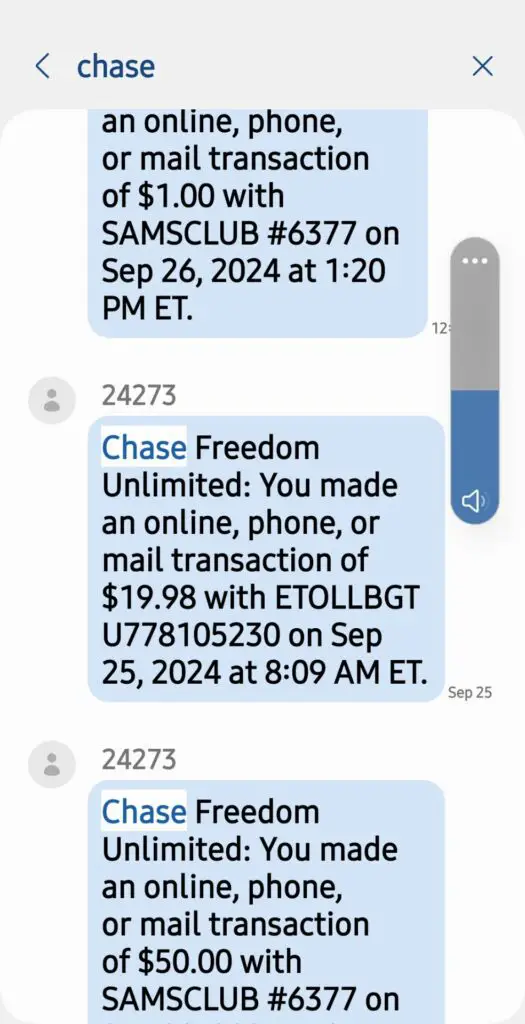
An eToll BGT charge on a credit card, debit card, or bank statement is usually connected to electronic tolls incurred while driving a Budget rental car. The descriptor may also appear as ETOLLBGT, BGTNYCFEE, or BGTFINE.
The transaction can include the toll itself, a daily administrative fee, a New York City-related fee, or a toll violation. Standard Budget e-Toll charges may not appear until four to eight weeks after the rental ends, which is why the transaction can be difficult to recognize.
Quick answer: eToll BGT or ETOLLBGT normally identifies a Budget rental-car toll processed through Budget’s e-Toll program. Use the official toll-receipt lookup to compare the toll date, location, rental-agreement number, and fee with your rental. If you never rented from Budget, contact your card issuer promptly.
What Is the eToll BGT Charge?
eToll BGT appears to be an abbreviated statement version of e-Toll Budget, Budget Rent a Car’s electronic toll-payment program. Budget’s published information says standard toll charges may appear on a card statement as e-Toll Budget followed by the rental-agreement number.
The charge may be created when a Budget vehicle travels through:
- A cashless toll road
- An electronic toll lane
- A toll bridge or tunnel
- An express lane
- A congestion-pricing zone
- A toll facility where a personal transponder did not register
If the toll authority records the rental vehicle’s transponder or license plate, Budget’s toll administrator may bill the card kept on file for the rental.
Does BGT Mean Budget Rent a Car?
Most likely, yes. Budget says its electronic toll transactions may appear as e-Toll Budget. A bank or card network may shorten that description to eToll BGT or ETOLLBGT.
The strongest confirmation is a toll receipt showing the rental-agreement number, vehicle, toll road, date, and amount. The abbreviation alone cannot confirm an individual transaction.
Common eToll BGT Statement Variations
Wording may vary by bank, toll administrator, rental agreement, location, and transaction type. Reported or searched variations include:
- eToll BGT
- ETOLLBGT
- ETOLL BGT
- e-Toll Budget
- e-Toll Budget followed by a rental-agreement number
- BGTNYCFEE
- BGT NYC FEE
- BGTFINE
- BGT FINE
- ETOLLBGT followed by a reference number and 800-482-0159
Numbers or letters following the merchant name may be a rental-agreement number, invoice number, toll-processing reference, location code, or another transaction identifier.
Why Is eToll BGT Charging Me?
You Used a Toll Road in a Budget Rental
The most common explanation is that the rental vehicle traveled through an electronic or cashless toll during the rental period.
You Declined e-Toll Unlimited
If you did not purchase e-Toll Unlimited and used an all-electronic toll without another approved payment method, Budget’s current FAQ says the card on file may be charged:
- The toll authority’s highest undiscounted toll rate
- A $6.95 administrative fee for each calendar day on which a toll was incurred
- A maximum administrative fee of $34.75 per rental month
Fees, coverage, and program terms can change or differ by rental location. Review the agreement for your specific rental and confirm current terms on Budget’s official e-Toll page.
The Toll Was Reported After the Vehicle Was Returned
Budget says standard e-Toll charges may take four to eight weeks after the rental ends to reach the credit or debit card on file. The delay occurs because the toll authority must first report the vehicle, location, date, time, and toll amount.
Several Toll Authorities Reported Charges Separately
Different toll agencies may submit records at different times. One rental can therefore produce several eToll BGT transactions instead of one combined charge.
A Personal Transponder Did Not Work
A personal E-ZPass or other compatible transponder may fail because it was mounted incorrectly, the account lacked funds, the plate was not registered when required, or the rental vehicle’s built-in transponder was not kept in its shield box.
What Is a BGTNYCFEE Charge?
BGTNYCFEE may identify a New York City-related toll, administrative fee, or congestion-pricing charge associated with a Budget rental. The descriptor itself does not identify the exact road or zone.
Budget’s toll administrator states that e-Toll Unlimited does not cover tolls incurred when entering New York City’s Congestion Relief Zone. A related charge may therefore be billed separately.
If the rental involved New York City, compare the charge with:
- The rental pickup and return dates
- Trips into Manhattan
- Bridge and tunnel crossings
- New York toll roads
- The toll receipt and rental-agreement number
- Any separately billed congestion-pricing fee
Use the toll-receipt lookup rather than assuming that every BGTNYCFEE transaction is the same type of fee.
What Is a BGTFINE Charge?
BGTFINE may indicate a toll violation, fine, penalty, or related administrative charge involving a Budget rental.
This may occur when:
- A toll was not covered by the selected rental toll program
- A personal transponder failed to register
- A toll was not paid using an approved method
- The toll authority issued a violation to the rental vehicle
- A separate administrative charge was added
Ask Budget e-Toll support for documentation identifying the toll authority, vehicle, rental agreement, date, location, original toll, and added fee.
How to Find Your Budget Toll Receipt
Budget’s toll administrator provides a separate lookup for toll statements and receipts:
- Open the Budget e-Toll Receipts and Statements page.
- Enter the requested information exactly as it appears on the rental agreement.
- Search using the card information, rental contract, or other requested details.
- Compare the listed toll date with the rental period.
- Verify the toll road, amount, vehicle, and rental-agreement number.
- Save or print the receipt before contacting support.
Standard e-Toll charges may not appear on the original Budget rental invoice, so the separate toll lookup may be necessary.
Budget e-Toll Contact Information
Budget e-Toll and rental support
- Budget e-Toll phone: 1-800-482-0159
- e-Toll phone hours: 9 a.m.–5:30 p.m. ET
- e-Toll email: etoll@htallc.com
- Toll receipts: Budget e-Toll receipt lookup
- Contact form and document upload: Budget e-Toll Contact Us
- Program FAQ: Budget e-Toll FAQ
- Budget customer service: 1-800-214-6094
- Budget telephone directory: Official Budget phone numbers
For toll dates, roads, receipts, administrative fees, personal-transponder payments, or duplicate tolls, begin with the dedicated e-Toll department. Use general Budget customer service for the rental agreement, branch, invoice, or unresolved rental complaint.
Additional independent resources include the Budget Rent a Car customer service guide on CustomerServiceNumbers.com and the Budget corporate office and complaints guide on CorporateOfficeHeadquarters.com.
What If I Already Paid the Toll?
If you paid through a personal transponder, with cash, or through the toll authority’s website:
- Locate the toll receipt or transponder statement.
- Find the matching Budget e-Toll receipt.
- Compare the vehicle, date, time, toll road, and amount.
- Contact Budget e-Toll support.
- Upload or send proof that the same toll was already paid.
- Request a written review and refund when the charge is duplicated.
- Save the case number, messages, and final response.
Security warning: Black out complete card numbers, bank-account information, Social Security numbers, driver’s-license numbers, and unrelated personal details before uploading documents. Do not post a rental-agreement number, toll reference, receipt, or complete statement image in a public comment.
Can I Use My Own E-ZPass or Toll Transponder?
Budget permits a personal transponder when it is compatible with the toll road, properly mounted, active, and in good standing. To reduce the risk of duplicate billing:
- Keep the Budget vehicle’s transponder secured inside its shield box when required
- Mount the personal transponder according to the toll authority’s instructions
- Confirm that the account is active and adequately funded
- Add the rental vehicle or plate when the toll authority requires it
- Confirm that the transponder is accepted on the roads being used
- Save the transponder statement and toll receipts
Compatibility and plate-registration requirements vary by toll authority.
Why Are There Multiple eToll BGT Charges?
Several transactions may represent:
- Tolls reported by different agencies on different dates
- A toll and a separate administrative fee
- Several toll-road or bridge crossings
- A separately billed New York City fee
- A toll followed by a violation or fine
- A pending authorization and its completed replacement
- A duplicate payment that requires review
Compare the posted status and receipt for every transaction. Do not count a pending entry and its completed replacement as two final charges unless both eventually post.
Is the eToll BGT Charge Fraudulent?
Usually not when you recently rented a Budget vehicle and used a toll road. Investigate the transaction as potentially incorrect or unauthorized when:
- You have not rented a Budget vehicle
- No authorized card user recognizes the rental
- The rental-agreement number is not yours
- The toll occurred outside the rental period
- The vehicle was never driven near the listed toll location
- You have proof that the same toll was already paid
- Two completed charges appear for the same toll
- Transactions continue without a matching rental
How to Dispute an eToll BGT Charge
If you did rent from Budget, begin with the toll administrator so it can identify the toll and review supporting documents:
- Look up the toll statement.
- Compare the toll date with the rental period.
- Verify the rental-agreement number and vehicle.
- Request the toll location and original toll record.
- Provide proof if the toll was paid separately.
- Request a correction or refund in writing.
- Keep all receipts, case numbers, emails, and responses.
If It Is a Credit Card Charge
If the toll administrator cannot explain or correct the transaction, call the card issuer using the number printed on the card. Ask whether the issue should be handled as a merchant billing dispute or as unauthorized use.
If It Is a Debit Card or Bank Account Charge
Contact the bank promptly because the payment may remove money directly from the account. Ask the bank to secure the card, review other activity, explain its dispute process, and determine whether the debit card should be replaced.
How Cardholders Have Identified or Resolved the Charge
Cardholders have reported resolving eToll BGT questions by:
- Finding the matching Budget rental agreement
- Using the toll receipt lookup
- Confirming a toll taken several weeks earlier
- Identifying the daily administrative fee
- Identifying a separate BGTNYCFEE transaction
- Providing proof that a personal transponder paid the toll
- Requesting a review of a duplicate charge
- Contacting Budget about a BGTFINE transaction
- Reporting the transaction when no Budget rental existed
These are individual experiences and do not establish that every eToll BGT, BGTNYCFEE, or BGTFINE transaction has the same explanation.
Frequently Asked Questions
What does ETOLLBGT mean?
ETOLLBGT most likely means an electronic toll or related fee from a Budget rental car. The description may be a shortened version of e-Toll Budget.
Why did eToll BGT appear weeks after my rental?
Budget says standard e-Toll charges may take four to eight weeks to reach the card because the toll authority must first report the vehicle and toll details.
Why is the toll not on my Budget rental invoice?
Standard e-Toll transactions may be billed separately after the rental closes. Use Budget’s separate toll-receipt lookup to find the supporting statement.
What is BGTNYCFEE?
BGTNYCFEE may be a New York City toll, administrative fee, or congestion-related charge associated with a Budget rental. Use the receipt lookup to identify the exact date, road, zone, and amount.
What is BGTFINE?
BGTFINE may identify a toll violation, penalty, or related administrative charge. Ask Budget e-Toll support for the toll authority’s record and an itemized explanation.
What is 1-800-482-0159?
1-800-482-0159 is the phone number currently published by Budget’s e-Toll administrator for toll receipts, fees, supporting documents, and related questions.
Why did I receive more than one eToll BGT charge?
Different toll authorities may report charges at different times. Multiple transactions can also represent separate tolls, administrative fees, a New York City fee, or a toll violation.
Can I dispute the administrative fee?
You may request a review when the charge is incorrect, duplicated, outside the rental period, or connected to a toll you already paid. Refund eligibility depends on the rental agreement, toll-program terms, and supporting evidence.
Should I cancel my card?
Not solely because a toll matches a recent Budget rental. If you never rented from Budget or the charge cannot be matched to a toll receipt, contact the issuer and ask whether the card should be locked or replaced.
Related Rental, Toll, and Unrecognized Charge Guides
- ERACTOLL Enterprise rental-car toll charge
- PMUSA ParkMobile parking and tolling charge
- How to investigate an unrecognized credit card or bank charge
These guides cover different merchants and descriptors. A related link does not mean the companies or transactions are affiliated.
Share Your eToll BGT Experience
Did the transaction match a Budget rental, toll road, administrative fee, BGTNYCFEE charge, or BGTFINE notice? You may share the shortened descriptor, general amount, rental state, toll road, delay after the rental, and how the issue was resolved.
Do not post a complete card number, bank-account number, driver’s-license number, rental agreement, toll reference, home address, email address, phone number, login information, or complete statement image.
Why Trust ChargeOnMyCard.com?
ChargeOnMyCard.com researches unfamiliar credit card, debit card, and bank-statement descriptors using official company information, current support resources, payment clues, and visible cardholder reports. This guide uses Budget’s published e-Toll information and the current receipt, FAQ, and contact pages provided by its toll administrator.
Information reviewed August 15, 2026.
Disclaimer
ChargeOnMyCard.com is an independent consumer-information website and is not affiliated with Budget Rent a Car, Avis Budget Group, Verra Mobility, any toll authority, bank, card issuer, or payment processor. Fees and program terms may vary by rental location and can change. Confirm a specific transaction using the rental agreement, toll receipt, Budget’s official resources, and the card issuer.