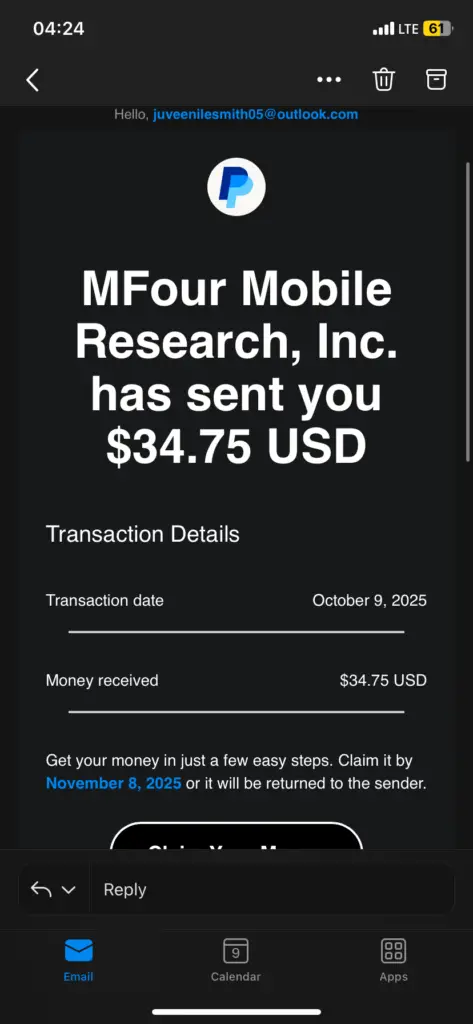
An unrecognized charge on a credit card, debit card, PayPal account, or bank statement may be a legitimate transaction displayed under an unfamiliar merchant name, but it may also be a billing error or unauthorized payment.
Start by recording the complete statement descriptor, amount, date, payment method, and transaction status. Check receipts, subscriptions, payment platforms, and other authorized users. Contact the card issuer or bank immediately when the card is missing, several suspicious charges are appearing, or no authorized purchase explains the transaction.
What Should You Do About an Unrecognized Charge?
Use this order of investigation unless there are signs that the card or account has been compromised:
- Copy the complete transaction description exactly as displayed.
- Record the amount, authorization date, posting date, currency, and payment method.
- Determine whether the transaction is pending, completed, reversed, or refunded.
- Search email receipts, invoices, order histories, and subscriptions.
- Check Apple, Google, PayPal, Amazon, digital wallets, and other payment platforms.
- Ask spouses, family members, employees, and other authorized card users.
- Search for the merchant or descriptor through ChargeOnMyCard.com.
- Ask the bank for expanded merchant information when the wording is incomplete.
- Contact the identified merchant through its official website or your receipt.
- Contact the financial institution promptly if nobody recognizes the transaction.
Do not delay while investigating when the physical card is missing, additional unfamiliar charges are appearing, or someone may have accessed the card, bank account, digital wallet, or online account.
Start With the Complete Transaction Details
The short wording displayed in account activity may not show the brand, product, subscription, app, event, website, or store that you remember.
Save the following information:
- The complete merchant descriptor
- The amount and currency
- The authorization and posting dates
- Whether the transaction is pending or completed
- The card or bank account involved
- Any telephone number, website, city, state, or country shown
- Wording such as recurring, subscription, installment, or web payment
- Any reference supplied by the bank
Do not publish complete transaction references, card numbers, bank-account numbers, receipts, or screenshots containing private information.
Find the Merchant Behind the Statement Descriptor
A statement may show a legal company name, parent company, payment processor, website, telephone number, corporate location, franchise owner, or shortened merchant name instead of the brand the cardholder recognizes.
Use the Credit Card Charge Codes and Statement Descriptor Directory to search for:
- A merchant or company name
- An abbreviation
- A payment processor or merchant of record
- A website or shortened domain
- A telephone number
- A city, state, country, or corporate address
- A coded or number-based descriptor
Search the most distinctive part of the transaction. Generic bank wording such as POS, DEBIT, CHECKCARD, VISA, MC, PURCHASE, PENDING, RECURRING, or ONLINE usually describes the transaction method rather than the merchant.
Identifying a likely merchant does not prove that the individual transaction was authorized. Compare the amount, date, account, order, receipt, subscription, and authorized users before deciding what happened.
Is the Charge Pending or Completed?
A pending charge is an authorization that has not fully posted. It may change amount, disappear, or be replaced by a completed transaction.
Pending authorizations are common with:
- Hotels and resorts
- Rental-car companies
- Gas stations
- Restaurants
- Cruise lines
- Delivery services
- Merchants verifying a newly added payment card
A restaurant charge may change after a tip is added. A hotel or rental-car authorization may include a deposit for incidentals. A fuel pump may authorize an estimated amount before the final fuel total is known.
Do not automatically treat one pending transaction and one matching completed transaction as two completed charges. Compare the amounts, dates, and status of both entries.
Contact the issuer immediately when the pending transaction is clearly unauthorized, other suspicious attempts are appearing, or the physical card is missing.
Search Receipts, Orders, and Email Accounts
Search every email address that may have been used for the purchase, including personal, work, older, shared-household, Apple, Google, and PayPal email accounts.
Useful searches include:
- The exact merchant descriptor
- The transaction amount
- The approximate transaction date
- The merchant telephone number
- Receipt
- Invoice
- Order confirmation
- Subscription
- Membership
- Renewal
- Trial ending
- Payment successful
Check spam, promotions, archived, and deleted folders. The receipt may identify a seller, app, product, subscription, event, or service that is not shown on the statement.
Check Subscriptions and Free-Trial Renewals
An unfamiliar recurring charge may result from:
- A free or discounted trial converting to paid billing
- A monthly or annual subscription renewal
- An app or mobile-game subscription
- A streaming or digital-content service
- Software, cloud storage, or an AI tool
- A fitness, wellness, or dating membership
- A credit-monitoring service
- An online course or membership program
- A PDF or document-software subscription
- A subscription created under another email address
Review several months of statements. A small earlier transaction may have been a trial or introductory payment followed by the full subscription amount. For a descriptor historically associated with unfamiliar transactions under $1, see our guide to the LiveLook charge on a credit card.
Deleting an app, replacing a physical card, or no longer using a service does not necessarily cancel the underlying subscription. Cancel through the merchant, payment platform, app store, or account that controls the recurring agreement.
Check Apple Purchases and Subscriptions
An Apple-related charge may involve an app, in-app purchase, subscription, iCloud storage, music, a movie, a book, Apple services, or a Family Sharing purchase.
- Review Apple purchase history and search by the exact amount.
- Check active and expired subscriptions.
- Review every Apple Account used in the household.
- Ask members of the Family Sharing group.
- Search email for Apple receipts and invoices.
Apple may group multiple purchases into one statement charge. For descriptor-specific help, see the APPLE.COM/BILL and Apple subscription charge guide.
Official resource: view Apple purchase history.
Check Google and Google Play Purchases
A Google-related charge may involve Google Play, an app or game, an in-app purchase, YouTube, Google One, Google Workspace, Google Ads, Google Store, or another Google service.
- Check Google Play order history.
- Review the Google Payments Center.
- Check Google Play subscriptions.
- Review YouTube, Google One, Workspace, Ads, and Store accounts when relevant.
- Repeat the search for every Google Account used on the device or in the household.
Other Google payments may not appear in Google Play order history, so check the broader Google payments profile as well.
For descriptor-specific help, see the Google, Google Play, and 1600 Amphitheatre Parkway charge guide.
Check PayPal Activity and Automatic Payments
A PayPal descriptor may represent a regular PayPal payment, automatic payment, subscription, invoice, donation, guest-checkout purchase, or payment processed for another merchant.
- Sign in through the official PayPal website or app.
- Search PayPal Activity using the date and amount.
- Review Automatic Payments and connected businesses.
- Check other PayPal accounts and email addresses.
- Look at the wording appearing after PAYPAL or PP in the descriptor.
A guest-checkout purchase or a merchant using PayPal as its card processor may appear on the card statement without appearing in the cardholder’s normal PayPal Activity.
For common phone-number-style PayPal wording, see the PayPal and 402-935-7733 charge guide.
Official resource: report unauthorized PayPal activity.
Check Amazon Orders, Digital Purchases, and Memberships
Amazon charges may be difficult to match because orders can ship separately, marketplace sellers may use different wording, digital transactions use separate descriptors, and memberships may renew independently.
Compare the amount with:
- Amazon orders
- Archived orders
- Digital orders
- Memberships and subscriptions
- Amazon Pay activity
- Prime Video and other digital services
- Other household Amazon accounts
Use the Amazon and AMZN charge descriptor guide to select the appropriate Amazon Marketplace, AMZN.COM/BILL, Amazon Digital, Prime, Music, or Amazon Pay page.
Official resource: identify an Amazon charge.
Ask Authorized Cardholders and Account Users
An unfamiliar transaction may have been made by:
- A spouse or partner
- A child or teenager
- A family-sharing member
- An employee
- A business partner
- A caregiver
- Someone using a shared device
- Someone using a shared shopping, gaming, delivery, or streaming account
Ask about the product, app, event, store, or service rather than only the unfamiliar legal merchant name.
Do not report a transaction as fraud before checking authorized users when it is safe and reasonable to do so. Contact the issuer immediately when asking other users could create a safety concern or when active account compromise is suspected.
Why Is the Amount or Date Different?
The statement amount may differ from the expected price because of:
- Sales tax
- Shipping or handling
- Tips
- Service or convenience fees
- Hotel or rental deposits
- Currency conversion
- Foreign-transaction fees
- Several items combined into one payment
- One order divided into several payments
- A partial refund
- An adjusted authorization
The displayed date may be the authorization, processing, settlement, or posting date rather than the date the purchase was originally made. Review purchases from several days before the statement date.
Why Does the Charge Appear Twice?
Two similar entries may be:
- One pending authorization and one completed transaction
- Two separate orders
- A failed attempt followed by a successful payment
- A split shipment
- An installment and a separate purchase
- Two accounts using the same payment method
- A genuine duplicate billing error
- Two unauthorized attempts
Compare the amount, date, transaction status, receipts, and bank references. Contact the merchant when both transactions are completed and only one purchase was authorized.
What Information Can the Bank Provide?
Ask the bank or card issuer whether it can provide:
- The complete merchant descriptor
- The legal merchant name
- The merchant telephone number or website
- The merchant location
- The merchant category
- The payment processor
- The original transaction currency
- Whether the transaction was recurring
- Whether a digital wallet or stored token was used
- Whether the card was physically present
- Whether it was online, contactless, or manually entered
- Whether other authorization attempts occurred
- Whether it is pending, completed, reversed, or refunded
Not every institution provides every field, but the bank may have more information than appears in online account activity.
Should You Contact the Merchant or Bank First?
Contact the Merchant First When:
- You recognize the merchant but not the amount.
- You were charged twice.
- A refund has not appeared.
- You canceled but were billed again.
- You did not receive the product or service.
- You need a receipt or invoice.
- You want to cancel a subscription.
- You believe the merchant made a billing error.
Contact the merchant through the official website, app, order history, or receipt. Explain the charge date, amount, account used, and requested resolution. Save the response and any refund or cancellation confirmation.
Contact the Bank Immediately When:
- No authorized user recognizes the transaction.
- The card is missing or stolen.
- Several unfamiliar payments are appearing.
- A small test transaction is followed by larger attempts.
- The merchant cannot locate any matching account or order.
- The card was used in an impossible location.
- Card or account credentials may have been compromised.
- You need to lock or replace the card.
Use the number printed on the payment card, the institution’s official app, or its official website. Do not rely on contact information in an unexpected email, text message, advertisement, pop-up, or comment.
Billing Error, Merchant Dispute, or Unauthorized Transaction?
Billing Error
A billing error may include an incorrect amount, duplicate completed charge, missing refund, incorrect transaction date, or charge after a confirmed cancellation.
Merchant or Purchase Dispute
A merchant dispute may involve goods that never arrived, a service that was not provided, an item substantially different from its description, a canceled reservation, or disagreement about a refund.
Unauthorized Transaction
A transaction may be unauthorized when the cardholder did not approve it, no authorized user made it, no matching order or account exists, or the card or account was compromised.
Describe the problem accurately. A recognized purchase with a delivery, quality, cancellation, or refund problem is different from a transaction that nobody authorized.
How to Request a Merchant Refund
- Gather the receipt, order number, cancellation confirmation, transaction date, and amount.
- Contact the merchant through an official account or support page.
- Explain the billing problem and the resolution requested.
- Ask for a written refund or cancellation confirmation.
- Record the expected refund amount and processing timeframe.
- Monitor the original payment method for the credit.
- Keep all correspondence if a bank dispute later becomes necessary.
A merchant refund and a bank dispute are separate processes. Do not submit contradictory claims to several parties without explaining what has already been requested or refunded.
How to Dispute an Unrecognized Credit Card Charge
- Contact the card issuer promptly using the number on the back of the card.
- Explain whether the transaction is unrecognized, unauthorized, duplicated, incorrectly billed, or connected with undelivered goods.
- Provide the date, amount, descriptor, and any merchant communication.
- Ask whether the card should be locked or replaced.
- Follow the issuer’s online or telephone dispute procedure.
- Ask whether written notice is required to preserve your billing-error rights.
- Send written notice to the billing-inquiries address rather than the payment address when applicable.
- Keep copies of receipts, letters, screenshots, cancellation records, and delivery information.
- Record representative names, dates, case numbers, and provisional credits.
- Continue paying the undisputed portion of the account as required.
- Review the issuer’s written investigation result.
For U.S. credit-card billing errors, written-notice deadlines can apply. Act promptly rather than waiting for another statement.
How to Report an Unrecognized Debit Card or Bank Transaction
Debit-card and bank-account transactions can remove available funds directly, and reporting deadlines differ from credit-card rules.
- Contact the bank or credit union immediately.
- Lock the debit card through the official app when appropriate.
- Identify every transaction that was not authorized.
- Explain whether the physical card, PIN, login, or security information was lost or stolen.
- Ask whether the card, PIN, online credentials, or account number should be replaced.
- Ask whether additional pending attempts are visible.
- Provide written confirmation when requested.
- Save the case number and provisional-credit information.
- Continue monitoring the account for additional activity.
Do not delay reporting a clearly suspicious withdrawal while trying to identify the merchant independently.
Official U.S. Consumer Dispute Resources
- CFPB guidance for disputing a credit-card charge
- FTC credit-card billing and dispute guidance
- FTC sample dispute letter
- CFPB guidance for unauthorized debit-card and bank transactions
When Should You Lock or Replace the Card?
Consider locking the card immediately when:
- The physical card is missing.
- Several unfamiliar transactions are appearing.
- A small test transaction is followed by larger attempts.
- Card details were entered on a suspicious website.
- An online account containing the card was accessed by someone else.
- The issuer recommends a lock.
The issuer may recommend replacement when the card number has been compromised, unauthorized transactions continue, or the physical card was lost or stolen.
Ask whether recurring legitimate merchants or digital wallets may receive updated card information automatically. Replacing the card may not terminate an existing subscription agreement.
Secure Related Accounts
When account compromise is possible:
- Change the password for the affected merchant or payment account.
- Use a unique password that is not used elsewhere.
- Turn on two-factor authentication.
- Review signed-in devices and remove unknown devices.
- Review saved cards and payment methods.
- Check account recovery email addresses and telephone numbers.
- Review recent orders, subscriptions, and profile changes.
- Monitor the card and bank account for additional attempts.
Watch Out for Fake Customer-Service and Refund Agents
Searches for unfamiliar charges can lead to impersonators, fake refund departments, misleading advertisements, and unrelated call centers.
Never provide an unverified caller or website with:
- Your complete card or bank-account number
- Your banking password
- Your PIN or CVV security code
- A one-time verification code
- Your device passcode
- Remote access to your computer or phone
- Gift-card numbers
- Cryptocurrency
- A second payment to release or verify a refund
Use the official merchant website and the number on the back of the payment card. Do not trust a number solely because it appears in a search result, advertisement, comment, email, or pop-up.
Frequently Asked Questions About Unrecognized Charges
What should I do first when I see an unrecognized charge?
Copy the complete descriptor, amount, date, and status. Search receipts, orders, subscriptions, payment platforms, and authorized users. Contact the issuer promptly when nobody recognizes the transaction.
Does an unfamiliar merchant name mean the charge is fraudulent?
No. The statement may show a legal company name, payment processor, parent company, franchise owner, website, or shortened descriptor. The transaction should still be investigated.
Should I dispute a pending transaction?
Ask the issuer for instructions. A pending authorization may change or disappear, but a clearly unauthorized attempt or ongoing suspicious activity should be reported immediately.
Can a small charge be unauthorized?
Yes. A small amount may be a temporary card-verification authorization, legitimate digital purchase, trial payment, or unauthorized card-testing transaction. Investigate it and contact the issuer when no authorized explanation exists.
Why is the city different from where I made the purchase?
The city may identify the merchant’s headquarters, payment account, processor, acquiring bank, registered address, or billing system rather than the purchase location.
Why did the charge appear after I canceled?
The renewal may have processed before cancellation, the cancellation may apply to a different account, or the cancellation may not have been completed. Locate the confirmation and contact the merchant.
Does replacing a card cancel a subscription?
Not necessarily. The underlying agreement can remain active, and some merchants may receive updated card credentials. Cancel directly through the merchant or billing platform.
Should I call the telephone number in the statement descriptor?
Verify the number through the merchant’s official website or with the financial institution first. For suspected unauthorized activity, use the number printed on the payment card.
How long should I wait before reporting the charge?
Do not wait when unauthorized use is suspected. Reporting and written-notice deadlines vary by payment method and circumstances, and debit-card protections can depend heavily on prompt notification.
Can ChargeOnMyCard.com cancel or refund a charge?
No. ChargeOnMyCard.com cannot access merchant accounts, subscriptions, orders, refunds, card accounts, bank accounts, or dispute systems.
Share Your Unrecognized-Charge Experience
If you identified a confusing transaction, nonprivate information may help another cardholder understand a similar descriptor.
Helpful details include:
- The shortened merchant descriptor
- The general amount or price range
- Whether it was pending or completed
- The merchant or service eventually identified
- Whether it was a subscription or trial renewal
- Whether another authorized user made the purchase
- Whether the bank provided expanded merchant information
- Whether the merchant corrected a billing error
- Whether the card had to be replaced
Do not post:
- Card or bank-account numbers
- Account email addresses
- Passwords, PINs, or security codes
- One-time verification codes
- Complete transaction or order IDs
- Booking, policy, claim, or account numbers
- Home addresses or private telephone numbers
- Copies of complete statements or receipts
- Other private financial or identity information
Why Rely on ChargeOnMyCard.com?
ChargeOnMyCard.com researches confusing credit-card, debit-card, bank-statement, subscription, payment-processor, telephone-number, website, location, and digital-service descriptors.
We separate confirmed merchant information from possible explanations and help readers verify transactions through receipts, official accounts, merchant support, payment platforms, and expanded information from financial institutions.
ChargeOnMyCard.com cannot view a reader’s private account or independently determine who authorized a particular transaction. Always verify the individual payment with the merchant and financial institution.
Last reviewed: July 20, 2026.
Disclaimer
ChargeOnMyCard.com is an independent informational website and is not affiliated with any merchant, seller, subscription provider, payment processor, merchant of record, bank, credit union, card issuer, card network, digital wallet, app store, purchaser, or account holder discussed in this guide. This information is not financial, legal, banking, billing, refund, dispute, chargeback, identity-theft, fraud-prevention, or account-security advice. Rules, deadlines, protections, and merchant policies vary by payment method, issuer, location, and transaction. Contact the merchant and financial institution directly regarding a specific charge.