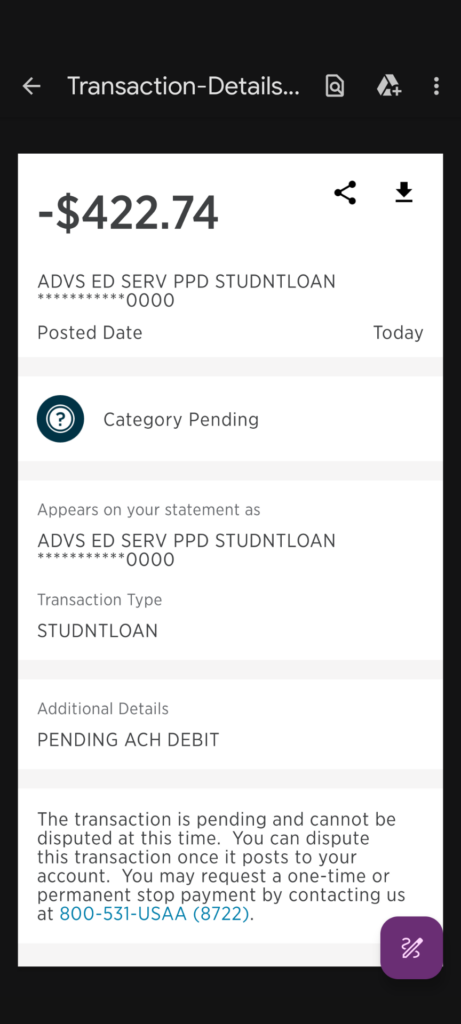
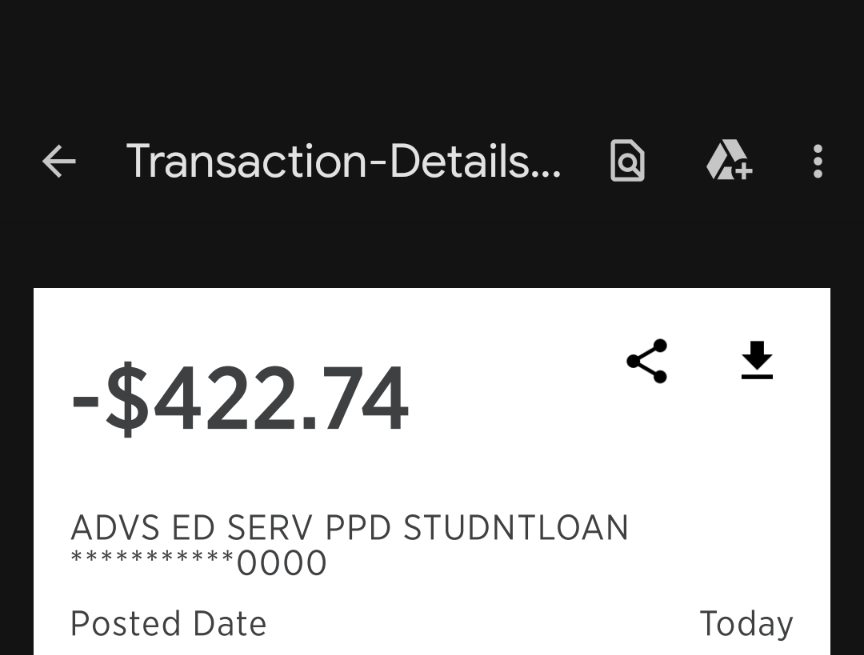
An ADVS ED SERV PPD STUDNTLOAN, ADVS ED SERV WEB STUDNTLOAN, or similar ACH debit on a checking or savings account is strongly associated with a student-loan payment processed by Aidvantage.
Aidvantage is an official federal student-loan servicer. The debit may represent monthly Auto Pay, a one-time online payment, a telephone payment, an additional loan payment, or a payment scheduled before an account-status change. Verify it through the official Aidvantage account before requesting a reversal or reporting it as unauthorized.
What Is ADVS ED SERV on a Bank Statement?
The complete descriptor usually identifies a student-loan payment made to Aidvantage.
Aidvantage services federal student loans and handles:
- Monthly billing
- Student-loan payments
- Automatic bank withdrawals
- Repayment-plan information
- Loan balances and payoff amounts
- Payment allocation
- Deferment and forbearance requests
- Account and payment history
The withdrawal may represent:
- A regularly scheduled Auto Pay payment
- A one-time online student-loan payment
- A payment made through the automated telephone system
- A payment submitted through a bank’s bill-pay service
- An additional payment toward principal and interest
- A payoff or partial payoff
- A payment scheduled by a borrower, parent borrower, spouse, or joint bank-account holder
- A payment initiated before a loan entered deferment or forbearance
- A pending authorization followed by a completed debit
- A manual payment and an Auto Pay debit made close together
- An incorrect or unauthorized ACH withdrawal
How to Read the ADVS ED SERV Descriptor
ADVS ED SERV
`ADVS ED SERV` is an abbreviated ACH originator name strongly associated with Aidvantage and student-loan servicing.
Aidvantage does not appear to publish a complete consumer directory defining every shortened bank descriptor, so use the complete wording, amount, date, and Aidvantage payment history to confirm the transaction.
PPD
`PPD` means Prearranged Payment and Deposit.
It is an ACH classification commonly used for an authorized single or recurring electronic payment involving a consumer bank account.
A PPD debit may therefore represent:
- Monthly Auto Pay
- A recurring authorized withdrawal
- A single payment made under a previously established authorization
WEB
`WEB` identifies an internet- or mobile-initiated ACH transaction.
An `ADVS ED SERV WEB STUDNTLOAN` entry commonly points to a payment submitted online through an Aidvantage account or another authorized online payment route.
STUDNTLOAN
`STUDNTLOAN` is a shortened form of student loan.
Its presence makes the Aidvantage student-loan connection much stronger than a transaction showing only the letters `ADVS`.
PPD ID and WEB ID
Some statements may show:
- PPD ID: 9102001101
- WEB ID: 9102001102
- TYPE: STUDNTLOAN
- CO: ADVS ED SERV PPD
- CO: ADVS ED SERV WEB
These fields may be ACH originator or transaction-identification information.
Do not publish your complete bank trace number, student-loan account number, bank-account number, or other private transaction information.
Common ADVS ED SERV Statement Variations
Possible and reported variations include:
- ADVS ED SERV PPD STUDNTLOAN
- ADVS ED SERV WEB STUDNTLOAN
- ACH DEBIT ADVS ED SERV PPD
- ACH DEBIT ADVS ED SERV WEB
- ADVS ED SERV PPD TYPE STUDNTLOAN
- ADVS ED SERV WEB TYPE STUDNTLOAN
- ADVS ED SERV PPD STUDNTLOAN 0000
- ADVS ED SERV PPD ID 9102001101
- ADVS ED SERV WEB ID 9102001102
- ADV ED SERV PPD
- ADVS ED SERVICE
- ADVS ED SERV ACH TRANSACTION
- ADVS ED SERV STUDENT LOAN
- AIDVANTAGE PAYMENT
- AIDVANTAGE AUTO PAY
- PENDING ADVS ED SERV
A shortened or misspelled variation should be compared with the Aidvantage account before reaching a conclusion.
Is This a Credit Card Charge?
Usually, a descriptor containing `PPD`, `WEB`, or `ACH DEBIT` identifies money withdrawn electronically from a checking or savings account.
It is generally not a conventional credit-card purchase.
Aidvantage also accepts certain debit-card payments by telephone, but the PPD and WEB wording usually points to an ACH bank transfer.
Check:
- Which account contains the transaction
- Whether it is labeled ACH, electronic debit, withdrawal, or card payment
- The bank account used in Aidvantage
- The payment method shown in Aidvantage history
Why Did Aidvantage Withdraw Money?
Monthly Auto Pay
Aidvantage Auto Pay automatically withdraws the scheduled monthly payment from the designated bank account on the payment due date.
The amount may match:
- The regular monthly payment
- A greater amount previously selected by the borrower
- A newly calculated repayment-plan payment
- The combined amount due across a loan billing group
One-Time Online Payment
A payment submitted through the Aidvantage website may appear as `ADVS ED SERV WEB STUDNTLOAN`.
Someone may have logged in and scheduled:
- The regular monthly payment
- A past-due payment
- An additional payment
- A payoff payment
- A payment directed to a particular loan
Telephone Payment
Aidvantage accepts payments through its automated telephone system.
A telephone payment may be funded through:
- A checking account
- A savings account
- An eligible debit card
Another Borrower or Account Holder Paid the Loan
A spouse, parent, cosigner, joint bank-account owner, family member, or another authorized person may have scheduled the payment.
This is especially relevant for:
- Parent PLUS loans
- Shared checking accounts
- Family members helping with repayment
- Borrowers who previously saved a relative’s bank information
The Loan Was Transferred to Aidvantage
Federal loans can be transferred from one servicer to another.
After a transfer:
- A new Aidvantage account may need to be created.
- Payment history may take time to appear.
- Auto Pay may need to be established with the new servicer.
- The bank statement may show an unfamiliar servicer name.
Confirm the current servicer through the official Federal Student Aid account.
How to Verify an ADVS ED SERV Payment
- Copy the full bank-statement descriptor.
- Record the amount and effective date.
- Determine whether it is pending, processing, posted, returned, or reversed.
- Sign in directly to the official Aidvantage account.
- Review recent and scheduled payments.
- Open the complete account and payment history.
- Compare the amount and payment method.
- Review the monthly billing statement.
- Check the Auto Pay enrollment and withdrawal amount.
- Review every loan and billing group.
- Ask anyone authorized to use the bank account.
- Confirm through StudentAid.gov that Aidvantage is the current servicer.
- Call Aidvantage if the transaction remains unclear.
- Contact the bank promptly if no authorized payment can be identified.
Official Aidvantage account:
Official Federal Student Aid site:
Confirm your federal student-loan servicer
How to Stop or Change Aidvantage Auto Pay
To stop or update future automatic debits:
- Sign in to the official Aidvantage account.
- Open the Auto Pay or payment-settings area.
- Review which loans are enrolled.
- Review the bank account and payment amount.
- Choose the option to update or disenroll from Auto Pay.
- Complete every confirmation step.
- Save the confirmation message or screenshot.
- Review scheduled and pending payments separately.
- Call Aidvantage if a debit is already scheduled or processing.
Disenrolling from Auto Pay:
- Does not cancel the student loan
- Does not eliminate the amount due
- Does not automatically cancel a one-time payment
- Does not automatically reverse a completed debit
- May affect any Auto Pay interest-rate benefit
Can a Pending Aidvantage Payment Be Canceled?
A payment may appear in Aidvantage as scheduled, pending, processing, posted, or returned.
When the payment is still scheduled:
- Check whether the account provides a cancellation option.
- Review the scheduled-payment details.
- Save proof of any cancellation.
When the payment is already processing:
- Call Aidvantage immediately.
- Ask whether the debit can still be stopped.
- Contact the bank when the payment was not authorized.
Cancellation may no longer be possible after the ACH debit has entered processing.
What If the Payment Was Taken During Forbearance or Deferment?
First verify:
- Whether the request was approved
- The effective start date
- Whether the status covered every loan
- Whether the postponement fully suspended monthly payments
- Whether the debit had already entered processing
- Whether it was a voluntary one-time payment
- Whether an additional Auto Pay amount had been authorized
A submitted request is not necessarily the same as an approved and effective forbearance or deferment.
If the payment should not have occurred:
- Save the approval notice and effective date.
- Save the bank transaction.
- Save the Aidvantage payment history.
- Call Aidvantage at 1-800-722-1300.
- Ask for an account and payment review.
- Ask whether a reversal or refund is available.
- Request a case or reference number.
- Contact the bank promptly if the withdrawal was unauthorized.
Do not post forbearance documents, Social Security numbers, loan numbers, or financial-hardship details publicly.
Why Is the Payment Amount Different?
The amount may differ from a previous month because:
- The repayment plan changed.
- An income-driven payment was recalculated.
- A graduated payment increased.
- More than one loan was included in the billing group.
- A past-due amount was paid separately.
- An additional Auto Pay amount was previously selected.
- A manual extra payment was submitted.
- A loan was paid off or removed from the billing group.
- A returned payment had to be replaced.
Compare the withdrawal with the monthly statement, scheduled-payment screen, and payment confirmation.
How Aidvantage Applies Payments
Aidvantage generally applies payments first to unpaid interest and then to principal.
When multiple loans are grouped, the payment may be divided among them.
An extra payment may:
- Pay accrued interest
- Reduce principal
- Be directed to the highest-interest loan
- Advance the next due date
Borrowers may be able to provide special payment instructions through the online account, by telephone, or in writing.
Why Are There Two ADVS ED SERV Debits?
Two entries may represent:
- A manual payment and monthly Auto Pay
- Payments for two different borrowers
- Two separate student-loan accounts
- A regular payment and an additional payment
- A pending authorization and its completed payment
- A failed payment followed by another attempt
- An actual duplicate completed debit
- Repeated unauthorized withdrawals
Do not automatically count a pending transaction and its completed replacement as two settled payments.
When both debits have posted:
- Compare the Aidvantage payment history.
- Check whether both were applied to the loan.
- Check whether one was returned or reversed.
- Contact Aidvantage for a duplicate-payment review.
- Contact the bank if one or both were unauthorized.
What If the Payment Was Returned or Caused an Overdraft?
An ACH debit may be returned when:
- The bank account lacks sufficient funds.
- The account or routing number is incorrect.
- The bank account is closed.
- The bank rejects or blocks the debit.
- A stop-payment order exists.
A returned payment may:
- Disappear from Aidvantage payment history
- Be marked returned or reversed
- Leave the student-loan payment unpaid
- Cause the loan to become past due
- Trigger a bank overdraft or returned-item fee
Aidvantage does not control fees charged by the borrower’s bank. Contact the bank separately to request review of an overdraft or returned-payment fee.
How to Request a Payment Review, Reversal, or Refund
Contact Aidvantage when:
- The wrong amount was withdrawn.
- A payment was submitted twice.
- A scheduled payment should have been canceled.
- The debit occurred after an approved status change.
- A payment was applied to the wrong loan.
- A completed debit does not appear in the loan history.
Prepare:
- The transaction date
- The amount
- The complete descriptor
- The Aidvantage payment confirmation
- The payment method
- The loan-status or forbearance notice when relevant
A reversal or refund is not guaranteed. The result may depend on whether the payment is pending, completed, returned, applied to the loan, or authorized.
Do not reverse a legitimate loan payment through the bank without understanding how the reversal will affect the loan balance and payment status.
Current Aidvantage Contact Information
- Borrower support: 1-800-722-1300
- TDD/TTY: 711
- Monday: 8 a.m.–9 p.m. Eastern
- Tuesday and Wednesday: 8 a.m.–8 p.m. Eastern
- Thursday and Friday: 8 a.m.–6 p.m. Eastern
- Official website: Aidvantage Federal Student Aid Loan Servicing
- Contact page: Contact Aidvantage
- Account access: Aidvantage account login
- Payment mailing address: Aidvantage – Federal Student Aid Loan Servicing, P.O. Box 4450, Portland, OR 97208-4450
The Portland P.O. box is a payment address. Do not mail disputes, identity documents, or unrelated correspondence there unless Aidvantage specifically instructs you to do so.
What If You Have Never Had an Aidvantage Student Loan?
- Save the descriptor, amount, date, and transaction status.
- Ask every owner of the bank account.
- Check whether a spouse, child, parent, or household member used the account for a student-loan payment.
- Sign in to StudentAid.gov and check for federal loans.
- Confirm whether Aidvantage is listed as the servicer.
- Contact Aidvantage through its official website or telephone number.
- Ask the bank for the ACH originator name, company ID, and trace information.
- Report the debit promptly if no authorized payment can be found.
- Ask whether future debits from the originator can be stopped.
- Monitor the account for additional withdrawals.
Aidvantage is a legitimate federal student-loan servicer, but that does not prove that a particular bank-account owner authorized a specific debit.
Unauthorized ACH Debit Guidance
Contact the bank or credit union immediately when:
- No account holder authorized the payment.
- The bank information was used without permission.
- The debit continued after authorization was revoked.
- A second unauthorized payment appears.
- Aidvantage cannot locate the borrower or payment.
Ask the bank about:
- An unauthorized electronic-fund-transfer claim
- An ACH debit dispute
- A stop-payment order
- Blocking future originator debits
- Replacing the affected bank account when necessary
The CFPB advises consumers to report an unauthorized withdrawal immediately and, at the latest in many cases, within 60 days after the bank sends the statement showing the transaction.
Official guidance:
CFPB guidance for unauthorized bank-account withdrawals
Student Loan Scam Warning
Federal student-loan servicers do not require borrowers to pay an enrollment, subscription, or maintenance fee to obtain ordinary help with federal repayment plans or consolidation.
Protect yourself by:
- Starting at StudentAid.gov
- Confirming the official loan servicer
- Using only the servicer’s `.studentaid.gov` website
- Never sharing an FSA ID or password
- Not paying a third party for access to free federal repayment assistance
- Not trusting unsolicited forgiveness calls or text messages
Official federal servicer information:
Find your federal student-loan servicer
How to File a Student-Loan Servicing Complaint
First contact Aidvantage and save:
- The date and time
- The representative or case number
- Payment and account screenshots
- Forbearance or deferment notices
- Bank statements with sensitive information removed
- The requested resolution
When the issue remains unresolved, official complaint routes include:
Consumer Reports and Experiences
There are currently two visible public reports on this ChargeOnMyCard.com page.
One commenter asked why a $25 bank-account withdrawal had occurred.
A second commenter reported that a $422 monthly student-loan payment was taken after a forbearance request and said the withdrawal caused a negative bank balance.
The reports do not establish:
- Whether Auto Pay was active
- Whether the payments were one-time or recurring
- Whether the forbearance was approved
- The effective date of the forbearance
- Whether the payment was already processing
- Whether every loan was covered
- Whether Aidvantage reversed either payment
- Whether the bank refunded an overdraft fee
- The final resolution
The reports do not independently prove fraud, unauthorized access, or improper conduct by Aidvantage.
ChargeOnMyCard.com cannot:
- Access Aidvantage accounts
- Identify a borrower from a bank transaction
- Stop Auto Pay
- Cancel a student-loan payment
- Approve forbearance or deferment
- Issue a refund
- Change a repayment plan
- Submit an ACH dispute
Financial and Student-Loan Privacy Warning
Do not post:
- Social Security numbers
- FSA IDs or passwords
- Student-loan account numbers
- Bank-account or routing numbers
- ACH trace numbers
- Complete company IDs
- Debit-card numbers or card digits
- Tax documents
- Income information
- School records
- Forbearance or disability documentation
- Home addresses
- PINs or authentication codes
Frequently Asked Questions About ADVS ED SERV
What is ADVS ED SERV on my bank statement?
It is strongly associated with a student-loan payment processed by Aidvantage.
What is ADVS ED SERV PPD?
It usually identifies a prearranged single or recurring ACH student-loan debit, such as monthly Auto Pay.
What is ADVS ED SERV WEB?
It usually identifies an Aidvantage student-loan payment initiated through an online or mobile payment route.
What does STUDNTLOAN mean?
It is a shortened bank-statement version of “student loan.”
Is ADVS ED SERV the Department of Education?
Aidvantage is a private loan servicer that manages billing and payments for federal loans on behalf of the U.S. Department of Education.
Is this a credit-card charge?
Usually not. PPD, WEB, and ACH debit wording generally means money was electronically withdrawn from a checking or savings account.
How do I confirm the payment?
Review Aidvantage payment history, scheduled payments, Auto Pay settings, and the monthly statement. Confirm through StudentAid.gov that Aidvantage is the official servicer.
How do I stop future Aidvantage withdrawals?
Disenroll or update Auto Pay through the Aidvantage account and save confirmation. Review any separately scheduled payment.
Will stopping Auto Pay cancel the loan?
No. It only stops or changes the automatic payment authorization. The loan and monthly amount due remain.
Why was money taken during forbearance?
The payment may have entered processing before approval, the forbearance may not have become effective, only some loans may have been covered, or it may have been a voluntary one-time payment. Contact Aidvantage for an account review.
Why are there two ADVS ED SERV payments?
They may represent Auto Pay and a manual payment, separate accounts, a regular and additional payment, a pending and completed transaction, a retry, or a duplicate.
Can Aidvantage refund the payment?
Aidvantage can review a payment, but a reversal or refund is not guaranteed and depends on the transaction status and account circumstances.
What if I have no student loans?
Confirm through StudentAid.gov, ask all bank-account owners, contact Aidvantage, and report the ACH debit to the bank promptly if no authorized payment can be identified.
Can ChargeOnMyCard.com stop the debit?
No. ChargeOnMyCard.com cannot access Aidvantage, Federal Student Aid, bank, repayment, refund, or ACH systems.
Related ACH and Bank-Payment Descriptor Guides
- CARDMEMBER SERV WEB PYMT: ACH Credit-Card Payment Help
- COMENITY PAY OH WEB PYMT: Bread Financial ACH Payment Help
- IRS USATAXPYMT: Federal Tax ACH Payment on a Bank Statement
- How to Investigate an Unrecognized Credit Card, Debit Card, or Bank Charge
ACH descriptors may display an abbreviated originator name, payment channel, Standard Entry Class code, company ID, or shortened transaction purpose instead of the name the account holder remembers.
Help Other Borrowers Identify an ADVS ED SERV Payment
If you identified an ADVS ED SERV PPD, ADVS ED SERV WEB, or similar debit, please share what type of payment it represented.
Helpful nonprivate details include:
- The shortened descriptor without IDs or trace numbers
- The general amount
- Whether it was PPD or WEB
- Whether it was Auto Pay or one-time
- Whether the payment was pending or completed
- Whether Aidvantage located it
- Whether two payments were submitted
- Whether a status change affected the payment
- Whether a reversal or refund was approved
- How the bank resolved an unauthorized debit
Do not post Social Security numbers, student-loan account numbers, FSA IDs, bank-account numbers, ACH trace numbers, originator IDs, card digits, tax information, income documents, passwords, or authentication codes.
Why Rely on ChargeOnMyCard.com?
ChargeOnMyCard.com researches confusing credit-card, debit-card, ACH, student-loan, Auto Pay, electronic-payment, refund, and bank-statement descriptors using current official servicer information, ACH terminology, statement evidence, consumer resources, and visible public reports.
We distinguish Aidvantage’s role as the federal student-loan servicer from the bank that processes the ACH debit while helping borrowers identify the payment, account, Auto Pay authorization, loan transfer, duplicate withdrawal, status change, or potentially unauthorized transaction.
Last reviewed: July 15, 2026.
Disclaimer
ChargeOnMyCard.com is not affiliated with Aidvantage, Maximus Education, LLC, the U.S. Department of Education, Federal Student Aid, any school, borrower, bank, credit union, ACH operator, card network, or financial institution. This article is provided for informational purposes only and is not financial, legal, student-loan, repayment-plan, forbearance, deferment, refund, dispute, account-security, or fraud-prevention advice. Contact Aidvantage, Federal Student Aid, and the applicable financial institution regarding a specific transaction.