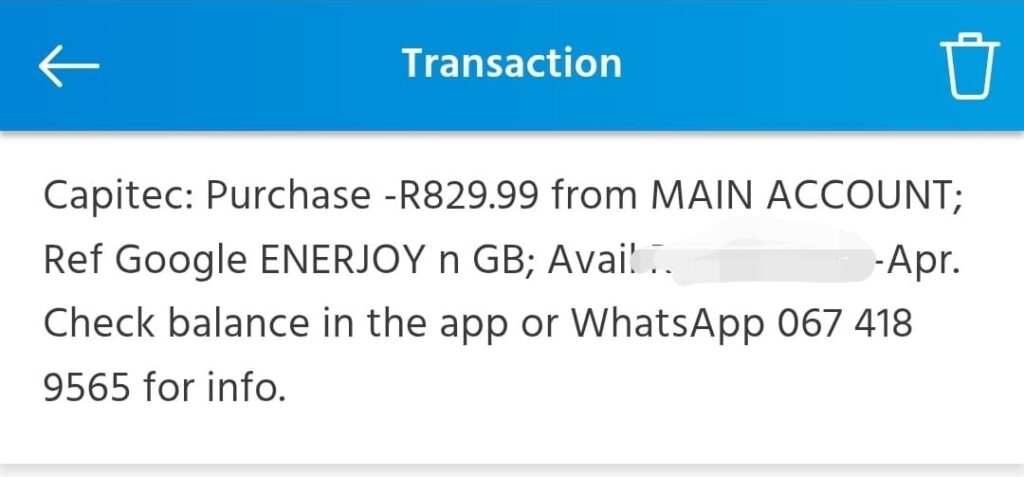
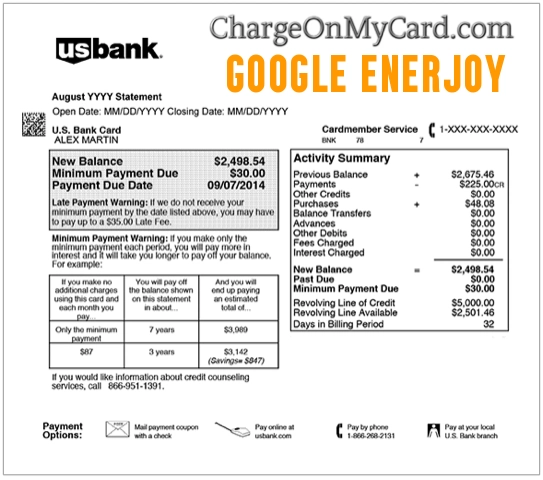
If you see a Google Enerjoy charge, GOOGLE*ENERJOY, Enerjoy charge, or Google Enerjoy charge on credit card, it is most likely connected to a Google Play app purchase, in-app purchase, or subscription from ENERJOY PTE. LTD., the developer behind wellness and lifestyle apps such as ShutEye, JustFit, Me+, and Eato.
Consumer Reports and Experiences
Consumers often search for google enerjoy, google enerjoy charge, google enerjoy charge on credit card, google enerjoy unauthorized charges, enerjoy charge, enerjoy cancel subscription, enerjoy reviews, enerjoy.life, and 650-2530000 after seeing an app-related charge they do not immediately recognize.
Many cardholders later connect the charge to a free trial, subscription renewal, in-app purchase, or app download through Google Play. Others report confusion because the bank statement may show GOOGLE*ENERJOY or GOOGLE *ENERJOY instead of the exact app name, subscription plan, Google account, device, or family member who started the purchase.
If you do not recognize the charge, check your Google Play order history and subscriptions first. If the charge is not in your Google account, or if no one with access to your card made the purchase, report it to Google and contact your card issuer.
What Is the Google Enerjoy Charge?
The Google Enerjoy charge usually means a payment was processed through Google Play for an app, in-app purchase, or subscription connected to ENERJOY PTE. LTD. Google Play statement descriptors often begin with “GOOGLE*” followed by the app developer name, app name, or content type.
Enerjoy is associated with several wellness, sleep, fitness, habit, and lifestyle apps. Depending on the app and device used, the charge may be tied to a trial renewal, monthly subscription, annual subscription, premium feature, or in-app upgrade.
Why You May Be Seeing This Charge
- Google Play subscription: A subscription for an Enerjoy app may have renewed through Google Play.
- Free trial converted to paid billing: A trial may have ended and converted to a paid subscription.
- In-app purchase: Someone may have purchased a premium feature, plan, or upgrade inside an app.
- App connected to another Google account: The charge may be tied to a different Google account used on your phone, tablet, or family device.
- Family payment method: A family member may have used a shared Google Play payment method.
- Apple App Store billing instead: If your statement says Apple rather than Google, the purchase may need to be handled through Apple subscriptions and refunds.
- Unauthorized account or card use: If no one recognizes the purchase, report it to Google and your card issuer.
Common Google Enerjoy Statement Variations
The exact descriptor can vary by bank, card network, Google billing format, app, and country. Possible statement variations include:
- GOOGLE*ENERJOY
- GOOGLE *ENERJOY
- GOOGLE ENERJOY
- GOOGLE ENERJOY CHARGE
- GOOGLE ENERJOY 650-2530000 US
- GOOGLE*ENERJOY 650-2530000
- ENERJOY GOOGLE
- ENERJOY CHARGE
- ENERJOY.LIFE
- ENERJOY PTE. LTD.
- ENERJOY LIMITED
- SHUTEYE
- JUSTFIT
- ME+
- EATO
Apps Commonly Associated With Enerjoy
Enerjoy is associated with multiple wellness, lifestyle, sleep, fitness, and habit apps. A Google Enerjoy charge may be connected to one of these apps or a similar Enerjoy app:
- ShutEye: Sleep tracker, snore recording, sleep sounds, and sleep insights.
- JustFit: Fitness, lazy workout, and home exercise app.
- Me+: Lifestyle routine, habit tracking, and daily planning app.
- Eato: Calorie counter, food tracking, and nutrition app.
- Other Enerjoy apps: Enerjoy may publish additional apps on Google Play or the Apple App Store.
What Does 650-2530000 Mean?
The number 650-2530000 may appear as part of a Google-related billing descriptor. It is not necessarily the best support number to use for a specific app charge. For account safety, use Google Play’s official order history, subscription tools, refund tools, and unauthorized-charge forms rather than calling random numbers from search results.
How To Check Whether the Charge Came From Google Play
Start by checking the Google account most likely connected to the phone, tablet, or app subscription.
- Open Google Play or go to Google Play order history.
- Check Payments & subscriptions for recent orders.
- Look for Enerjoy, ShutEye, JustFit, Me+, Eato, or the exact charge amount.
- Check every Google account used on your devices.
- Ask household members whether they started a trial or subscription.
- Check whether the charge is pending or fully posted.
- If the charge appears in Google Play, use Google’s refund or subscription tools.
- If the charge does not appear in Google Play, contact your card issuer and report it as unauthorized if appropriate.
How To Cancel an Enerjoy Subscription on Google Play
If the charge is from a Google Play subscription, canceling the app or deleting the app from your phone may not stop billing. You usually need to cancel the subscription in Google Play.
- Open the Google Play Store app or go to Google Play on the web.
- Make sure you are signed in to the Google account that started the subscription.
- Go to Payments & subscriptions.
- Select Subscriptions.
- Look for Enerjoy, ShutEye, JustFit, Me+, Eato, or another Enerjoy app.
- Select the subscription and choose Cancel subscription.
- Save a screenshot or email confirmation showing the cancellation date.
- Google Play subscription help: Cancel a Google Play Subscription
- Google payments and subscriptions: Google Payments & Subscriptions
How To Request a Google Play Refund
If you believe the charge was accidental, unwanted, or tied to a trial you did not intend to keep, request a refund through Google Play as soon as possible.
- Go to Google Play order history.
- Find the Enerjoy, ShutEye, JustFit, Me+, Eato, or related transaction.
- Select Report a problem.
- Choose the reason that best describes your situation.
- Submit the refund request.
- Save the confirmation and monitor your email for Google’s decision.
- Request a Google Play refund: Google Play Refund Help
- Report charges you do not recognize: Google Play Unrecognized Charges
What To Do If the Google Enerjoy Charge Was Unauthorized
If you do not recognize the Google Enerjoy charge and no family member, friend, or authorized card user made the purchase, treat it as potentially unauthorized.
- Check whether the charge appears in your Google Play order history.
- If it appears in your Google account, change your Google password and review account security.
- Turn on two-step verification for your Google account.
- Report the unauthorized purchase to Google if it qualifies.
- Contact your bank or card issuer if the charge does not appear in your Google account.
- Ask your issuer whether the card should be replaced.
- Check for other unfamiliar Google, app, or subscription charges.
Google says unauthorized credit card, debit card, and PayPal transactions can generally be reported to Google within 120 days of the transaction date. If the transaction is older than that or does not appear to be from Google, contact your card issuer’s fraud department promptly.
- Google unauthorized transaction form: Report Unauthorized Google Purchases
- Google payments center help: Report Unauthorized Charges
How To Contact Enerjoy
If the charge clearly matches an Enerjoy app or subscription, you can also contact Enerjoy. Include the app name, order number, charge amount, transaction date, country, platform, and the Google account email used for the purchase if available.
- Enerjoy website: enerjoy.life
- Enerjoy contact page: Enerjoy Contact Us
- Enerjoy support email: service@support.enerjoy.life
- Enerjoy address: 9 Straits View, West Tower, Marina One, 018937 Singapore
- Google Play developer page: ENERJOY PTE. LTD. on Google Play
- Apple developer page: Enerjoy Pte. Ltd. on the App Store
What If the Charge Came Through Apple Instead?
If your statement says Apple, Apple.com/bill, or App Store rather than Google, handle the issue through Apple instead of Google Play. Enerjoy apps may be available on both platforms, but Google cannot cancel or refund Apple App Store subscriptions, and Apple cannot cancel or refund Google Play subscriptions.
- Apple subscriptions and billing: Apple Billing Support
- Cancel an Apple subscription: Cancel a Subscription From Apple
- Request an Apple refund: Request a Refund From Apple
How To Prevent Future Enerjoy or Google Play Charges
- Cancel unwanted Google Play subscriptions before the next renewal date.
- Check all Google accounts used on your phone, tablet, or family devices.
- Remove old payment cards from Google Play if you no longer use them.
- Turn on purchase verification in Google Play.
- Review Family Library or shared payment settings.
- Use two-step verification on your Google account.
- Monitor your next card statement after cancellation.
Is the Google Enerjoy Charge a Scam?
The Google Enerjoy descriptor itself is usually not a scam if it matches a real Google Play app purchase or subscription connected to an Enerjoy app. Many unfamiliar app charges come from free trials, family-member purchases, shared devices, or subscriptions that renewed automatically.
However, if the charge does not appear in your Google Play order history, no one recognizes it, or you see multiple unfamiliar Google charges, treat it as suspicious. Report it to Google when appropriate and contact your card issuer if the charge was unauthorized.
Frequently Asked Questions
What is Google Enerjoy on my credit card?
Google Enerjoy on a credit card usually means Google Play billed you for an Enerjoy app, subscription, in-app purchase, or trial renewal. Check Google Play order history and subscriptions for Enerjoy, ShutEye, JustFit, Me+, or Eato.
What is Enerjoy charge on my bank statement?
An Enerjoy charge may be tied to a wellness, sleep, fitness, habit, or lifestyle app subscription. If it begins with GOOGLE*, check Google Play. If it begins with Apple, check Apple subscriptions and Apple’s refund tools.
How do I cancel an Enerjoy subscription?
If the charge came through Google Play, cancel it in Google Play under Payments & subscriptions. If it came through Apple, cancel it in Apple subscriptions. Deleting the app usually does not cancel the subscription.
What is Google Enerjoy 650-2530000?
Google Enerjoy 650-2530000 appears to be a Google-style statement descriptor connected to a Google Play purchase or subscription. Use Google Play order history and official Google support to verify it.
Can I get a refund for a Google Enerjoy charge?
Possibly. If the charge appears in Google Play order history, use Google Play’s refund request process. If the charge was unauthorized, use Google’s unauthorized transaction form or contact your card issuer.
Why was I charged after a free trial?
Many app trials automatically renew as paid subscriptions unless canceled before the trial ends. Check the app subscription in Google Play or Apple and cancel it if you do not want future billing.
What should I do if the charge is unauthorized?
Check whether the charge appears in your Google Play account. If it does, secure your Google account and report the issue to Google. If it does not appear in your Google account, contact your card issuer’s fraud department.
Is Enerjoy the same as ShutEye or JustFit?
Enerjoy is the developer associated with apps such as ShutEye, JustFit, Me+, and Eato. Your statement may show the developer name instead of the specific app name.
Related Credit Card and Bank Charges
App-store, digital subscription, and online-service descriptors can be confusing because the statement may show the payment platform, developer name, app name, or phone-style descriptor instead of the exact subscription.
- Google 1600 Amphitheatre Pkwy Charge
- BETPL Charge on Credit Card
- Glority Global Charge
- Large Digital Goods Merchant Charge
- Luxtonicware Charge on Credit Card
- Google SVCSAPPS Charge
- Elevate Jewels Charge
Why Trust ChargeOnMyCard.com?
ChargeOnMyCard.com helps consumers research confusing credit card and debit card descriptors using available company information, official resources, payment clues, and reports from cardholders. Our goal is to help readers understand what a charge may be, how to verify it, and when to contact the merchant, app developer, payment platform, or card issuer.
Share Your Experience
Have you seen a Google Enerjoy, GOOGLE*ENERJOY, Enerjoy, ShutEye, JustFit, Me+, or Eato charge on your credit card, debit card, or bank statement? Please share the exact descriptor, amount, platform, app name, and how you resolved it. Your report may help another reader identify a subscription, request a refund, cancel unwanted billing, or report unauthorized card use.
Disclaimer
ChargeOnMyCard.com is an independent consumer information website and is not affiliated with Google, Google Play, Enerjoy, ENERJOY PTE. LTD., ShutEye, JustFit, Me+, Eato, Apple, or any company mentioned. Information is provided for educational purposes only. Always verify unfamiliar charges directly with Google Play, Apple, the app developer, the merchant shown on your transaction record, and your financial institution before taking action.