
An 8558124430 Venmo charge on your credit card, debit card, or bank statement is most likely connected to a payment processed through Venmo. The transaction may appear as VENMO 8558124430 NY, VENMO 855-812-4430, (855) 812-4430 VENMO, or another variation.
1-855-812-4430 is Venmo’s current official general-support number. However, seeing the phone number on your statement does not prove that you authorized the individual payment. Review your Venmo activity, linked cards and bank accounts, authorized users, and recent purchases before accepting or disputing the charge.
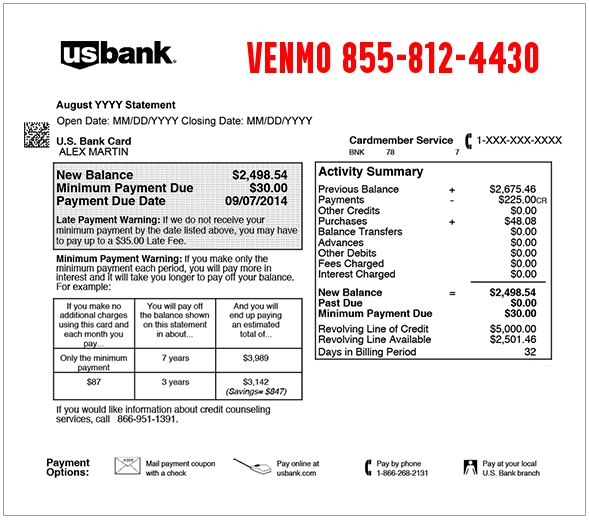
What Is the 8558124430 Venmo Charge?
8558124430 is the punctuation-free version of Venmo’s general-support number, 855-812-4430. Banks often include a merchant’s support number in the transaction description so cardholders know which company processed the payment.
The charge may represent:
- A person-to-person payment sent through Venmo
- A payment funded by your linked debit card
- A payment funded by your linked credit card
- A payment withdrawn from a linked bank account
- A purchase from a merchant that accepts Venmo
- A payment made through a Venmo business profile
- A payment made by another authorized card or account user
- A delayed bank-funded Venmo payment
- A duplicate payment or authorization
- Unauthorized use of your card, bank account, or Venmo account
Common 855-812-4430 Statement Variations
- 8558124430
- 855-812-4430
- 855 812 4430
- 855 812-4430
- (855) 812-4430
- 1-855-812-4430
- 1 855 812 4430
- VENMO 8558124430
- VENMO 855-812-4430
- VENMO 8558124430 NY
- VENMO 855-812-4430 NY
- 8558124430 VENMO NY
- CHECKCARD VENMO 8558124430
- POS VENMO 855-812-4430
- DEBIT VENMO 8558124430
The exact wording may vary by bank, card issuer, payment method, transaction type, and the amount of statement space available.
What Does VENMO 8558124430 NY Mean?
VENMO 8558124430 NY is a reported statement descriptor for Venmo-related payment activity. The `NY` portion may reflect merchant or payment-processing information rather than the location of the person or business that received your payment.
A Venmo payment sent to someone in another state may still display NY or another company-related location on your statement.
The descriptor normally does not reveal:
- The recipient’s Venmo username
- The recipient’s legal name
- The payment note
- The product or service purchased
- The Venmo account that initiated the payment
Open your Venmo transaction history to find those details.
Why Did Venmo Charge My Credit Card?
Venmo may charge a linked credit card when you use that card as the funding source for a Venmo payment or purchase.
Possible explanations include:
- You sent money to a friend or family member.
- You paid a landlord, contractor, seller, or service provider.
- You purchased from a merchant using Venmo checkout.
- You paid a Venmo business profile.
- A family member used your card through a Venmo account.
- Your card remained linked to an older Venmo account.
- A payment posted several days after it was initiated.
- Your card information may have been added to another Venmo account without permission.
Compare the statement amount and date with the payments listed in every Venmo account that may use the card.
Why Did Venmo Charge My Bank Account?
A Venmo payment may be withdrawn directly from a linked checking account when the bank account was selected as the funding source.
The withdrawal may not appear on the same day that the Venmo payment was sent. Bank processing can cause the debit to appear later, making the transaction harder to recognize.
Check:
- The payment date inside Venmo
- The date the bank debit posted
- The payment recipient
- The amount sent
- The selected payment method
- Whether part of the payment came from a Venmo balance
Could It Be a Person-to-Person Venmo Payment?
Yes. One of the most common explanations is a payment sent to another Venmo user.
The outside bank or card statement may display Venmo’s name and phone number rather than the recipient’s name. Open the Venmo app and review recent payments for the matching amount.
Person-to-person payments can include:
- Rent or shared household expenses
- Restaurant or entertainment costs
- Reimbursement to a friend
- Payments to a contractor or service provider
- Family transfers
- Payments for secondhand goods
- Accidental payments to the wrong user
Could It Be a Merchant Purchase Paid With Venmo?
Yes. Some online and in-person merchants allow customers to pay using Venmo. The statement may show Venmo rather than the merchant’s complete public name.
Review:
- Online order confirmations
- Venmo merchant payments
- Business-profile transactions
- Food-delivery and transportation purchases
- Subscriptions paid through a merchant checkout
- Purchases made by another household member
The full transaction inside Venmo may provide the merchant name, date, amount, and payment note.
How to Find the Payment Behind 8558124430
- Open the Venmo app.
- Review your personal transaction feed.
- Find a payment with the same or a similar amount.
- Compare the Venmo payment date with the bank-posting date.
- Open the transaction and review the recipient or merchant.
- Check which card or bank account funded the payment.
- Repeat the process for any other Venmo accounts in your household.
- Ask authorized card users whether they recognize the payment.
You can also download a Venmo account statement through the app or Venmo website to review a longer transaction history.
How to Download Your Venmo Transaction History
In the Venmo app:
- Open Settings.
- Select Statements.
- Choose the year and month.
- Download the statement or send it to your email.
On Venmo.com:
- Sign in to your account.
- Select Statements.
- Choose the month and year.
- Download the transaction history.
Compare the statement with the date, amount, and funding source shown by your bank.
What Is VENMO-0 CASHOUT?
VENMO-0 CASHOUT is generally associated with a standard transfer from a Venmo balance to a linked bank account.
This normally appears as money entering the bank account rather than a debit funding a Venmo payment. It is different from a statement charge containing 8558124430.
A standard Venmo transfer may take one to three business days and may appear on the bank statement under a cash-out or transfer description.
Could It Be a Bank-Verification Transaction?
Venmo may use small deposits and debits when manually verifying a linked bank account. These microtransactions generally appear as separate small entries.
If you recently linked or reverified a bank account, check the Venmo Wallet section for a bank marked unconfirmed or awaiting verification.
Do not enter microtransfer amounts into a link sent by an unexpected text or caller. Complete verification only through the official Venmo app.
Why Are There Multiple Venmo Charges?
Multiple entries may represent:
- Several separate Venmo payments
- Payments made by different Venmo users
- A person-to-person payment and a merchant purchase
- A delayed bank-funded payment
- A temporary authorization and completed payment
- A payment accidentally submitted twice
- A failed payment retried later
- Duplicate or unauthorized activity
If you sent only one payment but see more than one completed bank or card charge, contact Venmo support and your financial institution.
What If the Venmo Charge Is Pending?
A pending Venmo entry may be an authorization or an unsettled payment. Bank-funded and card-funded transactions do not always appear immediately.
The amount, date, or descriptor may change when the transaction posts. Avoid disputing both a pending authorization and its matching completed transaction as separate purchases until you confirm that both remain posted.
Contact your bank promptly if the card or account appears compromised or if additional unknown transactions are appearing.
Is 855-812-4430 Venmo Customer Service?
Yes. Venmo currently lists 1-855-812-4430 as its official general customer-service number for account access, payments, settings, and other support issues.
- Official Website: venmo.com
- General Support: 1-855-812-4430
- Contact Page: Venmo Contact Us
- Help Center: Venmo Help Center
- General Phone Hours: Every day, 8 a.m. to 8 p.m. Central Time
- In-App Support Messaging: Every day, 8 a.m. to 7:45 p.m. Central Time
- Virtual Assistant: Available 24 hours a day
Start the call yourself using the number on Venmo’s official contact page. Do not trust caller ID alone.
Is Venmo Customer Service Available 24 Hours?
Venmo’s current contact page does not advertise a live general-support representative by phone 24 hours a day.
Current options include:
- General telephone support from 8 a.m. to 8 p.m. Central Time
- In-app support messaging from 8 a.m. to 7:45 p.m. Central Time
- A virtual assistant available 24/7
Venmo Credit Card support through the card issuer may have different hours, including 24-hour help for certain credit-card issues.
What Is the Venmo Debit Card Support Phone Number?
For a Venmo Mastercard Debit Card problem, Venmo recommends calling the number printed on the back of the card. General Venmo support is also available at 1-855-812-4430.
If the Venmo Debit Card is lost, stolen, or being used without permission:
- Open the Venmo app.
- Open the Cards section.
- Select the Venmo Debit Card.
- Lock or disable the card.
- Contact Venmo support.
What Is the Venmo Credit Card Support Number?
The Venmo Credit Card is different from an ordinary Venmo payment funded by a linked card.
For unauthorized activity or a billing dispute on a Venmo Credit Card statement, contact Synchrony Bank at 1-855-878-6462. Venmo currently lists this service as available 24 hours a day.
You may also temporarily disable the Venmo Credit Card through the Venmo app.
What If the Charge Is Not in Your Venmo Account?
If an unknown Venmo charge appears on your bank or card statement but no matching payment appears in your Venmo account, your payment information may have been connected to another Venmo account.
Venmo advises affected cardholders to work directly with their bank or card issuer because Venmo cannot take action on another user’s account on your behalf.
- Call the number printed on the back of your card.
- Report the unknown Venmo transaction.
- Ask to open an unauthorized-transaction dispute.
- Ask whether the card or bank-account number should be replaced.
- Review the account for additional Venmo charges.
- Change passwords for online banking and payment services.
What If the Unauthorized Payment Is in Your Venmo Account?
If the payment appears inside your own Venmo account:
- Open the Venmo app.
- Select the unfamiliar transaction.
- Select Need Help?
- Choose the option that best describes the problem.
- Add any other related transactions.
- Provide the requested details.
- Submit the issue.
- Reset your Venmo password if prompted.
Contact Venmo support immediately if you also see unfamiliar account, email, telephone, password, or payment-method changes.
Could the Venmo 8558124430 Charge Be Fraud?
A Venmo 8558124430 charge is not automatically fraudulent. It may be a valid payment funded through your bank account, debit card, or credit card.
The specific transaction may be unauthorized if:
- No household member recognizes the payment.
- No matching transaction appears in your Venmo account.
- The recipient or merchant is unfamiliar.
- The card was never intentionally linked to Venmo.
- Several unknown Venmo transactions appeared.
- Your Venmo login or payment information changed unexpectedly.
- Other unfamiliar charges appeared around the same time.
How to Secure Your Venmo Account
- Change your Venmo password.
- Change the password for the connected email account.
- Review linked cards and bank accounts.
- Remove payment methods you do not recognize.
- Review recent Venmo transactions.
- Enable available security features.
- Lock an affected Venmo Debit Card or Venmo Credit Card.
- Notify Venmo and the affected financial institution.
How to Dispute an 8558124430 Venmo Charge
Gather:
- The complete statement descriptor
- The date and amount
- The affected bank account or card
- The matching Venmo transaction, if one exists
- The recipient or merchant name
- Venmo account statements
- Messages exchanged with Venmo
- Bank or card dispute numbers
Use Venmo’s dispute option when the transaction appears in your own Venmo account.
Contact your bank or card company directly when the charge appears only on the external statement and cannot be found in your Venmo account.
Watch Out for Calls Spoofing 855-812-4430
Even though 1-855-812-4430 is an official Venmo number, caller ID can be manipulated. A scammer may make it appear that the call came from Venmo.
Be cautious if an unexpected caller asks you to:
- Read a one-time security code
- Provide your Venmo password or PIN
- Transfer money to protect your account
- Send money to a supposed Venmo employee
- Install remote-access software
- Purchase gift cards
- Send cryptocurrency
- Move money to a “safe” account
End the call, open the official Venmo app, or call 1-855-812-4430 yourself.
Frequently Asked Questions About 8558124430 Venmo Charges
What is 8558124430 on my bank statement?
It is most likely a Venmo-related payment funded through a linked bank account, debit card, or credit card. Check your Venmo transaction history for the matching amount.
Is 8558124430 Venmo?
Yes. The number is the punctuation-free version of Venmo’s current general-support number, 1-855-812-4430.
What is VENMO 8558124430 NY?
It is a reported Venmo statement descriptor. The NY portion may reflect merchant or processing information rather than the recipient’s location.
Is 855-812-4430 a legitimate phone number?
Venmo currently lists 1-855-812-4430 on its official contact page. Still, initiate the call yourself because caller ID can be spoofed.
Is Venmo customer service available 24 hours?
The virtual assistant is available 24/7. General phone support is currently available every day from 8 a.m. to 8 p.m. Central Time.
How do I speak to Venmo customer service?
Call 1-855-812-4430 during listed support hours or use Get Help and Chat With Us inside the Venmo app.
Why did Venmo debit my bank account?
A linked bank account may have funded a person-to-person payment or merchant purchase. The debit may post after the payment was originally sent.
Why did Venmo charge my credit card?
Your linked credit card may have been selected to fund a Venmo payment or merchant purchase.
Why are there two Venmo charges?
There may have been two payments, a duplicate submission, a delayed transaction, or an authorization and completed payment. Compare each entry with your Venmo history.
What if the Venmo charge is not in my account?
Contact your bank or card issuer, file an unauthorized-transaction dispute, and ask whether the payment method should be replaced.
How do I dispute a Venmo payment?
Open the transaction in the Venmo app, select Need Help, choose the issue, and submit the dispute details.
What is the Venmo debit card support phone number?
Use the number printed on the back of the Venmo Debit Card. General Venmo support is available at 1-855-812-4430.
Should I dispute the charge with my bank?
Contact the bank when the transaction appears on your bank or card statement but cannot be found in your own Venmo account.
Related Digital-Wallet Charge Guide
Help Other Cardholders Identify This Charge
If you saw 8558124430, VENMO 8558124430 NY, VENMO 855-812-4430, or another Venmo descriptor, please share what the payment was connected to.
Helpful details include whether it involved a person-to-person payment, merchant purchase, bank-funded transfer, linked card, duplicate transaction, delayed payment, or unauthorized use.
Do not post complete card numbers, bank-account numbers, Venmo usernames, recipient names, transaction IDs, email addresses, telephone numbers, passwords, PINs, or one-time security codes.
Why Rely on ChargeOnMyCard.com?
ChargeOnMyCard.com researches confusing credit-card, debit-card, digital-wallet, person-to-person payment, merchant-payment, and bank-statement descriptors using current official support information, transaction clues, and cardholder reports when available.
A legitimate support number in a statement does not prove that an individual transaction was authorized. We explain how to match the descriptor to account activity and choose the correct dispute route.
Disclaimer
ChargeOnMyCard.com is not affiliated with Venmo, PayPal, Synchrony Bank, Visa, Mastercard, any payment recipient, merchant, payment processor, bank, card network, or financial institution. This page is for informational purposes only and is not financial, legal, banking, billing, payment, refund, dispute, account-security, or fraud-prevention advice. Contact Venmo and your financial institution directly about a specific transaction.