A Select Media LLC charge, SELECT MEDIA 844-927-3881 charge, or similar Select Media entry on a credit card, debit card, or bank statement is usually associated with Fansly, a creator-subscription and paid digital-content platform.
Select Media LLC is the legal company that owns and operates Fansly. A card charge may represent a creator subscription, automatic renewal, wallet top-up, tip, paid media purchase, locked message, or another Fansly transaction. If the bank entry is a credit or deposit rather than a debit, it may instead represent a Fansly creator payout.
What Is the Select Media LLC Charge?
Select Media LLC is the Maryland company that owns and operates Fansly.
A debit or card charge may represent:
- A monthly subscription to a Fansly creator
- An automatically renewed creator subscription
- A multi-month subscription purchased in advance
- A higher subscription tier
- A Fansly Wallet top-up
- A tip sent to a creator
- A paid post or locked media purchase
- A paid direct message
- A custom-content transaction completed through Fansly
- A purchase made by another authorized card user
- An unauthorized purchase or compromised Fansly account
The statement descriptor usually does not identify the creator, username, subscription tier, content purchased, or Fansly account email.
Common Select Media LLC Statement Variations
The transaction may appear as:
- SELECT MEDIA LLC
- SELECT MEDIA LLC 844-927-3881
- SELECT MEDIA 8449273881
- SELECT MEDIA LLC BALTIMORE
- SELECT MEDIA LLC BALTIMORE MD
- SELECT MEDIA LLC MD
- SELECT MEDIA 8449273881 US
- SELECT MEDIA LLC TX
- PENDING SELECT MEDIA LLC
- CHECKCARD SELECT MEDIA LLC
- CHKCARD SELECT MEDIA
- POS DEBIT SELECT MEDIA LLC
- RECURRING PAYMENT SELECT MEDIA LLC
Not every variation above has been independently confirmed as a current Fansly descriptor. A generic transaction containing only Select Media should be verified using the telephone number, amount, transaction date, Fansly account history, and expanded merchant information from the card issuer.
Is Select Media LLC the Same as Fansly?
Yes. Select Media LLC is the legal company that owns and operates Fansly.
The statement may use the legal company name rather than the public-facing Fansly brand. As a result, someone may recognize Fansly but not immediately recognize Select Media LLC on the bank statement.
Fansly is separate from:
- OnlyFans
- Fenix International Limited
- Other businesses using Select Media in their names
- Unrelated media, advertising, or publishing companies
Why Does the Charge Say Baltimore or Maryland?
Fansly’s official contact information lists Select Media LLC at:
145 West Ostend Street, Suite 600
Baltimore, MD 21230
A Baltimore or Maryland reference therefore may reflect the company’s legal or merchant address. It does not necessarily show where the cardholder made the purchase or where the creator is located.
What If the Charge Says Austin, Texas?
Some users search for Select Media entries containing Austin or Texas. Fansly’s current official contact page lists Baltimore, Maryland, not Austin.
If the statement shows Austin or Texas:
- Check whether the entry also includes 844-927-3881.
- Compare it with Fansly transaction history.
- Ask the issuer for the full merchant name and merchant category.
- Do not assume every Select Media business is Fansly.
Is Select Media LLC a Recurring Subscription?
It can be.
Fansly says creator subscriptions are set to automatically renew by default. A subscription usually renews at the end of its billing period unless the user turns off auto-renewal.
A recurring Select Media charge may represent:
- The next monthly creator subscription
- A subscription renewal after a promotional period
- Several active creator subscriptions
- A higher or different subscription tier
- A multi-month subscription
- A subscription that was canceled on the wrong account
- A subscription whose renewal was never disabled
How to Review Active Fansly Subscriptions
- Sign in to the correct Fansly account.
- Open the Subscriptions page.
- Review Active, Expired, and All Subscriptions.
- Check each creator and subscription tier.
- Review the subscription price.
- Check whether a promotion changed the renewal price.
- Review the next renewal or expiration date.
- Repeat the process for any other Fansly account or email address.
The subscription page may show:
- The creator
- The selected tier
- The monthly or multi-month price
- The promotional price
- The regular renewal price
- The subscription status
- The renewal date
- The expiration date after cancellation
How to Cancel a Fansly Subscription
To prevent the next renewal:
- Sign in to Fansly.
- Open the Subscriptions page.
- Find the creator whose subscription you want to cancel.
- Select the cogwheel or subscription-settings icon.
- Choose Don’t Renew Subscription or Disable Auto-Renew.
- Confirm that the account now shows a Sub Expiry Date instead of a renewal date.
- Save a screenshot of the cancellation status.
Turning off renewal does not immediately end the paid subscription. Access generally continues until the current billing period expires.
Deleting the app, signing out, unfollowing a creator, or stopping use of the account does not by itself cancel automatic renewal.
Why Was I Charged After Canceling?
A charge after cancellation may occur because:
- The renewal had already processed before cancellation.
- The cancellation was not fully completed.
- The account still displayed a renewal date rather than an expiration date.
- Another creator subscription remains active.
- Another Fansly account uses the same card.
- A wallet top-up or paid-content purchase occurred separately.
- The charge was pending before cancellation.
Check the cancellation timestamp, renewal date, transaction date, and every active subscription.
Could the Charge Be a Fansly Wallet Top-Up?
Fansly users can add money to a Spending Wallet and then use the wallet balance for subscriptions, tips, and paid content.
A wallet top-up may:
- Be larger than the individual purchase that followed it
- Use one of the preset wallet recharge amounts
- Be followed by several smaller internal Fansly purchases
- Appear as Select Media LLC on the card
Review the Fansly Wallet Transaction History to compare the card charge with:
- Wallet deposits
- Subscriptions
- Tips
- Paid-media purchases
- Locked-message purchases
- Refunds
Could It Be a Tip or Paid-Content Purchase?
Fansly allows users to pay for content in several ways.
The transaction may relate to:
- A voluntary creator tip
- A tip sent through a post or direct message
- A paid media post
- A locked photo, video, or message
- A content bundle
- A custom-content arrangement completed through Fansly
Fansly distinguishes tips from direct media purchases in Transaction History. A media purchase may be labeled Media Purchase, while a voluntary payment may be labeled Tip.
Why Are There Multiple Select Media Charges?
Multiple charges may represent:
- Subscriptions to several creators
- A subscription and a separate wallet top-up
- A subscription and a paid-media purchase
- Several tips or locked-message purchases
- Two Fansly accounts using the same card
- A discounted subscription renewing at its regular price
- A declined payment followed by another attempt
- A pending authorization and the completed payment
- An actual duplicate completed charge
- Repeated unauthorized use
Compare every completed transaction with the Fansly Wallet Transaction History rather than relying only on the statement descriptor.
What Is a Pending Select Media LLC Charge?
A pending transaction may:
- Become the final completed Fansly payment
- Update with a longer descriptor
- Disappear if the authorization is reversed
- Be followed by another transaction after a failed attempt
Do not automatically count a pending authorization and its completed replacement as two settled charges.
Why Is the Amount Different From What I Expected?
The amount may differ because of:
- Several subscriptions or purchases
- A promotional subscription renewing at its regular price
- A multi-month subscription
- Applicable taxes
- A wallet top-up rather than an individual purchase
- A currency conversion
- A foreign-transaction or conversion fee charged by the bank
Fansly processes transactions in U.S. dollars. A bank account using another currency may display a converted amount and may add its own exchange-rate or international-payment fees.
What Is the Fansly Inactive Status Charge?
Fansly may deduct a $5 inactive status fee from an existing Fansly Wallet balance after an account has had no activity for 12 consecutive months.
This fee:
- Is deducted only from the Fansly Wallet
- Is not charged directly to the saved credit or debit card
- May repeat monthly until the wallet reaches zero or the user signs in again
An external card charge should not be attributed to the inactive status fee without additional evidence.
Is the Entry a Charge or a Creator Payout?
Check whether the bank entry is a debit or a credit.
- Debit: It may represent a subscription, wallet top-up, tip, or paid-content purchase.
- Credit or deposit: It may represent a Fansly creator payout.
Fansly says creator deposits may appear under Select Media LLC, although the exact descriptor can vary by region and payout method.
How to Verify a Select Media LLC Charge
- Copy the complete statement descriptor.
- Record the amount, currency, and transaction date.
- Check whether it is pending, completed, reversed, or credited.
- Sign in to every possible Fansly account.
- Review Active and Expired Subscriptions.
- Open Wallet Transaction History.
- Compare subscriptions, tips, paid media, and wallet deposits.
- Search email for Fansly receipts and renewal notices.
- Ask household members and authorized card users.
- Contact Fansly support if the charge remains unexplained.
- Contact the bank promptly if no authorized transaction can be found.
Search email for:
- Fansly
- Select Media LLC
- Subscription
- Auto-renew
- Wallet
- Tip
- Media purchase
- Payment receipt
- The exact charged amount
What Is Fansly’s Refund Policy?
Fansly says most purchases and fees are final and nonrefundable.
General policies include:
- Tips are generally nonrefundable.
- Wallet top-ups are generally final.
- Paid digital content generally cannot be refunded after it was delivered and accessed.
- Subscriptions are generally nonrefundable when the intended content was available.
- Transactions completed outside Fansly generally cannot be verified by Fansly.
Fansly may review unusual circumstances case by case, including certain situations where promised content was not delivered.
How to Dispute a Charge With Fansly
Before contacting support, collect:
- The Fansly transaction ID
- The charge date
- The exact amount
- The account email
- The creator or transaction type, if known
- A clear explanation of the issue
- Screenshots or other supporting evidence
Suggested message:
I am contacting you about a SELECT MEDIA LLC charge dated [date] for [amount]. Please identify the Fansly transaction, account, subscription, wallet top-up, tip, or paid-content purchase connected with it. The transaction ID is [ID, if available]. I believe the issue is [brief explanation]. Please investigate and confirm whether the charge is eligible for correction or refund.
Do not send a complete card number, CVV, PIN, password, authentication code, or private content through an unsecured message.
Current Select Media LLC and Fansly Contact Information
- Legal company: Select Media LLC
- Platform: Fansly
- Support email: support@fansly.com
- Published voicemail/contact number: 1-844-927-3881
- Fansly Help Center: Fansly Support
- Official website: Fansly.com
- Mailing address: 145 West Ostend Street, Suite 600, Baltimore, MD 21230
Fansly also provides support through the Help button or chat tool on the official website.
What If You Never Used Fansly?
- Save the descriptor, amount, currency, and date.
- Ask household members and authorized card users.
- Search all email accounts for Fansly messages.
- Check whether an old or forgotten account exists.
- Use password recovery for any email address that may have been used.
- Contact Fansly and request transaction identification.
- Lock the card if additional suspicious activity appears.
- Notify the financial institution promptly.
- Ask whether the card number or payment token should be replaced.
A legitimate Select Media LLC descriptor does not prove that the cardholder personally authorized the transaction.
What If the Fansly Account Was Hacked?
Take these steps:
- Change the Fansly password.
- Change the password for the associated email account.
- Enable two-factor authentication on both accounts.
- Review saved payment methods.
- Review subscriptions and wallet transaction history.
- Close sessions or devices you do not recognize.
- Contact Fansly support immediately.
- Notify the card issuer about any unauthorized payment.
Credit Card Dispute Guidance
Contact the credit-card issuer promptly when:
- No authorized Fansly account or transaction can be found
- The card was used without permission
- An actual duplicate completed charge remains unresolved
- Charges continue after all renewals were disabled
- The amount differs from Fansly transaction history
- Fansly cannot identify the transaction
To preserve applicable billing-error rights:
- Call the issuer promptly.
- Use its official dispute process.
- Follow up in writing when required.
- Meet applicable reporting deadlines.
- Keep screenshots, transaction history, cancellation records, and support messages.
Official guidance:
CFPB credit-card dispute guidance
Debit Card and Bank Account Guidance
Report an unauthorized debit-card or bank transaction immediately.
Ask the bank:
- Whether another Select Media authorization is pending
- Whether the transaction is marked as recurring
- Whether it was processed in U.S. dollars
- Whether a card token or digital-wallet credential was used
- Whether the card should be replaced
- What documentation is needed for the claim
Official guidance:
CFPB unauthorized debit and bank-transaction guidance
Credit-card and debit-card procedures, protections, and reporting deadlines differ.
Watch Out for Fake Fansly Support
Use Fansly.com, Help.Fansly.com, support@fansly.com, or the published 844-927-3881 voicemail number.
Be suspicious of anyone who:
- Contacts you unexpectedly offering a refund
- Requests payment to cancel a subscription
- Asks for the complete card number
- Requests a CVV, PIN, password, or authentication code
- Wants remote access to a phone or computer
- Requests gift cards or cryptocurrency
- Claims money must be transferred to a safe account
Consumer Reports and Experiences
There are currently four visible public comments on this ChargeOnMyCard.com page.
The reports include:
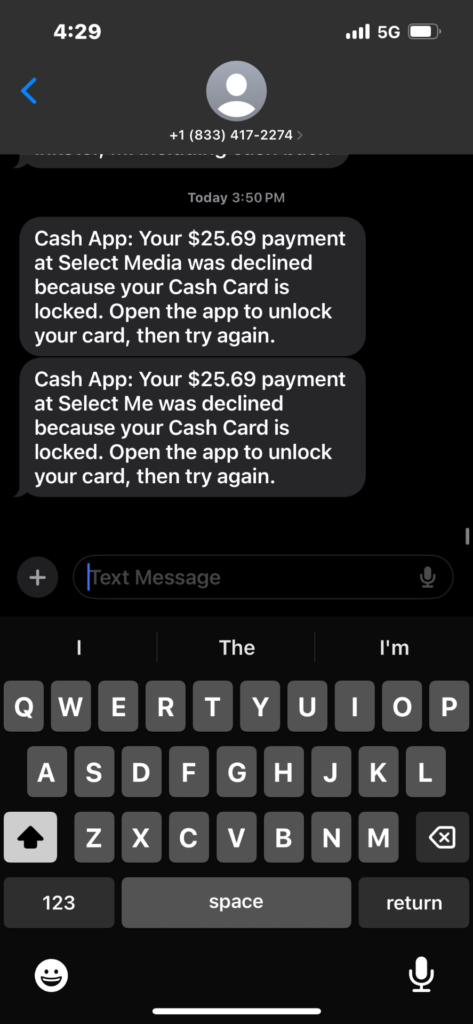
- An alleged attempted charge of $25.69
- Separate alleged charges of $14 and $6
- An alleged charge of £24.34
- Another commenter stating that money was taken from their card without recognition
The comments do not disclose:
- Whether a Fansly account was found
- Whether an automatic subscription renewed
- Whether the charges were wallet top-ups, tips, or paid content
- Whether another authorized user made the purchases
- Whether Fansly identified or refunded the transactions
- Whether the bank approved a dispute
- The final resolution
These comments are individual allegations and do not independently establish fraud or wrongdoing by Select Media LLC, Fansly, or any creator.
ChargeOnMyCard.com cannot:
- Access Fansly accounts
- Identify a creator subscription from a card number
- Cancel a subscription
- Disable auto-renewal
- Issue a refund
- Remove a saved payment method
- Replace a bank card
- Submit a dispute
Frequently Asked Questions About Select Media LLC Charges
What is Select Media LLC on my credit card?
It usually identifies a Fansly subscription, wallet top-up, tip, paid-content purchase, or another Fansly transaction.
Is Select Media LLC Fansly?
Yes. Select Media LLC is the legal company that owns and operates Fansly.
What is 844-927-3881?
Fansly’s official contact page currently lists 1-844-927-3881 as its voicemail and contact number.
Why does the charge say Baltimore?
Select Media LLC’s official address is in Baltimore, Maryland. The location does not necessarily show where the cardholder or creator is located.
Does Fansly automatically renew subscriptions?
Yes. Fansly says subscriptions are set to auto-renew by default unless the user disables renewal.
How do I stop future charges?
Open the Fansly Subscriptions page, select the creator, disable auto-renewal, and confirm that the subscription shows an expiration date.
Can Select Media LLC be a wallet top-up?
Yes. A card can be used to add funds to the Fansly Spending Wallet, which can then pay for subscriptions, tips, and paid content.
Can the charge be a creator payout?
Yes, when the bank entry is a credit or deposit rather than a debit. Fansly says creator deposits may appear under Select Media LLC.
Does Fansly provide refunds?
Most purchases are final. Fansly may consider certain refund requests case by case, particularly when promised content was not delivered or another exceptional issue occurred.
What if I never used Fansly?
Contact Fansly to identify the transaction, secure the payment method, and notify the card issuer or bank promptly if no authorized purchase can be found.
Can ChargeOnMyCard.com cancel the subscription?
No. ChargeOnMyCard.com cannot access Fansly, Select Media, card, refund, or banking systems.
Related Creator Subscription and Billing Guides
- OF London GB Charge: Online Subscription, OnlyFans, or Unauthorized Payment?
- How to Investigate an Unrecognized Credit Card, Debit Card, or Bank Charge
OnlyFans and Fansly are separate platforms operated by different companies.
Help Other Cardholders Identify Select Media LLC
If you saw SELECT MEDIA LLC, SELECT MEDIA 844-927-3881, SELECT MEDIA BALTIMORE, or another variation, please share what the payment represented.
Helpful details include:
- The descriptor without private transaction references
- The general amount and currency
- Whether it was a subscription, wallet top-up, tip, or paid-content purchase
- Whether the transaction was pending or completed
- Whether an active subscription was found
- Whether auto-renewal had been disabled
- Whether Fansly corrected or refunded the transaction
- How the issuer resolved an unauthorized charge
Do not post card numbers, card digits, Fansly usernames, account emails, creator names, private content, passwords, PINs, CVV codes, or authentication codes.
Why Rely on ChargeOnMyCard.com?
ChargeOnMyCard.com researches confusing credit-card, debit-card, creator-subscription, digital-content, wallet, automatic-renewal, and bank-statement descriptors using current merchant information, official support resources, consumer-protection guidance, statement patterns, and visible cardholder reports.
We distinguish the verified relationship between Select Media LLC and Fansly from the separate question of which subscription, wallet top-up, tip, media purchase, creator payout, household member, duplicate transaction, or unauthorized user caused a particular bank entry.
Last reviewed: July 2026.
Disclaimer
ChargeOnMyCard.com is not affiliated with Select Media LLC, Fansly, OnlyFans, Fenix International Limited, any creator, subscriber, content purchaser, cardholder, bank, credit union, card network, payment processor, or financial institution. This article is provided for informational purposes only and is not financial, legal, subscription, digital-content, refund, privacy, dispute, account-security, or fraud-prevention advice. Contact Fansly and the financial institution directly regarding a specific transaction.