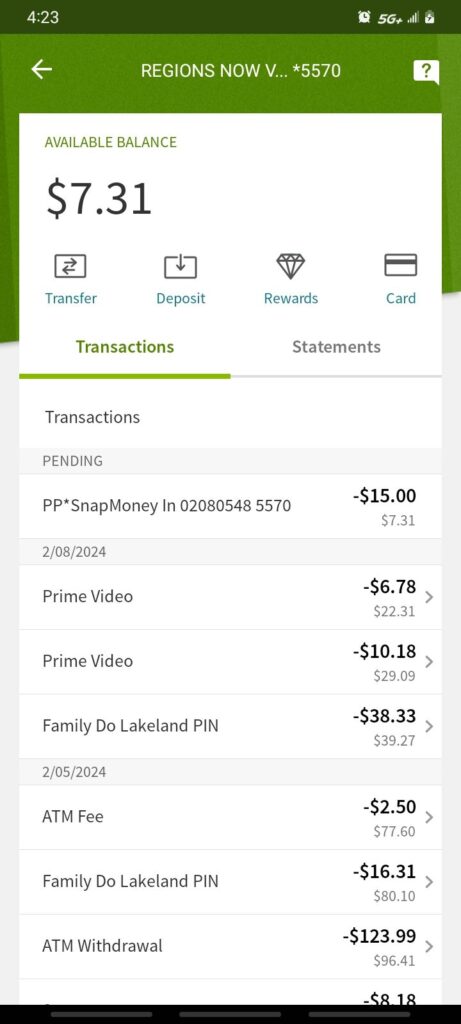
A PP SNAP MONEY INC charge, PP*SNAP MONEY INC charge, or SNAPMONEY INC charge on a credit card, debit card, or bank statement is strongly associated with Super.com. SnapMoney, Inc. is a legal entity that does business as Super.com.
A charge near $15 or $14.99 may represent a monthly Super+ membership. Other amounts could relate to a hotel reservation, another Super.com service, a payment made by another authorized card user, or an unauthorized use of the card. Verify the exact payment through the Super.com app, email receipts, and official support before reaching a conclusion.
What Is the PP SNAP MONEY INC Charge?
The transaction most likely relates to Super.com because SnapMoney, Inc. operates under the Super.com name.
Super.com offers travel, membership, rewards, and financial-service features. Depending on the amount and account activity, the charge may represent:
- A monthly Super+ membership
- A Super+ membership renewal
- A trial or introductory period that converted to paid membership
- A hotel reservation made through Super.com
- A reservation change or related travel payment
- A transaction involving another Super.com service
- A charge associated with a different Super.com account or email address
- A purchase or membership started by another authorized card user
- A pending authorization followed by a completed payment
- An actual duplicate completed payment
- An unauthorized use of the card or stored payment method
The statement descriptor normally does not identify the hotel, reservation, membership account, account email, person who enrolled, trial terms, or specific Super.com feature.
Is SnapMoney, Inc. the Same as Super.com?
Yes. SnapMoney, Inc. is identified in Super.com’s legal materials as doing business as Super.com.
Super.com was previously associated with names such as SnapTravel and Snapcommerce as its products and company structure developed. A card statement may therefore show a legal company name that is less familiar than the Super.com brand displayed in the app, website, advertisement, or receipt.
SnapMoney, Inc. should not be confused with:
- Snap Finance
- Snapchat or Snap Inc.
- Government SNAP food benefits
- A bank transfer labeled only SNAP
- Another unrelated business using the word Snap
What Does PP Mean in PP SNAP MONEY INC?
Super.com does not currently publish a consumer-facing explanation of the PP prefix.
It may be:
- Payment-processor formatting
- Card-issuer formatting
- A shortened merchant-account prefix
- Part of a longer descriptor that the bank truncated
Do not assume that PP automatically means PayPal.
Check PayPal activity only when:
- PayPal is named elsewhere in the transaction details
- The payment appears inside the PayPal account
- A Super.com receipt says PayPal processed the transaction
Common PP SNAP MONEY INC Statement Variations
Banks and card issuers may shorten or rearrange the descriptor.
Possible or reported variations may include:
- PP SNAP MONEY INC
- PP*SNAP MONEY INC
- PP SNAPMONEY INC
- SNAP MONEY INC
- SNAPMONEY INC
- SNAPMONEY INC SAN FRANCISCO
- SNAP MONEY SUPER.COM
- SUPER.COM SNAPMONEY
- RECURRING PP SNAP MONEY
- CHECKCARD PP SNAP MONEY INC
- CHKCARD SNAPMONEY INC
- PENDING SNAPMONEY INC
Not every variation has been independently confirmed as an official current descriptor. Compare the complete wording with the Super.com account and charged amount.
Why Was I Charged $15 by SnapMoney?
A recurring charge near $15 is most likely worth checking against a Super+ membership.
Super.com currently publishes a standard Super+ membership price of $15 per month. The membership can provide access to benefits and discounts across eligible Super.com services.
A $15 or similar charge may occur because:
- You enrolled in Super+ directly.
- You selected a member rate while booking travel.
- An introductory period ended.
- The monthly membership renewed.
- The membership is connected to another email address.
- A household member or authorized user enrolled.
- You canceled a hotel booking but did not separately cancel Super+.
- The payment was not authorized.
The amount alone does not prove which explanation applies.
Could It Be a Super.com Hotel Booking?
Yes, particularly when the amount is larger or does not repeat monthly.
A hotel-related charge may represent:
- A new reservation
- A prepaid hotel rate
- A reservation adjustment
- A cancellation fee permitted by the booking terms
- A payment connected with another traveler’s reservation
Search email for:
- Super.com
- SuperTravel
- SnapTravel
- Hotel confirmation
- Reservation
- Booking ID
- Cancellation
- Super+
Hotel cancellation and refund rights depend on the policy displayed for the specific reservation. Canceling Super+ does not cancel an existing hotel reservation, and canceling a reservation does not necessarily cancel Super+.
How to Verify a PP SNAP MONEY INC Charge
- Copy the complete statement descriptor.
- Record the amount and transaction date.
- Determine whether the transaction is pending or completed.
- Check whether the same amount appeared in previous months.
- Open the Super.com app.
- Review the Super+ membership status.
- Review hotel reservations and payment history.
- Check Super.com financial-product activity when applicable.
- Search every email account for Super.com, Super+, SnapTravel, SnapMoney, subscription, membership, reservation, and receipt.
- Search for the exact charged amount.
- Check spam, promotions, archived mail, and older email accounts.
- Ask household members and authorized card users.
- Contact Super.com through its official support routes.
- Ask the issuer for the expanded merchant descriptor if the payment remains unclear.
- Report the transaction promptly if no authorized account or purchase can be identified.
How to Check Your Super+ Membership
In the Super.com app:
- Open the app.
- Sign in with the likely email address or telephone number.
- Open the menu.
- Select Account Details.
- Select Super+ Membership Details.
- Review the membership status, renewal date, and payment information.
Repeat the process for any secondary email address or telephone number that may have been used.
How to Cancel a Super+ Membership
Super.com currently provides an in-app cancellation method.
- Open the Super.com app.
- Open the menu.
- Select Account Details.
- Select Super+ Membership Details.
- Select Manage Membership.
- Choose the cancellation option.
- Complete every confirmation step.
- Save the confirmation screen or email.
- Verify that the account shows an expiration date rather than another renewal date.
You may also use Super.com’s automated cancellation telephone line:
Select the Super+ membership option and follow the automated prompts.
Deleting the Super.com app does not cancel the membership.
Why Was I Charged After Canceling?
Possible explanations include:
- The cancellation was completed after the renewal date.
- The cancellation applied to another Super.com account.
- Two accounts use the same card.
- The hotel reservation was canceled but Super+ was not.
- Super+ was canceled but a separate hotel payment remained.
- The cancellation did not reach the final confirmation step.
- The charge was pending before the cancellation was completed.
- Another authorized user restarted the membership.
Compare the charge date, renewal date, cancellation time, account email, and confirmation message.
Does Canceling Super+ Automatically Provide a Refund?
No.
Cancellation generally stops a future renewal. It does not automatically reverse a charge that has already been completed.
Super.com says customers who believe they were enrolled in error may contact support and that refund requests are reviewed individually.
When requesting a review, provide:
- The charged amount
- The transaction date
- The Super.com account email or telephone number
- The membership enrollment date when known
- The cancellation date
- Whether the membership was used
- Whether another account may exist
- A concise explanation of why a refund is requested
How to Request a Super.com Refund
- Identify whether the payment was Super+, travel, or another service.
- Open the Super.com app.
- Use in-app live chat.
- Provide the transaction date and amount.
- Identify the account email or telephone number.
- Request cancellation of future membership billing separately.
- Request a written decision concerning the completed charge.
- Save the chat transcript or support case number.
- Ask when an approved refund should appear.
- Contact the card issuer if an approved refund does not post.
A hotel refund is governed by the cancellation terms of the specific reservation. A nonrefundable booking may not qualify merely because travel plans changed.
Current Super.com Contact Information
- General support and automated membership cancellation: 1-844-461-2577
- Super+ legal-center support number: 1-877-376-2710
- Travel and general email support: travelsupport@super.com
- Financial-product support: finproductssupport@super.com
- Help Center: Super.com Support
- Official cancellation guide: Cancel a Super+ membership
- Official website: Super.com
- Mailing address: SnapMoney, Inc. DBA Super.com, 447 Sutter Street, Suite 506, San Francisco, CA 94108
Use the support route that matches the product. Travel support may not be able to resolve a Super.com Card or other financial-product question.
Why Are There Multiple SnapMoney Charges?
More than one entry may represent:
- Monthly Super+ renewals
- Two Super.com accounts
- A membership charge and separate hotel booking
- Two separate reservations
- A pending authorization and completed payment
- A failed payment followed by another billing attempt
- An actual duplicate completed payment
- Repeated unauthorized use of the card
Compare each amount, date, account, reservation, membership status, and transaction status.
What Is a Pending PP SNAP MONEY INC Charge?
A pending charge is an authorization that has not fully settled.
It may:
- Become the final membership payment
- Become the final travel payment
- Update with a longer Super.com descriptor
- Disappear if the authorization is reversed
- Be replaced by a completed transaction
Do not automatically count a pending authorization and its completed replacement as two settled charges.
What If You Never Used Super.com?
- Save the complete descriptor, amount, and date.
- Ask household members and authorized card users.
- Search every email account for Super.com, Super+, and SnapTravel records.
- Check whether the card was stored in another person’s travel account.
- Ask Super.com to search for an account using the appropriate identifying information.
- Ask the issuer for the expanded merchant details.
- Lock the card if additional unexplained transactions appear.
- Notify the financial institution promptly if no authorized account can be identified.
- Ask whether future recurring merchant payments can be blocked.
- Ask whether the card number or payment token should be replaced.
The fact that SnapMoney, Inc. is a real Super.com entity does not prove that the cardholder authorized a specific transaction.
Credit Card Dispute Guidance
Contact the credit-card issuer promptly when:
- No authorized Super.com account can be identified
- The card was used without permission
- Membership billing continued after confirmed cancellation
- An actual duplicate completed charge remains unresolved
- The amount differs from the confirmed reservation or membership
- Super.com cannot locate the payment
- An approved refund does not appear
Keep receipts, account screenshots, cancellation confirmations, chat transcripts, reservation terms, support case numbers, and refund responses.
Official consumer guidance:
CFPB credit-card dispute guidance
Debit Card and Bank Account Guidance
Report an unauthorized debit-card or bank transaction immediately.
Ask the financial institution:
- Whether the charge is pending or completed
- Whether it is marked as recurring
- Whether another SnapMoney authorization is pending
- Whether a digital wallet or stored payment token was used
- Whether future recurring payments can be blocked
- Whether the debit card should be replaced
Official consumer guidance:
CFPB unauthorized debit and bank-transaction guidance
Credit-card and debit-card dispute procedures, protections, and reporting deadlines differ.
Consumer Reports and Experiences
There is currently one visible public report on this ChargeOnMyCard.com page.
The commenter reported a $15 PP SNAP MONEY INC charge and asked what it represented.
The report does not identify:
- Whether the payment was Super+
- Whether a Super.com hotel was booked
- The account email or telephone number
- Whether a trial was involved
- Whether the payment repeated monthly
- Whether another authorized user enrolled
- Whether the commenter contacted Super.com
- Whether the membership was canceled
- Whether a refund was requested or issued
- The final resolution
The reported $15 amount is consistent with the currently published Super+ monthly fee, but the comment does not independently prove what caused the charge.
ChargeOnMyCard.com cannot:
- Access Super.com accounts
- Identify an account from a card number
- Cancel Super+
- Cancel a hotel reservation
- Issue a refund
- Access Super.com financial products
- Replace a payment card
- Submit a bank dispute
Frequently Asked Questions About PP SNAP MONEY INC
What is PP SNAP MONEY INC on my credit card?
It is strongly associated with Super.com because SnapMoney, Inc. does business as Super.com. A charge near $15 may be a Super+ monthly membership.
Is SnapMoney the same as Snap Finance?
No. SnapMoney, Inc. is connected with Super.com. Snap Finance is a separate lease-to-own and financing company.
Does PP mean PayPal?
Not necessarily. Super.com does not publish a definition of the PP prefix. Check PayPal only when PayPal appears elsewhere in the transaction or in the PayPal account.
Why was I charged $15?
The current published Super+ membership price is $15 per month. Verify the membership status in the Super.com app before assuming that is the explanation.
Could it be a hotel booking?
Yes. Larger or irregular amounts may relate to a Super.com hotel reservation rather than the monthly membership.
How do I cancel Super+?
Open the Super.com app, review Super+ Membership Details, select Manage Membership, and complete the cancellation. You can also call 1-844-461-2577.
Does deleting the app cancel Super+?
No. Complete the membership-cancellation process and save the confirmation.
Will Super.com refund the membership charge?
A refund is not automatic. Super.com says enrollment-error requests are reviewed individually.
Does canceling a hotel cancel Super+?
Not necessarily. A reservation and a Super+ membership are separate. Check and cancel each one independently when appropriate.
Why are there two charges?
They may represent a membership and hotel reservation, two accounts, a pending authorization, an actual duplicate, or repeated unauthorized use.
Is PP SNAP MONEY INC automatically fraudulent?
No. It may be a valid membership, reservation, other Super.com payment, authorized-user transaction, duplicate, or unauthorized payment.
Can ChargeOnMyCard.com cancel the membership?
No. ChargeOnMyCard.com cannot access Super.com, SnapMoney, travel, membership, refund, card, or banking systems.
Related Consumer Resource
- How to Investigate an Unrecognized Credit Card, Debit Card, or Bank Charge
- 4029357733 PayPal Charge
- WPY and WePay Charge
Help Other Cardholders Identify PP SNAP MONEY INC
If you identified a PP SNAP MONEY INC, PP*SNAP MONEY INC, SNAPMONEY INC, or similar Super.com transaction, please share what it represented.
Helpful details include:
- The descriptor without private reference numbers
- The general amount
- Whether it repeated monthly
- Whether it was Super+ or a hotel booking
- Whether another Super.com account was found
- Whether a trial or member rate was involved
- Whether cancellation was confirmed
- Whether a refund was approved
- How the issuer resolved an unauthorized payment
Do not post card numbers, card digits, hotel confirmation numbers, account email addresses, telephone numbers, financial-product details, passwords, PINs, CVV codes, bank account numbers, or authentication codes.
Why Rely on ChargeOnMyCard.com?
ChargeOnMyCard.com researches confusing credit-card, debit-card, travel, membership, subscription, recurring-payment, cancellation, refund, and bank-statement descriptors using current company information, official support resources, statement clues, and visible cardholder reports.
We distinguish SnapMoney, Inc.’s connection with Super.com from unrelated companies using similar names while helping readers determine whether the payment involved Super+, travel, another account, a pending transaction, duplicate billing, or unauthorized card use.
Last reviewed: July 15, 2026.
Disclaimer
ChargeOnMyCard.com is not affiliated with SnapMoney, Inc., Super.com, Snapcommerce Holdings, SnapTravel, SuperTravel, Super+, any hotel, travel provider, financial-product provider, cardholder, bank, credit union, card network, payment processor, or financial institution. This article is provided for informational purposes only and is not financial, legal, travel, membership, subscription, refund, dispute, account-security, or fraud-prevention advice. Contact Super.com and the financial institution directly regarding a specific transaction.