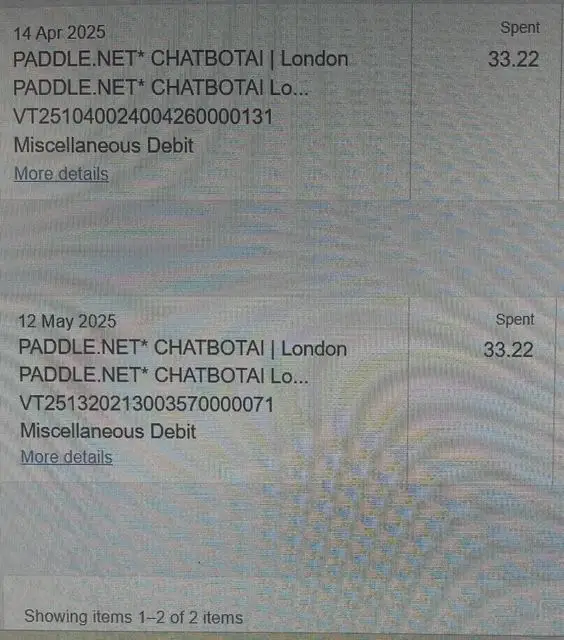
A Paddle.net charge on a credit card, debit card, PayPal account, or bank statement usually means you purchased software, an app, an AI tool, a digital product, or a subscription from a company that uses Paddle to handle the sale and billing.
Quick answer: Paddle is a legitimate merchant of record and authorized software reseller. Your statement may show PADDLE.NET* CHATBOTAI, PADDLE.NET* COMPANYNAME, PADDLE.COM, Paddle Market Limited, or PAYPAL *PADDLE.NET instead of the app or software name you remember. Use Paddle’s official buyer-support and purchase-lookup service to identify the seller, find a receipt, manage a subscription, cancel future billing, or request a refund.
What Is a Paddle.net Charge?
Paddle sells software and other digital products on behalf of thousands of developers and online businesses. Paddle describes itself as a merchant of record, meaning Paddle is the legal seller in the transaction and handles responsibilities such as payment processing, tax collection, billing support, refunds, and chargebacks.
This arrangement explains why the statement can show Paddle rather than the consumer-facing name of the app, website, AI service, PDF tool, security program, game, or subscription.
A Paddle charge may involve:
- A one-time software license
- A monthly or annual software subscription
- An AI chatbot, writing, image, or productivity service
- A PDF editor, file converter, document generator, or resume tool
- A photo, video, audio, design, or note-taking app
- A VPN, antivirus product, cleanup utility, or security program
- A business, browser, password, education, or language-learning tool
- A game, mod, add-on, or other digital product
- A free or discounted trial that converted to paid billing
- An automatic subscription renewal
Confirmed information
- Paddle is a legitimate merchant of record and reseller for software and digital-product companies.
- Paddle’s official statement format can include PADDLE.NET* followed by a seller-selected product or company descriptor.
- PayPal-funded Paddle purchases may appear as PAYPAL *PADDLE.NET.
- Paddle’s buyer portal supports purchase identification, receipts, subscription management, cancellation, and refund requests.
Not confirmed by the Paddle name alone
- The specific app, software company, or digital product behind your charge
- Whether the payment was a trial conversion, renewal, one-time purchase, duplicate, or billing error
- Whether an unfamiliar product name is affiliated with a well-known AI or software company
- Whether your individual transaction was authorized
Official Paddle Statement Format
Paddle’s current merchant guidance says a card transaction can appear as:
PADDLE.NET* COMPANYNAM
The part after the asterisk is selected for the software seller and can contain between two and ten characters. It may be a shortened company, product, website, or app name. This second part is often the best clue to what you purchased.
Paddle also confirms that PayPal transactions processed through its checkout are not customizable and appear as:
PAYPAL *PADDLE.NET
If the statement displays only Paddle.net or Paddle.com, ask the bank for the complete or expanded merchant descriptor. Our credit card charge-code and statement-descriptor directory explains how to separate a billing platform from the seller information appearing after an asterisk.
Common Paddle.net Statement Variations
The exact wording can vary by payment method, bank, country, seller, and available statement space. Cardholders may see or search for:
- PADDLE.NET
- PADDLE.COM
- PADDLE.NET* followed by a seller or product name
- PADDLE.COM* followed by a seller or product name
- PADDLE.NET* CHATBOTAI
- PAYPAL *PADDLE.NET
- Paddle Market Limited
- Paddle.com Market Limited
- Paddle London GB
- Charge from Paddle.net
- Charge from Paddle.com
- Paddlenet or Paddle Net
- Misspellings such as Paddel.net, Paddelnet, or Padle.net
What Is PADDLE.NET* CHATBOTAI?
PADDLE.NET* CHATBOTAI indicates that Paddle processed a purchase for a seller using CHATBOTAI as its shortened statement description. It may involve an AI chatbot, AI assistant, writing tool, chatbot app, website subscription, or a free or discounted trial that later renewed.
The descriptor does not prove that the transaction came from OpenAI, ChatGPT, Anthropic, Claude, Google Gemini, Microsoft Copilot, or another well-known AI company. Confirm the seller through Paddle’s buyer portal, the receipt, and the account that created the subscription.
If you see PADDLE.NET* CHATBOTAI:
- Search every email account for Paddle, CHATBOTAI, chatbot, AI subscription, receipt, invoice, trial, and renewal.
- Use Paddle.net to find the purchase and seller.
- Check whether the payment was a one-time purchase, trial conversion, monthly subscription, or annual renewal.
- Review the seller name, product name, price, and next billing date.
- Check whether another authorized card user enrolled in an AI tool.
- Cancel the subscription if you recognize the account but do not want future billing.
- Request a refund promptly when appropriate.
- Contact the card issuer if no authorized user recognizes the transaction.
Other Product Names After PADDLE.NET*
Search Console data for this page shows that cardholders also search for Paddle together with terms such as RSME.CC, SETAPP, GOODNOTES, IMAZING, PAIRED, CHATONPAY, ELFSIGHT, GEOGUESSR, SPEAK, PHOTOAPP, and other shortened names.
These searches do not independently prove that every named product currently uses Paddle or that any individual transaction is legitimate. Treat the wording after PADDLE.NET* as a search clue. Verify it through Paddle’s purchase lookup, a receipt, the seller’s official account, and the bank’s expanded merchant information.
Why Is Paddle.net Charging Me?
You Purchased Software or a Digital Product
The most common explanation is a software, app, SaaS, game, or digital-product purchase made through Paddle’s checkout. The seller delivered the product, but Paddle completed the sale and appears on the statement.
A Trial Converted to Paid Billing
A free, low-cost, or discounted trial may become a paid subscription when the trial period ends. Paddle says its subscription emails can include trial-end, discount-end, and automatic-renewal reminders, but the receipt may have been sent to another email address or filtered into spam or promotions.
A Monthly or Annual Subscription Renewed
Paddle-billed subscriptions can renew automatically. An annual charge may be difficult to recognize because it can appear many months after the original purchase. Search older email accounts and review more than one year of statements when the amount looks annual.
The Seller Name Is Shortened
Paddle’s seller descriptor is limited to ten characters, so a familiar product may appear as an abbreviation. Copy every character after the asterisk and search that exact wording.
Another Account or Authorized User Made the Purchase
A spouse, child, employee, contractor, business partner, or another authorized user may have purchased software or created a subscription. Also check work, school, shared, older, Apple, Google, and PayPal email addresses.
The Amount Includes Tax or Currency Conversion
Because Paddle handles taxes in many countries, the total may include sales tax, VAT, GST, or another consumption tax. A card issuer may also convert the purchase into another currency or add a foreign-transaction fee.
The Payment Was Not Authorized
A legitimate billing platform can still appear in an unauthorized transaction. Identifying Paddle or the underlying product does not prove that the cardholder approved the purchase.
How to Identify a Paddle.net Charge
- Copy the complete descriptor. Include everything after PADDLE.NET*, the amount, date, status, location, and payment method.
- Use Paddle’s official buyer portal. Visit Paddle.net and choose the option for identifying a charge or finding a purchase.
- Verify the email address. Paddle can search for products and subscriptions purchased from its sellers using the buyer’s email address.
- Search all email accounts. Look for Paddle, the product descriptor, receipt, invoice, trial, renewal, license, subscription, and the exact amount.
- Review PayPal and digital wallets. A transaction shown as PAYPAL *PADDLE.NET may also appear in PayPal Activity.
- Check the seller’s account. Review its billing history, subscription status, plan, invoices, and next renewal date.
- Ask authorized users. Describe the type of product rather than asking only whether anyone recognizes Paddle.
- Request expanded bank information. Ask for the full merchant descriptor, merchant category, recurring-payment flag, and seller details.
How to Cancel a Paddle Subscription
Paddle’s current Buyer Terms say a subscription may be canceled at any time, with cancellation taking effect at the end of the current billing period. You should not be charged again after it takes effect.
- Find the Paddle purchase, subscription-confirmation, renewal, or receipt email.
- Select the Manage subscription or buyer-portal link.
- If the email is missing, visit Paddle.net buyer support.
- Locate the correct seller and subscription.
- Select the cancellation option and complete every confirmation step.
- Record when the paid access and current billing period will end.
- Save the cancellation confirmation email or screenshot.
- Check for other Paddle subscriptions connected with another email address.
Deleting an app, uninstalling software, removing a browser extension, closing a seller account, or replacing a card may not cancel the underlying subscription agreement. Complete the cancellation through the buyer portal or official support.
How to Request a Paddle Refund
Paddle’s refund policy was updated on March 31, 2026. It says Paddle may issue a discretionary refund when the request is submitted within 14 days of the transaction, but submitting within 14 days does not guarantee approval. Requests are reviewed case by case and may result in a full refund, partial refund, or denial.
Country-specific statutory cancellation or withdrawal rights may provide different deadlines. Paddle’s current policy also states that approved refunds are normally returned to the same payment method where possible and processed within 14 days of approval.
- Open the View receipt or Manage subscription link in the Paddle confirmation email, or visit Paddle.net.
- Select Request refund.
- Choose the correct transaction and explain the billing or product problem accurately.
- Submit the request promptly, especially when the transaction is within 14 days.
- Save the request, response, refund amount, and expected processing time.
- If the problem is a technical or product defect, contact the software supplier first and retain its response for Paddle.
Read Paddle’s current Refund Policy for country-specific rights, digital-content exceptions, technical defects, chargebacks, and discretionary-refund rules.
Should You Contact Paddle or the Software Seller?
- Unknown seller, receipt, transaction lookup, subscription cancellation, or refund request: Start with Paddle.net.
- Login, download, license, missing features, product access, or technical support: Contact the software supplier through its official website.
- Technical defect and refund: Contact the supplier first, then provide its response to Paddle if the issue remains unresolved.
- Clearly unauthorized use or continuing suspicious activity: Contact the bank or card issuer promptly.
Consumer Reports on This Page
At the time of this review, ten visible reader reports appear on this ChargeOnMyCard.com page. They include reports of:
- Repeated or multiple Paddle charges
- A PADDLE.NET* CHATBOTAI descriptor reported twice at approximately $33
- An unfamiliar Paddle charge near $49
- A Paddle/Fortect-related entry near $36
- A PayPal-linked Paddle transaction near $26
- A low-cost calendar purchase followed by a higher later charge
- A receipt arriving even though the reader did not recognize the seller
- Requests to identify, cancel, or refund an unfamiliar transaction
These are unverified reader accounts, not proof that Paddle or a named seller charged every card improperly. They show why readers should match the complete descriptor, seller, account, receipt, amount, subscription terms, and authorized users before deciding what happened.
What to Do If You Did Not Authorize the Charge
- Use Paddle.net to identify the seller and transaction.
- Search all relevant email accounts, PayPal activity, and seller accounts.
- Ask every authorized cardholder or account user.
- Cancel any recurring subscription you locate.
- Request a refund through Paddle when appropriate.
- Secure the seller, email, PayPal, and digital-wallet accounts if unauthorized access is possible.
- Contact the card issuer promptly using the number printed on the card or its official app.
- Ask whether the card should be locked or replaced and whether a dispute should be filed.
- Continue monitoring for other unfamiliar transactions.
Fake Paddle support warning: Do not use a telephone number or “refund agent” found only in an advertisement, comment, unexpected message, pop-up, or unsolicited call. Paddle directs buyers to Paddle.net. Never provide an unverified person with your full card number, CVV, PIN, banking password, email password, one-time code, remote access to your device, gift cards, cryptocurrency, or a second payment to release a refund.
If the transaction remains unexplained, follow our complete guide to investigating an unrecognized credit-card or bank-statement charge.
Frequently Asked Questions
What is Paddle.net?
Paddle.net is Paddle’s buyer-facing support and purchase-management service. Buyers can use it to identify transactions, retrieve receipts, manage or cancel subscriptions, update subscription details, and request refunds.
Why is Paddle.net on my credit card?
You probably purchased software, an app, an AI service, a game, or another digital product from a seller using Paddle as merchant of record. The seller’s shortened name may appear after PADDLE.NET*.
Is Paddle.net legitimate?
Yes. Paddle is a legitimate merchant of record and authorized software reseller. You must still verify the underlying seller and determine whether your individual purchase was authorized.
What is PADDLE.NET* CHATBOTAI?
It is a Paddle-processed transaction using CHATBOTAI as the shortened seller or product descriptor. It may involve an AI chatbot or subscription, but it should not automatically be attributed to ChatGPT or another well-known AI company.
What does the wording after PADDLE.NET* mean?
Paddle says the characters after the asterisk are a seller-selected statement descriptor. Because it is limited to ten characters, it may be an abbreviated company, app, or product name.
What is PAYPAL *PADDLE.NET?
Paddle confirms that PayPal payments made through its checkout display as PAYPAL *PADDLE.NET. Review both Paddle’s purchase lookup and PayPal Activity for the seller and transaction details.
How do I look up a Paddle charge?
Visit Paddle.net, use its purchase-identification option, verify the email address used at checkout, and compare the returned seller, product, amount, date, and subscription with your statement.
How do I cancel a Paddle.net subscription?
Use the Manage subscription link in the Paddle confirmation email or Paddle.net’s buyer portal. Paddle says cancellation takes effect at the end of the current billing period and prevents later renewals.
Can I get a Paddle refund?
Possibly. Paddle’s current policy allows it to consider discretionary requests submitted within 14 days, but approval is not guaranteed. Statutory rights and deadlines vary by country and transaction.
Does deleting the app cancel the subscription?
Not necessarily. Cancel through Paddle’s buyer portal, the seller’s official billing account, or official support and save the confirmation.
Why did Paddle charge me after I canceled?
The transaction may have processed before cancellation, the cancellation may apply only after the current period, another subscription may exist under a different email, or the cancellation may not have been completed. Compare the posting date with the confirmation and ask Paddle to locate every related subscription.
Should I dispute the Paddle charge?
First try to identify the seller through Paddle.net, receipts, PayPal, accounts, and authorized users. Contact the card issuer promptly if nobody authorized the transaction, Paddle cannot identify it, the card is missing, or other suspicious activity is appearing.
Related AI, Software, Subscription, and Payment Charges
These guides cover similar AI subscriptions, PDF tools, software sellers, merchants of record, and payment processors. A related link does not mean that the companies are affiliated with Paddle.
- Anthropic PBC and Claude subscription charge
- Midjourney Inc AI subscription charge
- MGPDF PDF-app or subscription charge
- VSA_PDFLEADER.COM subscription charge
- FSPRG.COM and FastSpring software charge
- PrimeDefender.com security subscription charge
- Stripe.com charge on a credit card
- BlueSnap payment and subscription charge
Official Paddle Sources
- Why Paddle charged you and whether Paddle is legitimate
- Official PADDLE.NET* and PayPal statement formats
- Paddle buyer-support instructions
- Paddle Buyer Terms, including subscription cancellation
- Paddle Refund Policy effective March 31, 2026
Share Your Paddle.net Experience
Did your statement show Paddle.net, Paddle.com, PADDLE.NET* CHATBOTAI, PAYPAL *PADDLE.NET, Paddle Market Limited, or another seller name after the asterisk? Share the nonprivate descriptor, general amount, whether it was pending or posted, the product if identified, and how Paddle, the seller, or the card issuer resolved it.
Do not post a card number, bank-account number, receipt, email address, order number, invoice number, license key, password, PIN, CVV, one-time code, home address, or complete transaction reference.
Why Rely on ChargeOnMyCard.com?
ChargeOnMyCard.com researches confusing credit-card, debit-card, PayPal, and bank-statement descriptors using current official merchant resources, payment details, Search Console demand, and visible reader reports. Confirmed Paddle policies are separated from unverified seller identities and individual cardholder allegations.
Last reviewed: August 7, 2026. ChargeOnMyCard.com is an independent consumer-information website and is not affiliated with Paddle, Paddle.net, Paddle.com, CHATBOTAI, any software supplier, payment platform, bank, card network, or financial institution. It cannot identify individual accounts, cancel subscriptions, issue refunds, or dispute transactions.