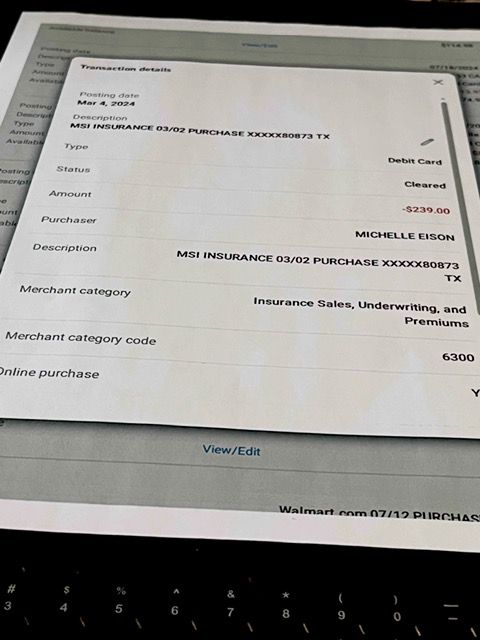
An MSI Insurance Bedford TX charge on a credit card, debit card, or bank statement is strongly associated with Millennial Specialty Insurance, LLC, commonly known as MSI.
MSI currently lists Bedford, Texas as its official mailing and payment location, which helps explain why a card or bank transaction may contain wording such as MSI Insurance Bedford or MSI Insurance Bedford TX.
For many consumers, the payment may relate to a renters insurance premium, although MSI also works with homeowners, property, flood, commercial, professional-lines, and other specialty insurance products.
What Is MSI Insurance on My Credit Card?
MSI Insurance generally refers to Millennial Specialty Insurance, LLC.
MSI is an insurance managing general agency that develops, distributes, and administers insurance products through:
- Insurance agents and brokers
- Property-management companies
- Proptech platforms
- Fintech platforms
- Other insurance distribution partners
A card or bank transaction may therefore appear under MSI even if you remember dealing primarily with:
- Your apartment community
- Your property manager
- An insurance agent
- A resident portal
- A leasing platform
- Another company through which the insurance was offered
What Is MSI Insurance Bedford TX?
Bedford, Texas is a current official mailing and payment location for Millennial Specialty Insurance.
MSI currently publishes:
MSI
PO Box 210788
Bedford, TX 76095
as its mailing and payment address.
That geographic match makes wording such as:
- MSI INSURANCE BEDFORD
- MSI INSURANCE BEDFORD TX
- MILLENNIAL SPECIALTY INSURANCE
- MSI INSURANCE
strongly consistent with a Millennial Specialty Insurance transaction when the amount also matches an insurance policy.
Could MSI Insurance Be Renters Insurance?
Yes. Renters insurance is one of MSI’s most established consumer insurance products.
MSI says it was founded in 2015 as a renters-insurance startup and issued its first renters policy that year.
Today, MSI says its renters-insurance technology can be integrated directly into:
- Property-management systems
- Proptech apps
- Fintech platforms
- Digital leasing experiences
That is important because a tenant may remember enrolling through:
an apartment or resident portal
but later see:
MSI INSURANCE BEDFORD TX
on the payment account.
Why Is MSI Insurance Charging Me?
Common legitimate explanations include:
- A renters insurance premium
- An annual renters-policy renewal
- A monthly or other scheduled premium installment
- A homeowners or other personal-lines insurance payment
- A policy purchased through an insurance agent
- A one-time payment made through MSI’s Customer Portal
- A payment connected with a property or rental account
- A payment made by another authorized cardholder
- A business or commercial insurance payment
The exact policy should be identifiable through your:
- MSI account
- Policy declarations
- Billing schedule
- Insurance agent
- Property manager
Does MSI Renters Insurance Renew Automatically?
Yes, MSI currently says renters policies generally renew automatically each year unless the policy is canceled or non-renewed for another applicable reason.
MSI’s current renters FAQ states that its renters policies have a:
12-month policy term
and renew automatically each year unless canceled or non-renewed.
Therefore, an unfamiliar MSI payment may appear around the anniversary of an existing policy even if you did not recently purchase a new policy.
Could MSI Insurance Be a Recurring Premium?
Yes.
Insurance can be paid:
- In full
- Through installments
- Through scheduled electronic payments
- At renewal
The billing arrangement depends on the individual policy.
If MSI appears repeatedly:
- Compare the amounts.
- Check the dates between payments.
- Review your policy billing schedule.
- Check MSI’s Customer Portal.
Do not assume repeated insurance charges are duplicate transactions until you compare them with the policy’s installment schedule.
Could MSI Insurance Be a One-Time Payment?
Yes.
MSI’s current payment page allows policyholders to make a:
one-time payment through the Customer Portal.
If you recently logged in and paid:
- A premium balance
- A missed installment
- A renewal amount
- Another policy amount due
the transaction may correspond with that payment.
Official payment page:
What Insurance Products Does MSI Offer?
MSI currently offers more than 20 insurance products and solutions across personal, commercial, professional, and specialty lines.
Its current published product lineup includes areas such as:
Personal Insurance
- Renters insurance
- Coastal homeowners insurance
- E&S homeowners insurance
- High-net-worth homeowners insurance
- New-construction homeowners insurance
- Personal flood insurance
Commercial Insurance
- Commercial general liability
- Commercial package insurance
- Commercial flood
- Workers compensation
- Cyber coverage
- Habitational property
- Real-estate investor coverage
- Commercial umbrella
Professional and Specialty Lines
- Directors and officers coverage
- Employment practices liability
- Fiduciary liability
- Contract frustration
- Tenant legal liability
- Captive solutions
Not every product is sold directly to consumers, and availability varies by jurisdiction.
Who Is Millennial Specialty Insurance?
MSI is the brand name for:
Millennial Specialty Insurance, LLC.
The company says it began in 2015 with a technology-based renters-insurance model.
MSI currently describes itself as one of the larger independent managing general agencies in the United States, serving more than:
1.5 million customers
and offering more than:
20 insurance products and solutions.
MSI is currently an indirect subsidiary of:
The Baldwin Insurance Group, Inc.
That corporate relationship should not be confused with the underwriting insurance company shown on an individual policy.
Is MSI the Insurance Company That Underwrites My Policy?
Not necessarily.
MSI describes itself as an insurance agency and managing general agency.
Its policies can be issued or underwritten by separate insurance companies.
MSI’s current Terms of Use identify multiple underwriting companies associated with products offered through its systems.
Therefore, your documents may contain:
- MSI
- Millennial Specialty Insurance
- An insurance carrier
- An insurance agent
- A property-management company
all in connection with the same insurance arrangement.
When researching a payment, use the billing information rather than assuming every company named on the policy is the merchant that charged the card.
Common MSI Insurance Statement Variations
Cardholders may see or search for wording such as:
- MSI INSURANCE
- MSI INSURANCE BEDFORD
- MSI INSURANCE BEDFORD TX
- MILLENNIAL SPECIALTY INSURANCE
- MILLENNIAL SPECIALTY INS
- MSI MGA
- MSI PAYMENT
- MSI PREMIUM
- MSI INSURANCE PREMIUM
- MSI RENTERS INSURANCE
- MSI POLICY PAYMENT
- MSI 844-788-0873
- 844-788-0873
This is not an official exhaustive descriptor list.
MSI does not currently publish one universal statement descriptor for every payment, and banks may shorten or rearrange merchant information.
Why Does My Statement Show MSI Instead of My Apartment?
MSI’s renters-insurance business is designed to integrate with property-management and technology platforms.
That means the purchasing path may look like:
Apartment / leasing portal → MSI insurance policy → MSI premium charge
You may remember the apartment or resident portal while the bank displays the insurance administrator.
This is similar to other situations where an intermediary, legal company, insurer, or payment provider appears instead of the consumer-facing name.
How to Identify an MSI Insurance Charge
Use these steps:
- Copy the complete transaction descriptor.
- Record the amount and date.
- Check whether the transaction repeats.
- Search your email for MSI and Millennial Specialty Insurance.
- Search for renters insurance and policy confirmation.
- Review your apartment lease or resident portal.
- Check your MSI Customer Portal.
- Review your declarations page and premium schedule.
- Ask other authorized cardholders.
- Contact your insurance agent or property manager if applicable.
- Contact MSI if the payment remains unclear.
How to Check Your MSI Policy and Payments
MSI currently offers an online Customer Portal.
Official login:
MSI says customers can use the portal to:
- Access policy documents
- Review policy information
- Select payment options
- Make payments
- Update personal information
- File and manage certain policy requests
Compare the card transaction with the payment and policy information in your account.
What If I Don’t Remember Buying MSI Renters Insurance?
Check how you obtained your apartment.
MSI says its renters-insurance technology can be embedded into third-party property and financial applications.
Therefore, coverage might have been purchased during:
- Apartment leasing
- Move-in
- Lease renewal
- Resident-portal setup
- Verification of insurance requirements
Ask your apartment community whether MSI is associated with insurance offered during the lease process.
How Do I Cancel MSI Renters Insurance?
MSI currently says renters can request cancellation through the:
Customer Portal.
Official portal:
MSI also lists customer service at:
Its current renters FAQ says renters policies may be canceled at any time.
Before canceling:
- Review your lease.
- Check whether renters insurance is required.
- Arrange replacement coverage if necessary.
- Request cancellation through MSI.
- Confirm the effective cancellation date.
- Save written confirmation.
- Check whether a premium refund or balance is due.
Do not simply stop payment if insurance is required by your lease.
Can an MSI Policy Be Backdated When Canceled?
MSI’s current renters FAQ says backdated cancellation requests may require supporting documentation.
Examples can include:
- Proof of replacement coverage
- A move-out statement
For agent-submitted cancellations, MSI currently says the request should contain details including:
- Policy number
- Policyholder name
- Policyholder address
- Reason for cancellation
- Effective cancellation date
- Policyholder signature
MSI says those cancellation requests are generally processed within:
5 business days
after receipt.
Your own cancellation requirements may depend on the policy and circumstances.
Does Canceling MSI Insurance Automatically Refund the Last Payment?
Not necessarily.
Cancellation and refund calculations depend on:
- The policy
- Effective cancellation date
- Premium already earned
- Applicable insurance rules
- Whether any balance remains due
Ask MSI or your insurance agent:
- Whether a refund is due
- How the refund is calculated
- Where it will be sent
- When it will be processed
Do not assume that stopping future insurance coverage automatically reverses an already completed premium payment.
Why Did MSI Insurance Charge Me After I Canceled?
Possible explanations include:
- The payment was submitted before cancellation processed.
- The cancellation effective date was later than expected.
- A balance remained due for prior coverage.
- The cancellation request was incomplete.
- A second policy exists.
- The transaction was a pending authorization that later posted.
- The charge was incorrect.
Check:
- Your cancellation confirmation
- The effective date
- The policy billing period
- The card posting date
and contact MSI for a billing breakdown.
Why Are There Two MSI Insurance Charges?
Two entries may result from:
- Two insurance policies
- Two premium installments
- A pending authorization and completed payment
- A payment retry
- A policy change
- A duplicate transaction
- Payments made by two authorized users
Check the status of each payment.
If one says:
Pending
while the other is fully posted, the pending entry may disappear after processing.
MSI Insurance Customer Service
Current official MSI contact information includes:
- U.S. Customer Service: 844-788-0873
- Customer Service Email: contactus@msimga.com
- Claims Email: claimsprocessing@msimga.com
- Official Website: MSIMGA.com
- Contact Page: MSI Contact Us
- Make a Payment: MSI Make a Payment
- Customer Portal: MSI Customer Login
- Mailing and Payment Address: MSI, PO Box 210788, Bedford, TX 76095
Use current information from MSI’s official site or your policy documents rather than an old phone-number directory.
What Information Should I Give MSI About a Charge?
Useful information can include:
- Policyholder name
- Policy number
- Covered address
- Transaction date
- Transaction amount
- Last four card digits when legitimately requested
Do not send through ordinary email:
- Your complete payment-card number
- Your CVV
- Your debit-card PIN
- Your banking password
- One-time authentication codes
Is MSI Insurance Bedford TX Legitimate?
Yes. Millennial Specialty Insurance is an active insurance business, and Bedford, Texas is a current official MSI mailing and payment location.
MSI’s current website states that:
- Millennial Specialty Insurance, LLC is a licensed property-and-casualty agency where its products are offered.
- It serves more than 1.5 million customers.
- It offers more than 20 insurance products and solutions.
- It provides a Customer Portal for policyholders.
- It lists 844-788-0873 for U.S. customer service.
However, a legitimate company identity does not prove that your individual transaction was authorized.
What If I Have No MSI Insurance Policy?
Before disputing:
- Search all email accounts for MSI.
- Search for Millennial Specialty Insurance.
- Check your lease and apartment records.
- Ask your property manager.
- Ask every authorized card user.
- Check with your insurance agent.
- Ask MSI whether a policy matches your information.
If nobody authorized to use the payment account recognizes an MSI policy and MSI cannot identify a legitimate payment, contact your financial institution.
Is an MSI Insurance Charge Fraud?
Not automatically.
A legitimate charge may represent:
- A renters-insurance premium
- A policy renewal
- An installment
- A one-time customer-portal payment
- Another insurance product
- A payment made by another authorized user
Treat the payment as potentially unauthorized when:
- No policy can be found.
- No authorized user recognizes the insurance.
- The covered address is unfamiliar.
- The payment does not appear in MSI records.
- The amount does not match any policy.
- Charges continue after confirmed cancellation without explanation.
- Additional unfamiliar payments appear.
How to Dispute an Unauthorized MSI Insurance Charge
If no authorized insurance payment explains the transaction:
- Save the complete MSI descriptor.
- Record the amount and date.
- Check the MSI Customer Portal.
- Contact your property manager or agent when relevant.
- Contact MSI using official contact information.
- Ask whether a policy or payment can be identified.
- Save any cancellation or refund documentation.
- Contact your card issuer if the transaction remains unauthorized.
- Ask whether other payments are pending.
- Ask whether the card should be replaced.
Use your bank’s official app, website, or the telephone number printed on the card.
See our guide to investigating an unrecognized credit-card or bank charge for additional steps.
Watch Out for Fake Insurance Billing Requests
Use only official contact information from:
- MSI
- Your policy
- Your insurance agent
- Your property manager
- Your bank
Be cautious if someone demands payment through:
- Gift cards
- Cryptocurrency
- Wire transfer to an unfamiliar account
- An unrelated payment app
Also be cautious if someone asks for:
- Your complete card number
- Online-banking password
- PIN
- Security code
- One-time authentication code
Frequently Asked Questions About MSI Insurance Charges
What is MSI Insurance on my credit card?
MSI Insurance most likely refers to Millennial Specialty Insurance. For many consumers, the payment may be a renters-insurance premium, although MSI also handles other personal, commercial, and specialty insurance products.
What is MSI Insurance Bedford TX?
Bedford, Texas is MSI’s current official mailing and payment location. A transaction containing MSI Insurance and Bedford TX strongly points to Millennial Specialty Insurance when it matches an insurance policy.
What is MSI Insurance Bedford TX charge on credit card?
It may be a premium, renewal, installment, or one-time payment connected with Millennial Specialty Insurance.
Could MSI Insurance be renters insurance?
Yes. Renters insurance is a major MSI product, and MSI’s technology can be integrated with apartment, leasing, property-management, proptech, and fintech platforms.
Why don’t I recognize MSI?
You may remember buying insurance through an apartment community, leasing portal, insurance agent, or another platform rather than directly under the MSI name.
Does MSI renters insurance renew automatically?
MSI currently says its renters policies have 12-month terms and generally renew automatically unless canceled or non-renewed.
How do I cancel MSI renters insurance?
MSI says customers can request cancellations through the Customer Portal. You can also call 844-788-0873 for assistance.
Can I cancel MSI renters insurance anytime?
MSI’s current renters FAQ says a renters policy may be canceled at any time, although the effective date, documentation, and premium calculation can depend on the circumstances.
What is MSI Insurance’s customer-service number?
MSI currently lists 844-788-0873 for U.S. customer service.
What is MSI’s payment address?
MSI currently lists PO Box 210788, Bedford, TX 76095 as its mailing and payment address.
Can I make a one-time MSI payment?
Yes. MSI currently provides a one-time payment option through its Customer Portal.
Why did MSI charge me after I canceled?
The payment could have been initiated before cancellation, related to coverage before the effective cancellation date, connected with another policy, or incorrect. Compare the transaction with your cancellation confirmation and contact MSI.
Is MSI Insurance Bedford TX legitimate?
Yes. MSI is an active insurance agency and Bedford, Texas is an official current mailing and payment location.
Is an MSI Insurance charge fraud?
Not automatically. Verify the policy, amount, billing schedule, apartment or property connection, and other authorized card users. Contact your bank if no legitimate insurance payment explains the transaction.
Related Insurance Charge Guides
- PROG DIRECT INS INS PREM: Progressive insurance premium charge
- United Fin Cas Ins Prem: Progressive insurance payment
- American Strateg charge: insurance payment identification
- X2L0COS54JERT3V charge: Fetch Pet Insurance
- NJM Group charge: NJM Insurance premium
- Unrecognized credit-card or bank charge: what to do
- Insurance charges on credit-card and bank statements
Why Trust ChargeOnMyCard.com?
ChargeOnMyCard.com researches confusing credit-card, debit-card, ACH, insurance-premium, recurring-payment, and bank-statement descriptors using current official company information, policy resources, payment documentation, and transaction-verification methods.
For this guide, MSI’s current official website confirms that:
- Millennial Specialty Insurance, LLC is an active insurance agency and managing general agency.
- MSI currently lists PO Box 210788, Bedford, TX 76095 as its mailing and payment address.
- MSI currently lists 844-788-0873 for U.S. customer service.
- Customers can make one-time payments through the MSI Customer Portal.
- Renters can make payments and request policy cancellations through the portal.
- MSI’s renters policies generally have 12-month terms and automatically renew unless canceled or non-renewed.
MSI also confirms that its renters-insurance technology can be embedded into property-management, proptech, fintech, and other applications. This helps explain why a cardholder may remember an apartment or leasing platform rather than the MSI name shown with the insurance payment.
MSI does not currently publish one universal credit-card descriptor, so ChargeOnMyCard.com does not claim that every transaction containing the letters MSI belongs to Millennial Specialty Insurance. The combination of MSI Insurance, Bedford TX, an insurance-related merchant category, and a matching policy or premium provides much stronger identification.
Last reviewed: August 25, 2026
ChargeOnMyCard.com is not affiliated with MSI, Millennial Specialty Insurance LLC, The Baldwin Insurance Group, any insurance carrier underwriting an MSI policy, insurance agent, apartment community, landlord, property manager, proptech platform, payment processor, card network, bank, or financial institution. This article provides general informational guidance and cannot access an MSI policy, resident portal, insurance account, credit card, debit card, or bank account; determine whether a private transaction was authorized; cancel insurance; guarantee a premium refund; block a card; or file a dispute. Verify an individual payment through MSI, the applicable insurance agent or property manager, and your financial institution.