
An 18004INTUIT charge on your credit card, debit card, checking account, or bank statement usually relates to a product, subscription, service, or order billed by Intuit, the company behind QuickBooks and other financial-software products.
The descriptor may appear as INTUIT *18004INTUIT, 18004INTUIT, or INTUIT 800-446-8848 CA. The wording includes Intuit’s official vanity telephone number, 1-800-4-INTUIT, which converts to 1-800-446-8848. However, the descriptor alone does not identify the exact Intuit product, account, company file, subscription, or person who authorized the payment.
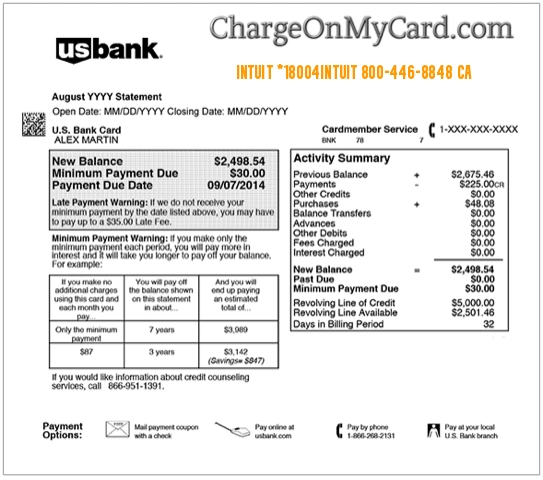
What Is the 18004INTUIT Charge?
The descriptor 18004INTUIT is usually associated with Intuit billing.
It may involve:
- A QuickBooks Online subscription
- A QuickBooks Desktop or Enterprise subscription
- QuickBooks Payroll
- QuickBooks Time
- QuickBooks Self-Employed or QuickBooks Solopreneur
- QuickBooks Checks & Supplies
- An Intuit Workforce product
- A software upgrade or renewal
- A payroll or service add-on
- An annual subscription renewal
- A product purchased through another Intuit account
- A business expense made by an employee or bookkeeper
- A duplicate, incorrect, or unauthorized payment
Intuit says its statement charges are commonly connected with subscription fees or service usage.
What Does 18004INTUIT Mean?
The wording is based on Intuit’s telephone number:
1-800-4-INTUIT
Converted into numbers, that is:
1-800-446-8848
Banks often remove spaces, hyphens, and punctuation from merchant descriptors, which can produce:
- 18004INTUIT
- INTUIT*18004INTUIT
- INTUIT 18004INTUIT
- INTUIT 8004468848
The number is a contact clue, not the purchase amount, account number, invoice number, or subscription ID.
Is 1-800-446-8848 Legit?
Yes. 1-800-446-8848 is currently published by Intuit as its product-support telephone number.
It is also written as:
- 1-800-4-INTUIT
- 800-446-8848
- 8004468848
- 18004INTUIT
Use the number only when you obtain it from an official Intuit website or dial it yourself.
A scammer can falsify Caller ID so that an incoming call appears to come from a legitimate company number. Do not provide passwords, security codes, complete card numbers, or remote access to someone merely because Caller ID displays Intuit.
Common Intuit Statement Variations
Possible wording includes:
- 18004INTUIT
- INTUIT *18004INTUIT
- INTUIT 18004INTUIT 800-446-8848 CA
- INTUIT 8004468848 CA
- 18004INTUIT QUICKBOOKS
- 18004INTUIT CHECKS
- INTUIT QUICKBOOKS
- INTUIT QB ONLINE
- INTUIT PAYROLL
- INTUIT QB TIME
- INTUIT CHECKS AND SUPPLIES
- CHECKCARD INTUIT
- POS DEBIT INTUIT
- RECURRING INTUIT
- PENDING INTUIT
- INTUIT REFUND
A bank may append additional product text, a location, an order reference, or an unexplained suffix. Treat the full descriptor as a clue and verify the exact product through Intuit.
Why Is Intuit Charging Me?
A QuickBooks Subscription Renewed
QuickBooks subscriptions may renew monthly or annually depending on the product and plan.
The charge may involve:
- QuickBooks Online Simple Start
- QuickBooks Online Essentials
- QuickBooks Online Plus
- QuickBooks Online Advanced
- QuickBooks Solopreneur
- QuickBooks Desktop
- QuickBooks Enterprise
Check the subscription name, billing frequency, next billing date, and payment history inside the Intuit account.
A Payroll or Time-Tracking Service Renewed
The payment may relate to:
- QuickBooks Online Payroll
- QuickBooks Desktop Payroll
- QuickBooks Time
- Employee or contractor services
- Payroll add-ons
- Workforce features
A business may have more than one recurring Intuit charge when accounting, payroll, and time tracking are billed separately.
QuickBooks Checks or Supplies Were Ordered
Intuit sells checks, forms, tax supplies, envelopes, and other business products.
A charge may involve:
- Business checks
- Deposit slips
- Tax forms
- Envelopes
- Payroll supplies
- Other QuickBooks-compatible products
- Shipping or expedited delivery
Search email for an order confirmation and compare the merchandise total, shipping charge, and order date.
A Subscription Price or Plan Changed
The amount may be different from a prior payment because of:
- A promotional discount ending
- An introductory price expiring
- A plan upgrade
- An added payroll or time-tracking service
- A change from monthly to annual billing
- Additional employees or usage
- Applicable taxes
Review the current invoice rather than relying only on an older recurring amount.
A Different Intuit Account Was Used
A card or bank account may be stored under:
- A second email address
- A former employee’s Intuit login
- A bookkeeper or accountant account
- A separate business or company file
- An old QuickBooks subscription
- A spouse or family member’s account
Check every email address and business account that may use the payment method.
The Subscription Was Purchased Through an App Store
Some mobile subscriptions may be purchased through Apple or Google Play.
In that situation:
- The subscription may need to be managed through the app store.
- The charge may appear under Apple or Google rather than Intuit.
- Intuit may not control the app-store refund decision.
Check Apple and Google Play purchase history when the direct Intuit billing records do not contain the transaction.
How to Identify an 18004INTUIT Charge
1. Use Intuit’s Official Charge-Lookup Tool
Open the official:
The tool asks for:
- The payment method number
- The exact charge amount
- The charge date
Only enter this information on the official `accounts.intuit.com` website.
The tool currently supports many QuickBooks and Intuit Workforce products and generally shows supported charges processed on or after May 27, 2020.
2. Check QuickBooks Billing History
For QuickBooks Online, QuickBooks Self-Employed, QuickBooks Solopreneur, or QuickBooks Payroll:
- Sign in to the correct QuickBooks account.
- Select the Settings icon.
- Select Subscriptions and billing.
- Review all active products.
- Select View Payment history.
- Compare the amount and date with the statement.
Intuit may also send an email each time a subscription fee is billed.
3. Check QuickBooks Desktop or Enterprise History
Desktop and Enterprise customers can use the Intuit Customer Account Maintenance Portal.
Sign in at:
Then:
- Select View your transaction history.
- Select the appropriate date range.
- Find the order or renewal.
- Open the order details.
The portal may display transaction history from the prior two years.
4. Search Every Email Address
Search for:
- Intuit
- QuickBooks
- 18004INTUIT
- Subscription renewal
- Payroll
- QuickBooks Time
- Checks & Supplies
- Order confirmation
- Payment receipt
- The exact charge amount
Check work, personal, bookkeeping, accounting, and former employee email accounts.
5. Review Every Intuit Account
Use the official Intuit Account Manager.
Review:
- Products & billing
- Active subscriptions
- Company names
- Saved payment methods
- Account users
- Refund requests
- Login and security settings
6. Ask Other Authorized Users
The transaction may have been authorized by:
- A business owner
- An employee
- A bookkeeper
- An accountant
- A payroll administrator
- A former employee with account access
- A spouse or family member
Ask about purchases, renewals, upgrades, payroll changes, and check orders before reporting the payment as fraud.
Why Are There Two 18004INTUIT Charges?
Two entries may represent:
- QuickBooks and Payroll billed separately
- QuickBooks and QuickBooks Time
- Two separate company subscriptions
- Two different Intuit accounts
- An annual product and a monthly add-on
- A subscription and a Checks & Supplies order
- A pending authorization and completed charge
- A failed payment followed by a successful retry
- A refund beside the original charge
- A genuine duplicate payment
- Repeated unauthorized transactions
A pending and completed entry do not always mean the payment was collected twice. Wait until the pending entry resolves or ask the card issuer whether both transactions settled.
How to Cancel an Intuit or QuickBooks Subscription
Cancel a Subscription Purchased Directly From Intuit
- Sign in to the Intuit Account Manager.
- Select Products & billing.
- Select the applicable company or product.
- Find the subscription.
- Select Cancel.
- Follow every confirmation step.
- Save the cancellation confirmation.
For QuickBooks Online, a canceled subscription generally provides read-only access to company data for a limited period under Intuit’s current policy.
Cancel an Apple App Store Subscription
If the subscription was purchased through Apple:
- Open Settings on the Apple device.
- Select the Apple Account name.
- Select Subscriptions.
- Select the Intuit or QuickBooks product.
- Select Cancel Subscription.
Cancel a Google Play Subscription
If purchased through Google Play:
- Open Google Play using the correct Google Account.
- Select the profile icon.
- Select Payments & subscriptions.
- Select Subscriptions.
- Select the Intuit or QuickBooks product.
- Complete the cancellation.
Deleting the app does not necessarily cancel its subscription.
Can I Get a Refund for an 18004INTUIT Charge?
Refund eligibility depends on:
- The Intuit product
- Whether the purchase was monthly or annual
- The purchase date
- Whether it was software, a subscription, hardware, or supplies
- Whether Intuit, Apple, Google, or another retailer processed it
- The applicable product guarantee and exclusions
QuickBooks Desktop products and certain annual QuickBooks Online subscriptions may qualify under Intuit’s 60-day satisfaction guarantee.
The 60-day guarantee generally does not apply to monthly QuickBooks Online subscriptions.
To request or track an eligible refund:
- Sign in to the Intuit Account Manager.
- Select Products & billing.
- Select Request or track a refund.
- Complete the official refund form.
- Save the case number and confirmation email.
You can also use the official:
App-store purchases must generally be submitted to Apple or Google.
Canceling a subscription and requesting a refund are separate actions.
How Long Does an Intuit Refund Take?
For eligible purchases made directly from Intuit, current guidance says:
- Credit- or debit-card refunds may appear approximately 7–10 business days after processing.
- Electronic-funds-transfer refunds may take at least 10 business days after processing.
- Retailer and mailed-product returns can follow different timelines.
Processing time can also depend on the bank or card issuer.
What If I Never Used QuickBooks or Intuit?
If neither you nor another authorized user recognizes the payment:
- Confirm whether the transaction is pending or completed.
- Copy the complete statement descriptor.
- Use Intuit’s official Find a Charge tool.
- Check every Intuit, QuickBooks, Apple, and Google account.
- Search all personal and business email addresses.
- Ask employees, bookkeepers, accountants, and other card users.
- Call Intuit using its official support number.
- Ask whether the charge can be matched to a product or account.
- Cancel any unauthorized subscription.
- Change Intuit passwords if an account may be compromised.
- Lock the payment card if additional unknown charges appear.
- Contact the card issuer using the number printed on the card.
- Ask whether the card number should be replaced.
A real Intuit descriptor does not prove that the cardholder opened or authorized the account.
Current Intuit Contact Information
- Official website: Intuit
- Intuit contact page: Contact Intuit
- Official product-support number: 1-800-446-8848
- Vanity number: 1-800-4-INTUIT
- Charge lookup: Find an Intuit charge
- Intuit Account Manager: Manage products and billing
- Refund request: Request or track a refund
- Security Center: Intuit Security Center
Current Corporate Office
Intuit Inc.
2700 Coast Avenue
Mountain View, CA 94043
The corporate address is not the preferred route for identifying, canceling, or refunding a consumer subscription. Use the charge-lookup tool, signed-in account, or product support.
Is 2632 Marine Way Still Intuit’s Address?
The former version of this article listed:
2632 Marine Way
Mountain View, CA 94043
That address appears in older Intuit documents, but Intuit’s current corporate and investor materials list:
2700 Coast Avenue
Mountain View, CA 94043
Use current product-support channels rather than mailing an ordinary billing request to an old address.
Watch Out for Fake Intuit Support
Scammers may impersonate Intuit or QuickBooks through:
- Fake telephone numbers
- Caller-ID spoofing
- Phishing email
- Fake renewal invoices
- Search advertisements
- Remote-computer support offers
- False refund messages
Never provide an unexpected caller with:
- Your Intuit password
- Your complete card or bank-account number
- Your PIN or CVV code
- A one-time authentication code
- Remote access to your device
- Gift-card numbers
- Cryptocurrency
- A second payment to release a refund
Suspicious emails misusing the Intuit brand can be forwarded to:
Use the official Intuit website to initiate support.
Credit Card and Debit Card Dispute Guidance
- CFPB credit-card dispute guidance
- FTC credit-card billing guidance
- CFPB unauthorized debit and bank-transaction guidance
Canceling an Intuit subscription, requesting a product refund, and disputing an unauthorized card charge are separate processes.
Consumer Reports and Experiences
There is currently one visible consumer report on this ChargeOnMyCard.com page.
The report states that:
- Two charges appeared on the consumer’s bank account.
- The consumer described both charges as unauthorized.
- The consumer wanted help stopping future payments.
- The consumer initially believed there was no telephone number available.
The report did not identify:
- The amount of either charge
- The exact statement variation
- The Intuit or QuickBooks product
- The billing account
- Whether the charges were pending or completed
- A cancellation result
- A refund decision
- A completed bank dispute
ChargeOnMyCard.com cannot access Intuit, QuickBooks, payroll, subscription, card, bank, refund, or dispute accounts. It cannot identify a private account, cancel a product, issue a refund, or file a financial dispute.
Frequently Asked Questions About 18004INTUIT Charges
What is 18004INTUIT on my credit-card statement?
It usually represents a charge for an Intuit or QuickBooks product, subscription, service, or order.
What does 18004INTUIT stand for?
It is based on Intuit’s official vanity telephone number, 1-800-4-INTUIT.
What is the 18004INTUIT phone number?
The numeric version is 1-800-446-8848.
Is 1-800-446-8848 legit?
Yes. Intuit currently publishes it as an official product-support number. Dial it yourself from Intuit’s official website because Caller ID can be spoofed.
Is 18004INTUIT a QuickBooks charge?
Often, but not always. It may involve QuickBooks Online, Payroll, Time, Desktop, Enterprise, Checks & Supplies, Workforce, or another Intuit product.
How do I find which Intuit product charged me?
Use Intuit’s official charge-lookup tool and review Products & billing and payment history in every Intuit account.
Why did the amount change?
A discount may have ended, the plan may have changed, an add-on may have been added, annual billing may have renewed, or taxes and usage fees may apply.
Why do I have two Intuit charges?
They may represent separate products, different company files, multiple accounts, a pending and completed payment, a retry, or a true duplicate.
How do I cancel the charge?
Identify the subscription, then cancel it through the Intuit Account Manager or through Apple or Google when an app store processed it.
Can I get a refund?
Eligibility depends on the product, billing period, purchase source, and purchase date. Use Intuit’s official refund-request portal.
Does canceling automatically provide a refund?
No. Cancellation stops or schedules the end of future service, while a refund requires a separate request and approval.
What should I do if I never opened an Intuit account?
Use the charge lookup, contact Intuit, secure the payment method, and report the transaction promptly to the card issuer if it remains unauthorized.
Where should I report a fake Intuit email?
Forward suspicious Intuit-branded messages to security@intuit.com.
Related Charge Guide
Help Other Cardholders Identify 18004INTUIT
If you saw 18004INTUIT, INTUIT *18004INTUIT, INTUIT 800-446-8848 CA, or another variation, share what the payment involved.
Helpful details include:
- The complete descriptor without private references
- The general amount range
- The Intuit or QuickBooks product
- Whether it was monthly or annual
- Whether Payroll, Time, Checks & Supplies, or another add-on was involved
- Whether the payment was pending, duplicated, refunded, or unauthorized
- How Intuit or the issuer resolved it
Do not post card numbers, bank-account numbers, Intuit login details, company-file information, employee information, order numbers, passwords, PINs, CVV codes, or authentication codes.
Why Rely on ChargeOnMyCard.com?
ChargeOnMyCard.com researches confusing credit-card, debit-card, software, subscription, payroll, business-service, product-order, and bank-statement descriptors using current official merchant resources, billing procedures, and visible consumer reports.
We distinguish Intuit’s verified support number and billing tools from the unconfirmed details of an individual charge. Cardholders should verify their specific transaction through Intuit and the financial institution where it appeared.
Last reviewed: July 2026.
Disclaimer
ChargeOnMyCard.com is not affiliated with Intuit Inc., QuickBooks, TurboTax, Credit Karma, Mailchimp, QuickBooks Payroll, QuickBooks Time, Intuit Workforce, Apple, Google, any app store, payment processor, card network, bank, credit union, or financial institution. This article is provided for informational purposes only and is not financial, legal, banking, accounting, tax, payroll, subscription, cancellation, refund, dispute, privacy, account-security, or fraud advice. Contact Intuit, the applicable app store, and the relevant financial institution directly regarding a specific transaction.