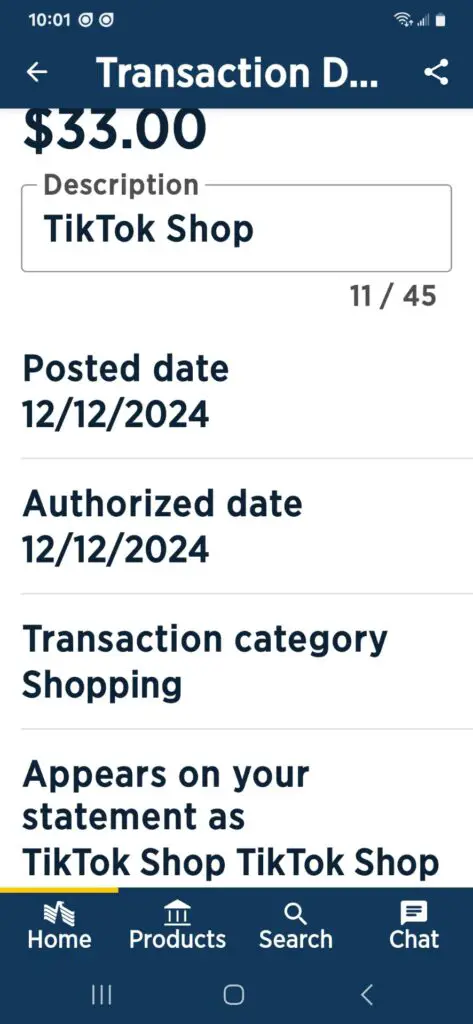
A Google TikTok Videos or Live charge on a credit card, debit card, Greenlight card, Cash App card, or bank statement most likely relates to a TikTok purchase processed through Google Play. It may involve TikTok Coins, virtual Gifts sent during a LIVE stream, or another in-app TikTok feature.
The transaction may appear as GOOGLE TIKTOK VIDEOS MOUNTAIN VIEW CA, GOOGLE*TIKTOK LIVE, GOOGLE TIKTOK, or a shortened variation. The descriptor does not reveal which Google Account, TikTok account, device, or person approved the payment.
What Is the Google TikTok Videos or Live Charge?
A Google TikTok Videos or Live charge most likely means that Google Play processed a purchase made through the TikTok Android app.
Possible explanations include:
- A purchase of TikTok Coins
- Coins purchased while watching a TikTok LIVE
- A virtual Gift sent to a LIVE creator
- A Gift sent on an eligible TikTok video
- Several separate Coin recharges
- Another TikTok digital purchase
- A purchase made through another Google Account or TikTok account
- A purchase made by a child, family member, or other device user
- An accidental purchase on a shared Android device
- A temporary payment authorization
- Unauthorized use of the card or saved Google Play payment method
The statement wording alone does not identify the TikTok username, creator, video, LIVE stream, number of Coins, Gift, Google Account, device, or person who approved the transaction.
What Is the $0.07 Google TikTok Videos Charge?
One unverified August 2026 Reddit report described the exact wording Google TikTok Videos Mountain View CA and an amount of $0.07 on a Greenlight card. The cardholder said they did not have TikTok.
A seven-cent transaction could be:
- A very small digital purchase
- A pending authorization or payment-method verification attempt
- A card-testing transaction used to see whether card details work
- An unfamiliar payment made from another Google Account, TikTok account, or device
The amount is too small to ignore merely because it is seven cents. If no authorized purchase or Google activity explains it, secure the card and contact Greenlight or the relevant card issuer promptly.
Why Does the Charge Begin With GOOGLE?
Google says Google Play purchases commonly appear as GOOGLE* followed by the seller, app, or content name.
A descriptor such as GOOGLE*TIKTOK LIVE or GOOGLE TIKTOK VIDEOS most likely indicates that:
- The purchase was initiated through TikTok on an Android device
- Google Play handled the payment
- TikTok, TikTok Videos, or TikTok LIVE identifies the app or feature
- The payment method was available to a Google Account on the device
Google may be the billing platform even though the virtual item or feature was supplied through TikTok. Start with Google Play order history because it should identify the account and transaction more clearly than the bank descriptor.
What Does Mountain View, CA Mean?
Mountain View, California may appear because the payment was processed through Google or because Google-related merchant information was included in the card record.
The location does not necessarily identify:
- Where the TikTok creator lives
- Where a LIVE stream or video originated
- Where the phone or tablet was located
- Where the cardholder made the purchase
- Where TikTok support is located
Use the Google Play receipt, order history, and TikTok account activity to identify the actual purchase.
Common Google TikTok Statement Variations
- GOOGLE TIKTOK VIDEOS MOUNTAIN VIEW CA
- GOOGLE*TIKTOK VIDEOS
- GOOGLE TIKTOK VIDEOS
- GOOGLE*TIKTOK LIVE
- GOOGLE TIKTOK LIVE
- GOOGLE*TIKTOK
- GOOGLE TIKTOK
- GOOGLE*TIK TOK LIVE
- GOOGLE TIK TOK LIVE
- GOOGLE TIKTOK PAYMENT
- GOOGLE BYTEDANCE
- GOOGLE*TIKTOK MOUNTAIN VIEW
- GOOGLE TIKTOK MOUNTAIN VIEW CA
- PENDING GOOGLE*TIKTOK LIVE
- DEBIT CARD GOOGLE TIKTOK
- CHECKCARD GOOGLE*TIKTOK LIVE
- GOOGLE TIKTOK LIVE G.CO/HELPPAY
The exact wording can vary by bank, card network, Google payment profile, app version, transaction type, country, and the space available on the statement. Not every possible variation has been officially documented.
Does TikTok Charge Money to Watch LIVE Videos?
Merely opening or watching a normal TikTok LIVE does not ordinarily explain a card charge.
Payment may occur when someone voluntarily:
- Purchases TikTok Coins
- Recharges a Coin balance while watching a LIVE
- Uses Coins to send a virtual Gift
- Purchases access to an eligible paid feature
- Completes another in-app transaction
The word LIVE in the descriptor therefore does not mean that TikTok charged a viewing fee simply because the app displayed a livestream.
What Are TikTok Coins and Gifts?
TikTok Coins are virtual items that users can purchase and hold in their TikTok Balance. Coins can be used to activate virtual Gifts for eligible creators, including Gifts sent during a LIVE.
A Google TikTok transaction may therefore represent:
- A Coin package purchased through Google Play
- Coins added to a TikTok account balance
- Some or all of those Coins later used for Gifts
The card is generally charged when Coins or another digital item are purchased, not each time previously purchased Coins are used.
Why Are There Repeated Google TikTok Charges?
Multiple Google TikTok charges may be separate purchases rather than one recurring subscription.
Possible explanations include:
- Several Coin recharges during one or more LIVE streams
- Repeated small Coin-package purchases
- Purchases made by more than one device user
- Several TikTok accounts connected to one Google payment method
- A child repeatedly approving in-app purchases
- A pending authorization followed by a completed charge
- A failed payment followed by another attempt
- A recurring TikTok feature or subscription
- Unauthorized access to the Google Account, TikTok account, or card
Do not assume that a series of small payments is one monthly subscription. Check whether Google issued a separate receipt and order number for each completed transaction.
Why Was I Charged $0.07, $1.08, $33, or Another Amount?
TikTok Coin packages and other digital-item prices may vary according to the item, payment route, country, tax, currency, and app-store pricing.
Reported amounts connected with this page or descriptor include:
- One unverified $0.07 Greenlight-card report using the exact Google TikTok Videos Mountain View CA wording
- Repeated charges of approximately $1.08 described by a visitor to this page
- One $33 transaction described as unauthorized by a visitor to this page
A matching amount alone does not prove that transactions from different cardholders were for the same Coin package, Gift, authorization, account, or feature. Locate the corresponding Google receipt for the exact item and quantity.
How to Verify a Google TikTok Charge
- Copy the complete statement descriptor.
- Record the amount, transaction date, posting date, and whether it is pending or completed.
- Open every Google Account used on the Android phone or tablet.
- Review Google Play order history under each account.
- Review Google Payments activity and subscriptions.
- Search every email account for Google Play, TikTok, receipt, Coins, LIVE, Gift, recharge, or GPA.
- Open TikTok and check the Balance area.
- Review every TikTok account used on the device.
- Ask family members and other authorized device or card users.
- Check whether the card was recently added to or verified by Google.
- Compare the amount and date with every Google receipt.
- Contact Google, TikTok, and the card issuer if the payment remains unexplained.
How to Check Google Play Order History
Using the Google Play App
- Open the Google Play Store.
- Tap the profile picture.
- Select Payments & subscriptions.
- Tap Budget & history.
- Look for TikTok transactions matching the statement amount and date.
- Switch to every other Google Account and repeat the search.
Using a Web Browser
- Follow Google’s instructions to review Google Play order history.
- Sign in to the Google Account.
- Open Payments & subscriptions.
- Select Budget & Order history.
- Review each TikTok purchase.
You can also visit Google Payments and review Activity for individual transactions and Subscriptions & services for recurring items.
How to Check Your TikTok Coin Balance
- Open TikTok.
- Tap Profile.
- Open the menu.
- Select Balance.
- Review the available Coin balance and related wallet options.
- Repeat the check for every TikTok account used on the device.
A current Coin balance may support the conclusion that Coins were purchased, but a zero balance does not rule it out. The Coins may already have been used to send Gifts.
What to Do About an Unrecognized Charge on a Greenlight Card
If the Google TikTok Videos transaction appeared on a Greenlight card:
- Open the Greenlight app and determine whether the transaction is pending or settled.
- Lock the affected card if the cardholder does not recognize the activity.
- Check every Google and TikTok account used by the child or cardholder.
- Ask whether the card was added to Google Play or used on another device.
- Save the complete descriptor, amount, date, screenshot, and any Google receipt.
- Contact Greenlight at 888-483-2645, the telephone number listed in its Help Center and on the back of the card.
- Ask whether the card should be replaced and how to dispute the payment after it settles.
Greenlight states that a card can be locked in the app and that a transaction generally must settle before a dispute is filed. Its current guidance says only a Primary Accountholder or Authorized Approver can submit the dispute and that it should be raised within 60 days after the transaction posts.
Official Greenlight resources:
- Turn a Greenlight card on or off
- Dispute a Greenlight charge
- Review a pending Greenlight transaction
Could the $0.07 Charge Be a Google Authorization?
Possibly, but not conclusively.
Google explains that recently added payment methods may show a small pending authorization and that payment verification can involve a temporary charge. A genuine temporary authorization should normally remain pending and later disappear or be reversed according to the issuer’s timing.
Check:
- Whether the $0.07 entry says pending, processing, reversed, or completed
- Whether the card was recently added to Google Play or Google Payments
- Whether Google requested payment-method verification
- Whether a matching item appears in Google Payments activity
- Whether a receipt or GPA order number exists
The exact descriptor and amount in the August 2026 report have not been publicly confirmed by Google as a standard verification transaction. Treat authorization as one possibility, not the identification.
How to Request a Google Play Refund
For an accidental or unwanted purchase that appears in Google Play order history:
- Open Google’s Google Play refund instructions.
- Sign in to the Google Account that made the purchase.
- Locate the TikTok transaction.
- Select the applicable refund or Report a problem option.
- Choose the reason that accurately describes the situation.
- Submit the request and retain the confirmation.
Refund eligibility depends on the purchase, timing, payment method, location, and circumstances. An accidental family purchase and stolen card information are not the same situation; use the reporting route that accurately describes what happened.
Family Purchase or Unauthorized Charge?
Google uses different procedures depending on who made the payment.
A Family Member or Friend Made It
If someone you know used the device, TikTok account, Google Account, or card, use the normal Google Play refund route and accurately describe the purchase as accidental or made by a family member.
No One You Know Made It
If neither the cardholder nor anyone authorized to use the account or card made the payment, use Google’s unrecognized Google Play charge process and contact the card issuer.
For eligible unauthorized credit-card, debit-card, or PayPal purchases, Google’s current help page says to report the charge within 120 days of the transaction date.
How to Stop Google TikTok Charges
The correct method depends on whether the transactions are separate Coin purchases, a subscription, family purchases, authorizations, or unauthorized activity.
- Identify the purchasing Google Account from the receipt or order history.
- Determine whether each transaction is a one-time purchase, subscription, pending authorization, or completed charge.
- Remove the payment method from unfamiliar or unused Google Accounts.
- Change the Google Account password if unauthorized access is suspected.
- Change the TikTok password and review account security.
- Sign out unknown devices and sessions.
- Turn on Google Play purchase verification.
- Require family purchase approval when applicable.
- Report unexplained transactions to Google, TikTok, and the card issuer.
- Lock or replace the card when the issuer recommends it.
A one-time Coin recharge does not have a conventional subscription to cancel. Review Google Payments subscriptions separately before assuming that repeated transactions are renewals.
How to Protect Future Google Play Purchases
- Open the Google Play Store.
- Tap the profile picture.
- Select Payments & subscriptions.
- Tap Purchase verification.
- Choose the strongest suitable verification requirement.
- Review the setting on every Android device and Google Account that can use the card.
For a managed family member, also review Google Play family purchase approvals or Google Family Link settings.
How to Contact TikTok About the Payment
TikTok handles support mainly through its Help Center and in-app reporting tools.
- Open TikTok.
- Tap Profile.
- Open the menu.
- Select Settings and privacy.
- Tap Report a problem.
- Choose the category for LIVE, Gifts, wallet, Coins, or payments.
- Provide the Google Play order number, amount, date, TikTok username, and a concise explanation through the private support channel.
Do not post or send a complete card number, Google password, TikTok password, bank login, PIN, CVV, or one-time security code.
Official Google, TikTok, and Greenlight Resources
- Google statement wording and authorizations: Google Play fees, charges, and authorizations
- Google order history: Review Google Play purchases
- Unrecognized Google charges: Report a Google Play charge you do not recognize
- Google Play refunds: Request a Google Play refund
- Purchase verification: Protect Google Play purchases
- TikTok Coins and Gifts: How TikTok Gifts and Coins work
- TikTok LIVE Gifts: Send Gifts during a LIVE
- TikTok support: Report a TikTok problem
- Greenlight disputes: Dispute a Greenlight transaction
What If the Google TikTok Payment Was Unauthorized?
- Confirm whether the transaction is pending or completed.
- Review every Google Account and TikTok account used on the device.
- Ask family members and authorized card users.
- Save the complete descriptor, screenshots, receipts, and related emails.
- Report the unauthorized purchase through Google promptly.
- Report the issue through TikTok support.
- Change the Google and TikTok passwords.
- Remove unknown devices and sessions.
- Turn on purchase verification.
- Contact the issuer through the official app or the number printed on the card.
- Ask whether the card should be locked or replaced.
If the completed transaction does not appear in any Google Play order history, ask the issuer for the expanded merchant record. The payment may involve a different Google Account, stolen card information, delayed processing, or statement wording that does not identify the purchase clearly.
Credit-Card, Debit-Card, and Bank Guidance
For a credit-card charge, review the Consumer Financial Protection Bureau’s credit-card dispute guidance and follow the issuer’s instructions.
An unfamiliar debit-card or prepaid-card payment can reduce the available balance immediately. Ask the issuer:
- Whether the entry is pending, reversed, or completed
- What expanded merchant information was supplied
- Whether other authorization attempts are pending
- Whether the card should be locked or replaced
- How to report an unauthorized electronic-fund transfer
See the CFPB’s unauthorized debit-card and bank-account guidance for general information.
Consumer Reports and Experiences
There are currently three visible cardholder reports on this page and one separate unverified August 2026 Reddit report relevant to the descriptor.
- One visitor reported a $33 transaction and described it as unauthorized.
- One visitor requested money back but did not provide enough information to determine the product or purchase route.
- One visitor reported repeated $1.08 charges on a Cash App card and said the expanded transaction information displayed TikTok LIVE and Mountain View, California.
- The August 2026 Reddit report described Google TikTok Videos Mountain View CA, a $0.07 amount, and a Greenlight card. The cardholder said they did not have TikTok.
These individual reports are useful discovery signals, not proof. They do not establish that every Google TikTok transaction is unauthorized, that the $0.07 charge was card testing, or that every payment represents the same Coin package, Gift, account, authorization, or feature.
Frequently Asked Questions About Google TikTok Charges
What is Google TikTok Videos on my bank statement?
It most likely represents a TikTok purchase processed through Google Play. Check Google Play order history for TikTok Coins, Gifts, subscriptions, or another digital item.
What is Google TikTok Live on my card?
It may be a Google Play purchase of TikTok Coins made from the TikTok Balance area or while watching a LIVE stream.
What does Google TikTok Videos Mountain View CA mean?
The wording likely combines Google as the payment platform, TikTok Videos as the app or content reference, and Mountain View as Google-related merchant-location information. It does not identify the user, video, creator, or device.
Why is there a $0.07 Google TikTok charge?
Seven cents could be a small purchase, temporary authorization attempt, card-testing transaction, or unfamiliar activity from another account or device. The amount and descriptor alone cannot determine which.
Does a seven-cent charge mean my card is being tested?
Not necessarily. Card testing is one possible explanation for a tiny unfamiliar transaction, but a payment-method authorization or small purchase may also be possible. Check Google activity and contact the issuer if no authorized explanation appears.
Does TikTok charge for watching LIVE videos?
Watching a normal TikTok LIVE does not ordinarily create a payment. A charge may occur when someone buys Coins, sends Gifts, or purchases another eligible feature.
Why do I have several small Google TikTok charges?
They may be separate Coin recharges, purchases by another device user, pending and completed entries, payment attempts, or unauthorized activity. Check whether Google issued a separate receipt for each completed charge.
Is Google TikTok a recurring subscription?
Not necessarily. TikTok Coin recharges are individual purchases. Review Google Payments subscriptions and Google Play order history to determine whether a transaction is recurring.
How do I stop Google TikTok charges?
Identify the purchasing account, secure the Google and TikTok accounts, enable purchase verification, remove unauthorized payment access, and report unexplained transactions to the issuer.
How do I get a refund for Google TikTok charges?
Find the transaction in Google Play order history, choose the applicable refund or Report a problem option, provide the accurate reason, and retain the confirmation.
What if my child purchased TikTok Coins?
Use the Google Play refund process for a family-member purchase and enable purchase verification or family purchase approvals to help prevent another transaction.
What should I do if the charge is on a Greenlight card?
Check whether it is pending or settled, lock the card if it is unfamiliar, review the child’s Google and TikTok accounts, and contact Greenlight through the official app or at 888-483-2645.
Related Google and Digital-Charge Guides
- 855-836-3987 Google charge: Play, YouTube, storage, or another Google service
- 1600 Amphitheatre Parkway and G.co/HelpPay charge
- Google YouTube Videos and G.co/HelpPay charge
- How to investigate an unrecognized credit-card, debit-card, or bank charge
These related guides do not establish that the apps, services, merchants, accounts, or transactions are affiliated. They may help when Google or another shortened digital descriptor appears on the same statement.
Help Other Cardholders Identify This Charge
If you saw GOOGLE TIKTOK VIDEOS MOUNTAIN VIEW CA, GOOGLE*TIKTOK LIVE, GOOGLE TIKTOK, or another related descriptor, please share nonprivate details about what the transaction involved.
Helpful details include:
- The exact shortened descriptor
- The general amount
- Whether the entry was pending or completed
- Whether several charges appeared
- Whether Coins, Gifts, or another item were purchased
- Whether the payment appeared in Google Play order history
- Whether the card had recently been added to Google
- How Google, TikTok, Greenlight, or another issuer resolved it
Do not post card numbers, card-ending digits, bank-account numbers, Google Play order numbers, TikTok usernames, email addresses, passwords, PINs, CVVs, one-time codes, receipts, or bank statements.
Why Trust ChargeOnMyCard.com?
ChargeOnMyCard.com researches confusing credit-card, debit-card, prepaid-card, Google Play, app-store, virtual-item, social-media, digital-purchase, authorization, and bank-statement descriptions using current official billing resources, transaction clues, and visible consumer reports.
For this update, we reviewed Google’s current statement-descriptor, temporary-authorization, order-history, refund, unrecognized-charge, and purchase-verification guidance; TikTok’s current Coins, Gifts, LIVE, and support information; Greenlight’s current card-lock, pending-transaction, and dispute instructions; the existing reports on this page; and the single August 2026 Reddit report containing the complete Google TikTok Videos Mountain View CA wording.
We distinguish what official sources confirm from what an individual report suggests. The $0.07 amount may be consistent with more than one explanation and is not, by itself, proof of a TikTok purchase, Google verification, fraud, or card testing.
Last reviewed: September 2026.
ChargeOnMyCard.com is not affiliated with Google, Google Play, TikTok, ByteDance, Greenlight, Cash App, any TikTok creator, app user, cardholder, bank, credit union, card network, digital wallet, or payment processor. This article provides general informational guidance and cannot access a Google, TikTok, Greenlight, or bank account; identify a private cardholder; determine who made a transaction; approve a refund; reverse a payment; lock or replace a card; or file a dispute. Verify the individual transaction through the relevant official account and financial institution.