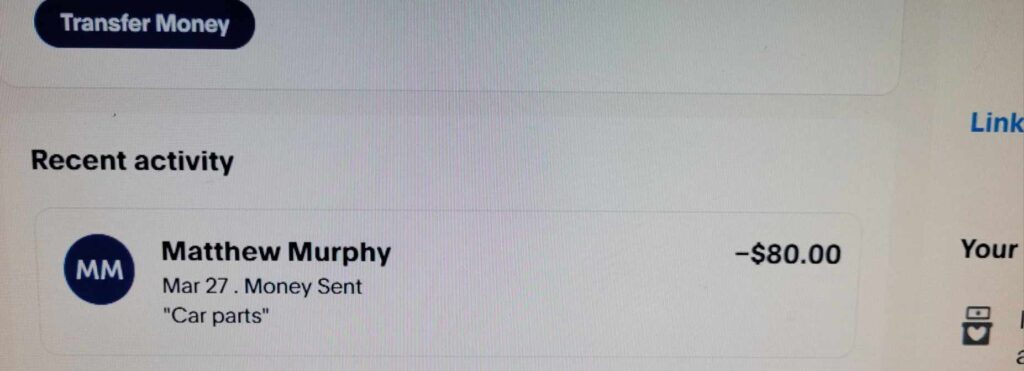
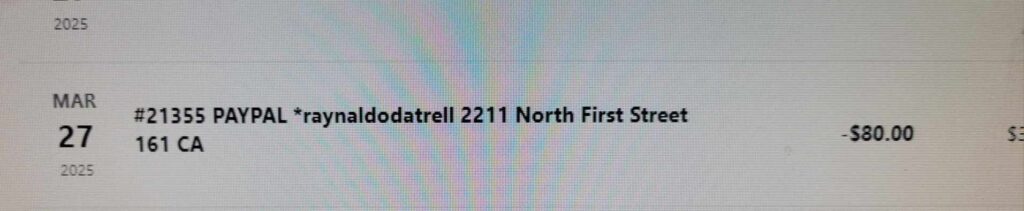
A 2211 North First Street San Jose CA charge on your credit card, debit card, or bank statement is most likely connected to a transaction processed through PayPal. The descriptor may also appear as 2211 N 1st St San Jose CA, 2211 T San Jose, 2211 TSAN JOSE, or another shortened address variation.
2211 North First Street, San Jose, California 95131 is PayPal’s official business address. However, the address alone normally does not identify the seller, payment recipient, subscription, product, donation, or person connected to the transaction. Check your PayPal Activity and compare the exact amount, date, funding source, and merchant information before deciding whether the charge was authorized.
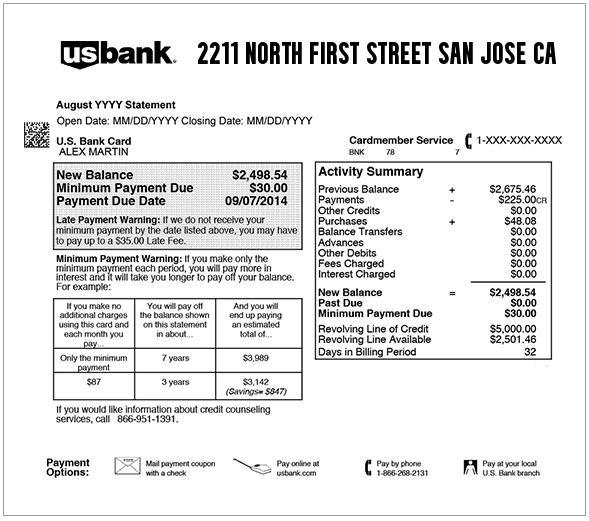
What Is the 2211 North First Street San Jose CA Charge?
A charge showing 2211 North First Street San Jose CA may be a PayPal payment funded through your credit card, debit card, or linked bank account.
Possible explanations include:
- A purchase paid through PayPal checkout
- A payment sent to another PayPal user
- An automatic payment or recurring subscription
- A donation processed through PayPal
- A merchant invoice paid with PayPal
- A purchase made through an online marketplace
- A PayPal payment funded by a linked card
- A delayed withdrawal from a linked bank account
- A transaction made by another authorized cardholder
- A pending authorization
- A duplicate or unauthorized payment
The descriptor may identify PayPal as the payment processor instead of showing the familiar public name of the merchant or recipient.
What Business Is at 2211 North First Street San Jose CA?
PayPal is located at 2211 North First Street, San Jose, California 95131. The address appears in PayPal’s official contact, licensing, legal, and company information.
PayPal operates an online and mobile payment platform that can be used to:
- Pay online merchants
- Send and receive money
- Fund purchases from a bank account or card
- Pay invoices
- Manage subscriptions and billing agreements
- Make charitable donations
- Buy eligible products and services
Seeing the PayPal address does not necessarily mean the payment was made directly to PayPal. PayPal may have processed the transaction for another business or individual.
Is the Correct Address 221 or 2211 North First Street?
The official PayPal address is:
2211 North First Street
San Jose, CA 95131
Searches and abbreviated bank descriptions may sometimes show 221 North First Street, but the verified address contains four digits: 2211.
Common 2211 North First Street Statement Variations
- 2211 NORTH FIRST STREET
- 2211 NORTH FIRST ST
- 2211 N FIRST STREET
- 2211 N FIRST ST
- 2211 N 1ST ST
- 2211 N 1ST ST SAN JOSE
- 2211 N 1ST ST SAN JOSE CA
- 2211 N 1ST ST SAN JOSE CA 95131
- 2211 NORTH FIRST STREET SAN JOSE
- 2211 NORTH FIRST STREET SAN JOSE CA
- 2211 NORTH FIRST STREET SAN JOSE CA 95131
- 2211 NORTH FIRST STREET CALIFORNIA 95131
- 2211 NORTH FIRST STREETSAN JOSE CAUS
- 2211 T SAN JOSE
- 2211 TSAN JOSE
- 2211 TSAN JOSE CAUS
- PAYPAL 2211 NORTH FIRST STREET
- PAYPAL PURCHASE SAN JOSE CA
- 2211 NORTH FIRST STREET 888-221-1161 CA
The exact wording may vary by bank, card network, PayPal transaction type, merchant record, and the amount of space available on the statement.
Why Does My Statement Show PayPal’s Address Instead of the Merchant?
A payment processor may submit its legal name, support number, or business address as part of the card transaction. Your bank may display that information instead of the merchant name you remember.
For example, you may remember purchasing from:
- An online store
- A marketplace seller
- A software or app company
- A streaming service
- A membership or subscription provider
- A fundraiser or charity
- An individual seller
If PayPal processed the payment, the outside card or bank statement may show PayPal’s San Jose address while the PayPal transaction details show the actual merchant or recipient.
How to Identify a 2211 North First Street PayPal Charge
- Write down the exact statement descriptor, amount, and posting date.
- Sign in to PayPal directly through the official website or app.
- Open your PayPal Activity.
- Look for a payment with the same or a similar amount.
- Allow for a difference between the purchase date and bank-posting date.
- Open the matching PayPal transaction.
- Review the merchant or recipient name.
- Check the funding source used for the payment.
- Review the transaction note, invoice, order ID, or subscription details.
- Repeat the process for any other PayPal accounts in your household.
The transaction inside PayPal may provide more useful information than the abbreviated bank descriptor.
Could It Be a Purchase Paid Through PayPal?
Yes. A purchase from another website may be funded through PayPal even when the merchant does not appear clearly on the bank statement.
Check recent:
- Online-store orders
- Marketplace purchases
- Digital products
- Software subscriptions
- Travel reservations
- Event tickets
- Food or delivery orders
- Invoices from contractors or service providers
Search your email for PayPal, the exact amount, the transaction date, and possible merchant names.
Could It Be Money Sent to Another Person?
A person-to-person PayPal payment may be funded by a linked card or bank account. The outside statement may show PayPal’s name or address instead of the recipient.
Payments may involve:
- Money sent to a friend or family member
- Reimbursement for shared expenses
- Payment for secondhand merchandise
- Payment to a contractor
- Rent or household costs
- A payment sent to the wrong PayPal account
Open the transaction inside PayPal to review the recipient, payment type, note, and status.
Could It Be a PayPal Automatic Payment or Subscription?
Yes. A merchant may have permission to charge PayPal automatically for a subscription, membership, service, or recurring purchase.
Automatic payments can involve:
- Streaming subscriptions
- Software and mobile apps
- Website services
- Online memberships
- Insurance or protection plans
- Recurring donations
- Gaming services
- Retail subscriptions
- Cloud storage
How to Check or Cancel a PayPal Automatic Payment
On the PayPal website:
- Sign in to PayPal.
- Open Settings.
- Select Payments.
- Open automatic payments, subscriptions, or saved businesses.
- Select the merchant.
- Review the status, payment method, and billing details.
- Choose the available cancellation option when appropriate.
- Save the confirmation.
Canceling an automatic payment in PayPal may stop future PayPal charges, but it may not end the underlying agreement with the merchant. Contact the merchant separately when necessary.
Could the Charge Be a PayPal Donation?
Yes. PayPal can process one-time and recurring charitable donations. A donation may show PayPal-related wording rather than the charity’s public name on the bank statement.
Check PayPal Activity and email receipts for:
- The organization name
- The donation amount
- Whether it was one-time or recurring
- The next scheduled payment
- The funding source
What Does 2211 T San Jose or 2211 TSAN JOSE Mean?
2211 T San Jose and 2211 TSAN JOSE appear to be shortened or compressed variations of the PayPal address descriptor.
They may show up as:
- 2211 T SAN JOSE
- 2211 TSAN JOSE
- 2211 TSAN JOSE CA
- 2211 TSAN JOSE CAUS
- 2211 NORTH FIRST S SAN JOSE CA
The missing words or unusual spacing may result from the bank shortening a longer merchant record.
What Does 888-221-1161 Mean?
1-888-221-1161 is a verified PayPal customer-service number. It may appear alongside PayPal’s address or other PayPal transaction information.
The number does not reveal which merchant, subscription, or recipient received your payment. Use PayPal Activity to identify the transaction before contacting support.
PayPal Official Contact and Account Resources
- Official Website: paypal.com
- Customer Service: 1-888-221-1161
- Contact PayPal: PayPal Contact Us
- Help Center: PayPal Help Center
- Resolution Center: PayPal Resolution Center
- Unauthorized Activity Help: Report unauthorized PayPal activity
- Automatic Payments: Manage PayPal automatic payments
Support availability and contact options may vary by issue, account status, and whether you are signed in. Use PayPal’s current Contact Us page for the available secure options.
What If the Charge Is Pending?
A pending PayPal charge may be:
- A temporary card authorization
- A merchant order that has not been completed
- A payment awaiting bank processing
- A duplicate-looking authorization that may later disappear
- A transaction under review
Check whether the same amount also appears as a completed charge. Your bank can explain when it expects a temporary authorization to be released.
Why Are There Multiple PayPal Charges?
Multiple entries may represent:
- Several separate purchases
- A purchase and an automatic payment
- Payments from more than one PayPal account
- A pending authorization and completed transaction
- A payment submitted twice
- A failed payment retried later
- Separate products from one merchant
- Duplicate or unauthorized billing
Open each transaction separately in PayPal and compare its status, recipient, funding source, and transaction ID.
Cardholder Reports About 2211 North First Street
Visible cardholder reports on this page include:
- A pending $9 transaction showing 2211 TSAN JOSE CAUS
- Two reportedly unrecognized debit-card charges of $49 and $350
- A report of apparent double billing
- A buyer who reported paying for vehicle parts and then being asked to send additional money through Friends and Family
These reports describe individual experiences and do not establish that every transaction displaying the address has the same explanation.
Be Careful With Friends and Family Payment Requests
A seller may ask a buyer to use PayPal’s personal or Friends and Family payment option. Be cautious when purchasing goods or services from an unfamiliar person who insists on a payment method intended for personal transfers.
Before sending more money:
- Confirm the recipient’s identity.
- Review the original agreement.
- Do not send an extra fee merely to release a payment.
- Do not send money to “verify” or “protect” an account.
- Save messages, listings, receipts, and transaction details.
- Contact PayPal through its official site when something seems wrong.
What If the Charge Appears in Your PayPal Account?
If the transaction appears inside your PayPal account but you did not authorize it:
- Sign in directly through PayPal’s official website or app.
- Open the Resolution Center.
- Select Report a Problem.
- Choose the unfamiliar transaction.
- Select the option for unauthorized activity.
- Follow the instructions to submit the report.
- Change your PayPal password.
- Review linked cards, bank accounts, telephone numbers, and email addresses.
What If the Charge Is Not in Your PayPal Account?
If the PayPal-related charge appears on your bank or card statement but cannot be found in any PayPal account you control:
- Check every PayPal account and email address used by your household.
- Ask authorized cardholders whether they recognize the payment.
- Search email for the amount and transaction date.
- Contact PayPal through its official Contact Us page.
- Ask your bank for the expanded merchant information.
- Report the transaction to the card issuer if it remains unidentified.
- Ask whether the affected card or account number should be replaced.
How to Report a Purchase or Billing Problem
If you recognize the merchant but have a problem with the product, service, amount, duplicate charge, or delivery:
- Contact the merchant first when practical.
- Save the order, messages, and delivery information.
- Open PayPal’s Resolution Center.
- Select Report a Problem.
- Choose the relevant transaction.
- Select the reason that best describes the issue.
- Submit the supporting information.
- Monitor the case through the Resolution Center.
Could the 2211 North First Street Charge Be Fraud?
A charge containing PayPal’s address is not automatically fraudulent. It may be a legitimate purchase, transfer, donation, subscription, or automatic payment.
The individual transaction may be unauthorized if:
- No PayPal account shows the payment.
- No cardholder recognizes it.
- The recipient or merchant is unfamiliar.
- The card was never intentionally connected to PayPal.
- The payment continued after cancellation.
- Several unexpected PayPal charges appeared.
- Account information changed without permission.
- Other unfamiliar transactions appeared at the same time.
How to Secure Your PayPal Account
- Change your PayPal password.
- Review your PayPal account email addresses and telephone numbers.
- Remove unfamiliar linked bank accounts or cards.
- Review automatic payments.
- Check recent account activity.
- Review devices and account-security settings.
- Change the password for the email account connected to PayPal.
- Contact PayPal and the affected financial institution.
Watch Out for Calls Spoofing PayPal Customer Service
Although 1-888-221-1161 is a verified PayPal customer-service number, caller ID can be spoofed.
PayPal warns that it will not call from this number to ask for personal or account information. End the call if an unexpected caller asks you to:
- Provide your PayPal password
- Read a one-time security code
- Give your complete card or bank-account number
- Send money to protect your account
- Move money to a “safe” account
- Install remote-access software
- Purchase gift cards
- Send cryptocurrency
- Pay a fee to receive a refund
Hang up and contact PayPal directly through its official website or by dialing 1-888-221-1161 yourself.
Frequently Asked Questions About 2211 North First Street Charges
What is 2211 North First Street on my bank statement?
It is most likely a PayPal-related transaction. The address belongs to PayPal, but you must review PayPal Activity to identify the actual merchant, recipient, or automatic payment.
What business is at 2211 North First Street San Jose CA?
PayPal is located at 2211 North First Street, San Jose, California 95131.
What is 2211 N 1st St San Jose CA 95131?
It is an abbreviated version of PayPal’s official San Jose address.
Is the address 221 or 2211 North First Street?
The verified PayPal address is 2211 North First Street. Searches for 221 North First Street may be missing one digit.
What does 2211 T San Jose mean?
It appears to be a shortened bank-statement variation of PayPal’s 2211 North First Street address.
What does 2211 TSAN JOSE CAUS mean?
It is another compressed address variation reported with PayPal-related transactions.
Why does PayPal’s address appear instead of the seller?
PayPal may have processed the payment, and the bank displayed PayPal’s legal merchant or address information instead of the seller’s familiar name.
How do I find the merchant behind the payment?
Open PayPal Activity, find the matching amount, and review the merchant, recipient, funding source, payment note, and transaction details.
Could this be an automatic payment?
Yes. Review the automatic-payment or subscription settings in your PayPal account for recurring merchant permissions.
What is PayPal’s customer-service number?
PayPal’s verified customer-service number is 1-888-221-1161. Use PayPal’s current Contact Us page for secure account-specific options.
Why do I see two PayPal charges?
They may be separate purchases, a pending authorization and final payment, automatic payments, transactions from different accounts, or duplicate activity.
How do I report an unauthorized PayPal charge?
Report transactions visible inside your PayPal account through the Resolution Center. Contact your bank or card issuer if the payment cannot be found in any authorized PayPal account.
Should I dispute the charge?
First review PayPal Activity, automatic payments, authorized cardholders, and receipts. File a dispute when the transaction remains unauthorized or a recognized purchase problem cannot be resolved.
Related PayPal Charge Guide
- 4029357733 PayPal Charge on Credit Card or Bank Statement
- PayPal Charges on Credit Card: PP Descriptor Guide
Related Resources
Help Other Cardholders Identify This Charge
If you saw 2211 NORTH FIRST STREET, 2211 N 1ST ST SAN JOSE CA, 2211 T SAN JOSE, 2211 TSAN JOSE CAUS, or another variation, please share what the payment was connected to.
Helpful details include whether it involved a purchase, person-to-person payment, subscription, automatic payment, donation, duplicate charge, pending authorization, or unauthorized activity.
Do not post complete card numbers, bank-account numbers, PayPal email addresses, recipient names, transaction IDs, invoice numbers, telephone numbers, passwords, PINs, or one-time security codes.
Why Rely on ChargeOnMyCard.com?
ChargeOnMyCard.com researches confusing credit-card, debit-card, payment-platform, subscription, automatic-payment, and bank-statement descriptors using current official company information, transaction clues, and cardholder reports when available.
An address-based descriptor may identify the payment processor rather than the merchant remembered by the cardholder. We explain how to use official account activity and dispute tools to investigate the specific transaction.
Disclaimer
ChargeOnMyCard.com is not affiliated with PayPal, PayPal Holdings, Inc., any PayPal merchant, payment recipient, seller, charity, payment processor, bank, card network, or financial institution. This page is for informational purposes only and is not financial, legal, banking, billing, payment, refund, dispute, account-security, or fraud-prevention advice. Contact PayPal and your financial institution directly about a specific transaction.