
An unfamiliar Amazon charge on your credit card, debit card, or bank statement may appear under AMAZON MKTPLACE, AMZN.COM/BILL WA, AMAZON DIGITAL, AMAZON MUSIC, AMAZON MX, AMZN.COM/PMTS, or another shortened billing descriptor.
This guide helps you choose the correct Amazon charge article and investigate the transaction through Amazon orders, digital purchases, subscriptions, Prime Video, Amazon Pay, Amazon Mexico, business accounts, and authorized card users. An Amazon-related descriptor can be legitimate, but every specific transaction should still be verified.
Quick answer: Match the complete wording on the statement to the most specific guide below. Then review Amazon Orders, Your Payments, Digital Orders, Memberships & Subscriptions, Amazon Pay activity, and every household or business account that may use the card. Contact Amazon and the card issuer if no authorized user can identify the completed transaction.
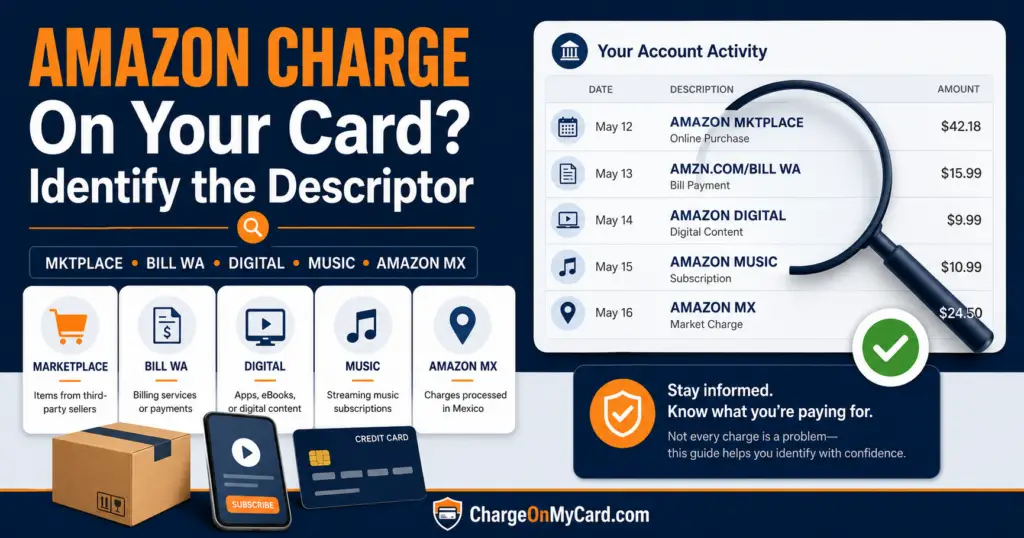
Which Amazon Charge Appeared on Your Statement?
Start with the wording that most closely matches your statement. Select the dedicated guide for more detailed variations, cancellation instructions, official support routes, and verification steps.
AMAZON MKTPLACE, Amazon MKTPL, or Marketplace PMTS
An AMAZON MKTPLACE or Amazon MKTPL charge usually involves an Amazon.com retail order, a purchase from a third-party Amazon Marketplace seller, an Amazon Pay transaction, or another payment processed through Amazon.
Use this guide when your statement contains wording such as:
- AMAZON MKTPLACE
- AMAZON MKTPL
- AMAZON MKTPLACE PMTS
- AMZN MKTP US
- AMAZON MARKETPLACE
- AMAZON MKTPLACE PMTS AMZN.COM/BILL WA
AMZN.COM/BILL WA or Amazon Bill WA
An AMZN.COM/BILL WA charge can involve an Amazon order, Prime renewal, digital purchase, subscription, Amazon Pay transaction, business purchase, or other Amazon account activity.
Use this guide when the transaction includes:
- AMZN.COM/BILL WA
- AMZN.COM/BILL WAUS
- AMAZON BILL WA
- AMAZON BILLWA
- AMAZON.COM SEATTLE WA
- AMZN.COM/BILL
Amazon Digital Services or AMZN DIGITAL
An Amazon Digital Services charge most commonly involves electronically delivered content or an Amazon digital subscription rather than an ordinary shipped product.
Possible sources include:
- Prime Video rentals or purchases
- Prime Video add-on channels
- Kindle books or Kindle Unlimited
- Amazon Appstore apps or games
- In-app purchases
- Amazon Kids+
- Amazon Music
- Software or another digital subscription
Use the dedicated guide for AMAZON DIGITAL, AMAZON DIGITAL SERVICES, AMAZON DIGI, AMZN DIGITAL, or similar digital billing descriptions.
Amazon Music Charge
An Amazon Music charge usually involves Amazon Music Unlimited, another paid music plan, a trial that converted to paid billing, or a digital music purchase.
The subscription could have been started through:
- An Amazon account
- The Amazon Music app
- An Echo device
- A Fire TV device
- Apple subscriptions
- Google Play subscriptions
- Another Amazon account using the same card
Use the Amazon Music guide when the statement specifically names AMAZON MUSIC, AMAZON MUSIC UNLIMITED, AMZN MUSIC, or another music-related variation.
AMAZON MX or Amazon Mexico
An AMAZON MX charge generally points to Amazon Mexico, Amazon.com.mx, the Mexico Marketplace, a Mexico-based digital service, or an Amazon seller account connected with the Mexico marketplace.
Possible variations include:
- AMAZON MX
- AMAZON MX MARKETPL
- AMAZON MX MARKETPLACE
- AMAZON MX CIUDAD DE MEX
- AMZN MX
- AMZN MKTP MX
This descriptor can involve an Amazon.com.mx consumer order, Prime Video billing associated with Mexico, a temporary authorization, a foreign transaction, or an Amazon Mexico seller-account fee.
Other Amazon Statement Descriptors
If the statement includes a telephone number, Amazon-owned service, business membership, or Seattle address, use the most specific guide below:
- Prime Video 888-802-3080 charge — use when the statement includes 888-802-3080, PRIME VIDEO, AMAZON PRIME PMTS, or related digital wording.
- Kindle SVCS charge — use for KINDLE SVCS, KINDLESVCS, KINDLE SCVS, Kindle Unlimited, or another Kindle-specific descriptor.
- Audible ADBL.CO/BILL NJ charge — use when ADBL.CO/BILL, AUDIBLE, AMZN.COM/BILL NJ, or similar Audible wording appears.
- Audible 888-283-5051 charge — use when the statement specifically includes Audible’s telephone-number-style descriptor.
- B2B Prime charge — use for an Amazon Business Prime membership, renewal, trial conversion, or plan-related transaction.
- 440 Terry Ave N or 410 Terry Ave N charge — use when an Amazon- or Amazon Pay-related transaction is displayed primarily as a Seattle address.
These more specific guides explain their exact descriptor families. Their inclusion does not establish that every transaction with similar wording was authorized or came from the same Amazon account.
Common Amazon Credit Card and Bank-Statement Descriptors
Amazon-related billing can appear in many formats depending on the service, country marketplace, bank, card network, payment processor, and available statement space.
Retail and Marketplace Descriptors
- AMAZON MKTPLACE
- AMAZON MKTPL
- AMZN MKTP US
- AMZN MKTPLACE PMTS
- AMZN.COM/BILL WA
- AMAZON.COM SEATTLE WA
- AMAZON MX
- AMAZON MX MARKETPL
Digital and Subscription Descriptors
- AMAZON DIGITAL
- AMAZON DIGITAL SERVICES
- AMZN DIGITAL
- AMAZON MUSIC
- AMZN MUSIC
- AUDIBLE
- ADBL.CO/BILL
- PRIME VIDEO
- AMAZON PRIME
- KINDLE SERVICES
- AMAZON APPSTORE
- AMAZON KIDS+
Payment and Processing Descriptors
- AMZN.COM/PMTS
- AMAZON PAY
- AMAZON PAYMENTS
- AMAZON PRIME PMTS
- CHECKCARD AMAZON
- POS DEBIT AMAZON
- RECURRING AMAZON
- PENDING AMAZON
Several of these descriptors can overlap. For example, AMZN.COM/BILL WA may represent a retail order, Prime membership, digital service, or Amazon Pay transaction. Use the transaction amount, date, account history, and longer statement wording to identify the actual source.
Why Does Amazon Use Different Charge Descriptions?
Amazon operates multiple retail, digital, subscription, payment, business, and seller services. The statement description can change depending on which Amazon system handled the payment.
Differences can be caused by:
- The Amazon service that created the charge
- A retail purchase versus digital content
- A direct Amazon sale versus a Marketplace seller
- An Amazon Pay purchase made on another website
- A Prime Video or channel subscription
- An Amazon Music or Kindle transaction
- The country marketplace associated with the account
- A personal, household, business, or seller account
- The card network and issuing bank
- Shortened statement-display limits
- A pending authorization versus a completed payment
The statement may identify Amazon without showing the product, seller, movie, book, subscription, marketplace, account email, or person who completed the transaction.
How to Identify an Amazon Charge
- Copy the complete statement descriptor exactly as displayed.
- Record the amount, transaction date, posting date, and whether the entry is pending or completed.
- Check every Amazon account that may use the payment card.
- Review recent orders and compare both order dates and shipment dates.
- Check archived, canceled, returned, preordered, and delayed orders.
- Review Amazon payment transactions.
- Check memberships and subscriptions.
- Review Prime Video purchases and add-on channels.
- Review Amazon Music, Kindle, Appstore, Kids+, and other digital activity.
- Check Amazon Pay activity for purchases made on other websites.
- Review Amazon Business and Seller Central accounts when applicable.
- Ask household members, employees, and other authorized card users.
- Search all email accounts for Amazon and the exact charge amount.
- Ask the card issuer for the complete merchant record when no account activity matches.
Check Your Amazon Orders
Begin with the official Amazon order-history page.
Compare the statement with:
- The final order total
- Tax and shipping charges
- The date each item shipped
- Orders divided into several packages
- Orders from third-party Marketplace sellers
- Preorders and backordered products
- Subscribe & Save orders
- Replacement orders
- Returned or refunded items
- Amazon Business orders
Do not compare only the date when the order was placed. The card transaction may appear later when an item ships or when a delayed product becomes available.
Review Amazon Payment Transactions
Amazon recommends using its payment-transaction history to investigate unfamiliar Amazon charges. Open Your Payments transactions while signed in.
The transaction history may help identify:
- The Amazon account that used the card
- The transaction amount
- The payment date
- The payment method
- A retail or digital transaction
- A refund or adjustment
You can also review Amazon’s official Amazon charge-identification guidance.
Check Amazon Memberships and Subscriptions
Open the official Amazon Memberships & Subscriptions area and look for active, recently renewed, canceled, or expired services.
Common recurring Amazon services can include:
- Amazon Prime
- Amazon Music Unlimited
- Kindle Unlimited
- Audible
- Amazon Kids+
- Prime Video
- Prime Video add-on channels
- App and software subscriptions
- Subscribe & Save deliveries
A free trial may convert to paid billing if it was not canceled before the renewal date. Another person using the account, television, tablet, Echo, Fire TV, or other connected device may also have started a subscription.
Check Prime Video and Add-On Channels
Prime Video can produce charges for:
- A standalone Prime Video subscription
- A movie rental
- A movie or television purchase
- A Prime Video add-on channel
- A sports or entertainment subscription
- A trial that converted to paid billing
- An accidental purchase made through a television or device
Review the official Prime Video Account & Settings page and the Prime Video Help Center.
If a subscription was purchased through Apple, Google Play, a mobile carrier, or another third party, it may need to be canceled through that billing provider.
Check Amazon Pay Purchases
Amazon Pay allows customers to use Amazon payment credentials with participating third-party merchants. The purchase may therefore be associated with another website even though the statement contains Amazon-related wording.
Review Amazon’s official Amazon Pay transaction instructions when the descriptor contains:
- AMZN.COM/PMTS
- AMAZON PAY
- AMAZON PAYMENTS
- AMZN PMTS
Amazon Pay also provides separate unknown and unauthorized charge guidance.
Check Amazon Mexico and Other Country Marketplaces
A cardholder can have activity connected with more than one Amazon country marketplace. A purchase made through Amazon.com.mx may appear as AMAZON MX even when the cardholder lives outside Mexico.
Review the official Amazon Mexico unknown-charge guidance when the statement includes MX, MEX, CIUDAD DE MEX, AMAZON.COM.MX, or another Mexico-related clue.
Amazon sellers should also check Amazon Mexico Seller Central for marketplace subscription, advertising, fulfillment, referral, refund-administration, or account-balance fees.
Why Does the Amazon Amount Not Match One Order?
An Amazon charge may not equal the total shown on the original order confirmation.
Possible reasons include:
- The order shipped in several packages
- Products were sold by different Marketplace sellers
- One item was delayed or backordered
- A preorder was charged later
- Tax or shipping was calculated separately
- A coupon, gift-card balance, or promotional credit covered part of the order
- A refund or return changed the final amount
- The amount came from a subscription rather than a retail order
- Two different Amazon accounts used the same payment card
- A currency conversion affected a foreign Amazon transaction
Compare each individual shipment and transaction instead of searching only for one order with the same total.
Why Are There Several Amazon Charges?
Multiple Amazon charges may represent:
- Separate shipments from one order
- Several different Amazon orders
- A retail order and a subscription renewal
- A digital purchase and a physical product
- Several Prime Video or app purchases
- A pending authorization and final posted charge
- Purchases from multiple household or business accounts
- A payment retry after an earlier failure
- A genuine duplicate or unauthorized transaction
Match every entry individually before assuming the charges are duplicates.
What Is a Small or Pending Amazon Charge?
A small or pending Amazon transaction may be a temporary payment authorization used to validate the card or reserve funds for an order. The authorization can disappear or be replaced by the final completed payment.
A small completed payment can also represent:
- A low-cost digital purchase
- An app or in-app transaction
- A prorated subscription charge
- A partial shipment
- A foreign-currency conversion
- A seller-account fee
- An unauthorized test transaction
Do not assume every small Amazon charge is harmless. Contact Amazon and the card issuer promptly if it cannot be matched to authorized activity.
How to Cancel a Recurring Amazon Charge
AMAZON, AMZN, or AMAZON MKTPLACE is not one universal subscription. First identify the service responsible for the recurring transaction.
- Open Amazon Memberships & Subscriptions.
- Review the Amazon Prime membership.
- Check Prime Video and add-on channels.
- Review Amazon Music settings.
- Check Kindle Unlimited, Audible, Kids+, apps, and software subscriptions.
- Review Subscribe & Save deliveries.
- Check Apple or Google Play when the subscription was started through an app.
- Cancel through the service that actually controls the billing.
- Save the confirmation and effective cancellation date.
- Monitor the card for another billing cycle.
Canceling one Amazon service does not automatically cancel other Amazon memberships, channels, deliveries, or digital subscriptions.
Why Did Amazon Charge Me After Cancellation?
A payment after cancellation could involve:
- A final billing period that began before cancellation
- A cancellation that becomes effective at the end of the paid term
- A separate Amazon subscription that remains active
- A channel subscription separate from Prime
- A product that shipped after the cancellation request
- A delayed or backordered purchase
- A subscription billed through Apple, Google, or another provider
- A cancellation that was not completed successfully
- Another Amazon account using the same card
Review the cancellation confirmation, renewal date, order history, subscriptions, and payment transactions before requesting a refund or dispute.
Can I Get a Refund From Amazon?
Refund eligibility depends on what created the charge.
- Physical order: Open the order details and review return, replacement, and refund options.
- Marketplace order: Review the order, seller communication, return window, and Amazon protection options.
- Prime Video: Check whether the rental, purchase, or subscription qualifies for cancellation or refund.
- Amazon Music or another subscription: Cancel through the account or billing provider and request a billing review when appropriate.
- Amazon Pay: Review the transaction and Amazon Pay dispute or support options.
- Seller fee: Open a case from the correct Seller Central marketplace.
Save order details, cancellation confirmations, return tracking, support messages, refund notices, and card statements.
What If No Amazon Account Matches the Charge?
If the transaction cannot be found in any retail, digital, subscription, Amazon Pay, business, seller, or country-marketplace account:
- Ask all authorized card users.
- Check every email address that may be associated with Amazon.
- Review shared household and business devices.
- Change the Amazon password if the account may have been accessed without permission.
- Enable two-step verification.
- Remove unfamiliar devices, addresses, profiles, and payment methods.
- Contact Amazon through the official signed-in support route.
- Ask the card issuer for the complete merchant descriptor and transaction record.
- Lock the card if additional unfamiliar attempts are appearing.
- Follow the issuer’s unauthorized-transaction process.
- Ask whether the payment card should be replaced.
An Amazon-related descriptor does not prove that the transaction was authorized. It identifies a likely billing platform or merchant family, but the account and purchase must still be confirmed.
Official Amazon Support Resources
- Amazon website: Amazon.com
- Amazon orders: Review Your Orders
- Payment transactions: Review Your Payments
- Identify a charge: Amazon charge-identification help
- Memberships and subscriptions: Manage subscriptions
- Customer support: Contact Amazon
- Prime Video support: Prime Video Help Center
- Amazon Pay: Amazon Pay
- Amazon Mexico: Amazon.com.mx
Amazon may require you to sign in before showing account-specific support options. Use Amazon’s website or app directly instead of relying on a telephone number or link from an unsolicited message.
Watch Out for Fake Amazon Support
Scammers may send fake Amazon order alerts, cancellation messages, security warnings, invoices, or refund notices. The message may include a telephone number and urge the recipient to call immediately.
Do not provide an unverified caller or website with:
- Your complete card or bank-account number
- Your Amazon password
- Your banking login
- Your PIN or CVV security code
- A one-time verification code
- Remote access to your computer or phone
- Gift-card numbers
- Cryptocurrency
- A payment to release a refund
Open Amazon directly through the official website or app. Do not use contact information contained in a suspicious email, text message, pop-up, voicemail, or search advertisement.
Frequently Asked Questions About Amazon Charges
What does an Amazon charge look like on a credit card?
It may appear as AMAZON MKTPLACE, AMZN.COM/BILL WA, AMZN MKTP US, AMAZON DIGITAL, AMAZON MUSIC, AMAZON PRIME, AMAZON MX, AMZN.COM/PMTS, or another shortened Amazon descriptor.
Why does my Amazon charge not show the item?
Card statements usually show a merchant or billing descriptor rather than the product, seller, subscription, order number, movie, book, or app. Check Amazon orders and payment transactions for the exact source.
What is AMAZON MKTPLACE?
AMAZON MKTPLACE generally refers to an Amazon.com or Amazon Marketplace transaction. It can involve an item sold by Amazon, a third-party seller, Amazon Pay, or another Amazon-related payment.
What is AMZN.COM/BILL WA?
AMZN.COM/BILL WA is a broad Amazon billing descriptor that can involve retail orders, Amazon Prime, digital content, subscriptions, Amazon Pay, or other Amazon services.
What is Amazon Digital Services?
It generally identifies digital content or subscriptions such as Prime Video, Kindle, Amazon Music, apps, games, Amazon Kids+, or another electronically delivered Amazon service.
Why am I being charged for Amazon Music when I have Prime?
Amazon Music Unlimited and certain other paid plans are separate from the music access included with an eligible Prime membership. Check Amazon Music settings for the exact plan and renewal date.
What is AMAZON MX?
AMAZON MX generally points to Amazon Mexico, Amazon.com.mx, a Mexico Marketplace purchase, Mexico-based digital billing, or an Amazon Mexico seller-account charge.
Why did Amazon charge me twice?
The entries may be separate shipments, different orders, a pending and completed transaction, a subscription plus a purchase, or activity from multiple accounts. Compare each charge individually.
How do I find an Amazon charge without an order number?
Compare the amount and date with Amazon orders, payment transactions, digital orders, memberships, Prime Video, Amazon Pay, archived orders, seller accounts, email receipts, and other authorized users.
Can ChargeOnMyCard.com cancel an Amazon charge?
No. ChargeOnMyCard.com cannot access Amazon, Amazon Pay, Prime Video, seller, bank, subscription, cancellation, refund, return, or dispute systems.
Should I dispute an Amazon charge?
First review all Amazon accounts, orders, digital services, subscriptions, Amazon Pay activity, business or seller accounts, and authorized users. Contact the issuer promptly when no authorized activity explains the completed transaction.
Related Amazon Charge Guides
- Amazon MKTPLACE and Amazon Marketplace Charges
- AMZN.COM/BILL WA Charge
- Amazon Digital Services Charge
- Amazon Music Charge
- AMAZON MX and Amazon Mexico Charge
- Prime Video and Amazon Digital 888-802-3080 Charge
- Kindle SVCS and Kindle Unlimited Charge
- Audible ADBL.CO/BILL NJ Charge
- Audible 888-283-5051 Charge
- B2B Prime and Amazon Business Charge
- 440 Terry Ave N Amazon Billing Address Charge
- Browse non-Amazon credit card charge codes and bank statement descriptors
- How to Investigate an Unrecognized Card Charge
Help Other Cardholders Identify Amazon Charges
If you found an Amazon, AMZN, Amazon MKTPLACE, Amazon Digital, Amazon Music, Amazon Pay, or AMAZON MX transaction, please share what you learned.
Helpful details include the complete descriptor, general amount, whether it involved a retail order, Marketplace seller, subscription, digital purchase, Prime Video channel, Amazon Pay merchant, Mexico marketplace, seller account, pending authorization, refund, or unauthorized-payment report.
Do not post complete card numbers, bank-account numbers, Amazon email addresses, passwords, order numbers, transaction IDs, home addresses, seller IDs, PINs, CVV security codes, or one-time verification codes.
Why Rely on ChargeOnMyCard.com?
ChargeOnMyCard.com researches confusing credit-card, debit-card, marketplace, digital-service, subscription, payment-platform, regional-marketplace, and bank-statement descriptors using current official merchant resources, payment clues, descriptor variations, public company information, and visible cardholder reports.
This hub separates the major Amazon billing families and directs readers to the most relevant detailed guide. A descriptor can provide a strong lead, but readers should verify their specific transaction through Amazon and their financial institution.
Last reviewed: August 26, 2026.
Disclaimer
ChargeOnMyCard.com is not affiliated with Amazon, Amazon.com, Amazon Marketplace, Amazon Pay, Amazon Prime, Prime Video, Amazon Music, Audible, Kindle, Amazon Appstore, Amazon Kids+, Amazon Business, Amazon Seller Central, Amazon Mexico, Amazon.com.mx, any Amazon Marketplace seller, subscription provider, app store, payment processor, cardholder, bank, card network, or financial institution. This article is provided for informational purposes only and is not financial, legal, banking, shopping, subscription, cancellation, return, refund, seller-account, dispute, account-security, or fraud advice. Contact Amazon, the applicable merchant or billing provider, and your financial institution directly regarding a specific transaction.