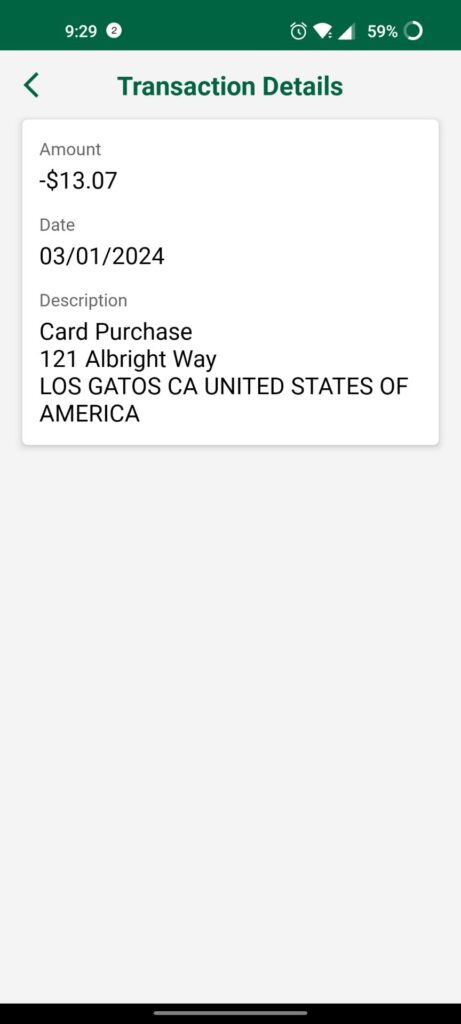
A 121 Albright Way charge on a credit card, debit card, or bank statement usually relates to Netflix. Netflix, Inc. officially lists 121 Albright Way, Los Gatos, California 95032 as its corporate address.
Some financial institutions display merchant address information such as 121 ALBRIGHT WAY or LOS GATOS CA prominently in the transaction details. That can make an ordinary Netflix subscription payment difficult to recognize when the word Netflix is shortened, omitted, or shown elsewhere in the expanded transaction record.
What Is the 121 Albright Way Charge?
The transaction most likely represents:
- A monthly Netflix subscription
- A Netflix plan renewal
- A Netflix account created by another authorized cardholder
- A second Netflix account using the same payment method
- An extra-member charge
- A prorated plan-upgrade charge
- A Netflix subscription billed through a partner
- A retry after an earlier payment was declined
- A pending authorization followed by the completed payment
- An unauthorized use of the card or payment information
The address itself is not a separate subscription company or local Los Gatos store. It is Netflix’s corporate address.
Is 121 Albright Way Netflix or Zipcar?
121 Albright Way is officially associated with Netflix.
Netflix currently publishes:
Netflix, Inc.
121 Albright Way
Los Gatos, CA 95032
United States
The old version of this article suggested the address might belong to either Netflix or Zipcar. Current official records support Netflix, and the unsupported Zipcar attribution has been removed.
A cardholder should still verify the specific payment because a legitimate Netflix address can appear in an unauthorized transaction.
Common 121 Albright Way and Netflix Statement Variations
The payment may appear as:
- 121 ALBRIGHT WAY
- 121 ALBRIGHT WAY LOS GATOS
- 121 ALBRIGHT WAY LOS GATOS CA
- 121 ALBRIGHT WAY LOS GATOS CA 95032
- 121 ALBRIGHT WAY CAUS
- NETFLIX 121 ALBRIGHT WAY
- NETFLIX LOS GATOS CA
- NETFLIX.COM LOS GATOS
- NETFLIX.COM CA
- NETFLIX.COM 866-579-7172
- NETFLIXCOM
- NETFLIX INC
- CHECKCARD NETFLIX
- CHKCARD 121 ALBRIGHT WAY
- POS DEBIT NETFLIX LOS GATOS
- RECURRING NETFLIX
- PENDING NETFLIX.COM
Banks can remove spaces, shorten merchant information, add a telephone number, or show a different description while a transaction is pending.
The older number `1-866-579-7172` may appear as part of a historical Netflix descriptor. Use Netflix’s current official Help Center or in-app Call and Chat options rather than relying on an old number copied from a statement.
How Much Does Netflix Cost?
As reviewed in July 2026, Netflix’s U.S. list prices before applicable taxes are:
- Standard with ads: $8.99 per month
- Standard: $19.99 per month
- Premium: $26.99 per month
Eligible Standard and Premium accounts may also pay separate monthly fees for extra members.
The final charge can differ because of:
- State or local taxes
- An extra-member slot
- A plan upgrade
- A prorated adjustment
- Foreign currency conversion
- A bank foreign-transaction fee
- Different pricing in another country
- A legacy plan or historical rate
Netflix prices can change. Check the Account and Payment History pages for the price currently attached to the membership.
Why Does the Charge Not Match a Current Netflix Price?
A different amount does not automatically mean the transaction is unrelated to Netflix.
Possible explanations include:
- The charge occurred under an older Netflix price
- Taxes were added
- The account is registered in another country
- The issuer converted the payment into another currency
- The member changed plans during the billing cycle
- An extra member was added
- The payment was prorated
- The issuer added a separate international fee
- The entry is pending and has not reached its final amount
Compare the transaction with Netflix Payment History rather than relying only on a current plan-price list.
How Netflix Monthly Billing Works
Netflix normally bills members once per month at the beginning of the billing cycle.
The billing date generally corresponds to the date the account originally started.
The charge may:
- Appear one day earlier or later because of time-zone differences
- Take several days to appear on the statement
- Occur on the last day of the month when the normal billing date does not exist
- Use a different date when Netflix is billed through a partner
Review the official billing record here:
Netflix Account and Billing Information
How to Verify a 121 Albright Way Charge
Follow these steps:
- Copy the complete statement descriptor.
- Record the transaction amount and date.
- Confirm whether the payment is pending or completed.
- Sign in to every Netflix account used by the household.
- Open the Account page.
- Review Payment History.
- Compare the statement amount and date with the Netflix record.
- Check the current plan and any extra-member slots.
- Review the payment methods stored on the account.
- Ask household members and authorized cardholders.
- Search email for Netflix receipts and billing messages.
- Contact Netflix through its official Help Center when no account matches.
Do not post account emails, passwords, profile names, card digits, invoice numbers, or transaction references publicly.
How to Check Netflix Payment History
Netflix Payment History can show:
- Past payment dates
- Subscription amounts
- Applicable taxes
- The current service period
- The account’s billing date
To review it:
- Sign in to Netflix.
- Open the Account page.
- Select Payment History or Billing Details.
- Compare each payment with the bank statement.
Netflix also allows members to open and print invoices for individual payments from the Payment History page.
What If You Cannot Remember the Netflix Account?
A card may be attached to:
- An older email address
- A family member’s account
- An account created on a television or mobile device
- A former household account
- A second Netflix membership
Netflix provides an account-recovery route for people who do not remember the email address or phone number.
Use:
Find or recover a Netflix account
When offered, the cardholder may be able to search using the name and payment method associated with the Netflix account.
Only enter payment information on the official Netflix website or app.
Why Are There Two Netflix Charges?
Two charges can result from:
- A pending authorization and completed payment
- A plan upgrade
- A prorated price difference
- An extra-member slot
- Two separate Netflix accounts
- Two different household members using the same card
- A preferred and backup payment-method issue
- A failed charge followed by a successful retry
- An actual duplicate transaction
- Repeated unauthorized use
Netflix says a plan upgrade or the first extra-member payment can result in more than one charge during the same month.
Check whether both transactions fully posted. A pending and completed entry may not represent two final charges.
Why Was a Different Card Charged?
Netflix can support more than one payment method on eligible accounts.
A backup payment method may be charged if the preferred payment method is declined.
Another card can also be charged when:
- Someone updated the account payment method
- A household member used a different card
- The account was restarted
- A secondary method was added for an extra member
- A partner package stopped covering the subscription
Review the Manage Payment Info section and remove payment methods that should no longer be attached to the account.
Why Is an Expired or Replaced Card Still Being Charged?
Some financial institutions participate in card-account updater services.
The issuer may automatically provide a recurring merchant with updated card credentials after:
- The card expires
- A replacement card is issued
- The account number changes
Replacing a card therefore may not cancel the Netflix membership.
Cancel the subscription itself and document the cancellation. Ask the issuer whether recurring payment updates are being provided when a replacement card continues to be charged.
How to Cancel Netflix
For an account billed directly by Netflix:
- Sign in to Netflix using a web or mobile browser.
- Open the Account page.
- Select Cancel Membership.
- Select Finish Cancellation.
- Save the confirmation email.
- Check the date on which access will end.
Official cancellation help:
Direct cancellation page:
Signing out, deleting the app, removing a profile, or stopping use of Netflix does not cancel the subscription.
What If There Is No Cancel Membership Button?
The account may be billed through:
- A mobile carrier
- An internet or television provider
- An app store
- A package that includes Netflix
- Another payment partner
The Netflix Account page should identify the billing partner and provide instructions.
In that situation:
- Open the Account page.
- Look under Membership and Billing.
- Identify the payment partner.
- Follow the partner’s cancellation instructions.
- Request confirmation from the billing partner.
Netflix may not be able to refund or cancel a payment collected directly by a third-party provider.
What Happens After Canceling Netflix?
When a directly billed account is canceled successfully:
- Netflix sends a confirmation email
- The membership normally remains active through the paid billing period
- No additional monthly charge should occur unless the account is restarted
Save:
- The cancellation email
- The cancellation date
- The final service date
- A screenshot of the Account page
Monitor at least the next two statements for another Netflix, Los Gatos, or 121 Albright Way transaction.
Why Was I Charged After Canceling?
Netflix says an account can be restarted by someone who still has access.
Take these steps:
- Sign in and cancel the membership again.
- Change the Netflix password.
- Use a password not used on any other website.
- Select the option to sign out all devices.
- Review Manage Access and Devices.
- Remove unfamiliar devices.
- Contact Netflix about the post-cancellation charge.
A charge may also have been submitted before the cancellation took effect. Compare the transaction date with the billing date and final service period.
Can Netflix Refund a 121 Albright Way Charge?
Netflix does not publish a blanket promise that every subscription payment will be refunded.
Contact Netflix when:
- The payment method was used without permission
- No Netflix account can be identified
- A duplicate completed payment appeared
- Billing continued after a confirmed cancellation
- An account was restarted without permission
- The charged amount does not match the account record
Official unauthorized-charge help:
Unrecognized or unauthorized Netflix charges
Ask Netflix to provide:
- The account connected with the transaction
- The billing date
- The plan or extra-member charge involved
- The cancellation status
- The refund decision
If the subscription was billed by a partner, contact that provider about cancellation and refunds.
What If You Never Opened a Netflix Account?
Someone may have created an account using the payment method.
Take these steps:
- Search email for Netflix signup and billing messages.
- Ask household members and authorized cardholders.
- Try Netflix’s account-recovery page.
- Contact Netflix immediately through the official Help Center.
- Ask Netflix to locate the payment.
- Request cancellation of any unauthorized account.
- Change passwords when account access may be compromised.
- Contact the card issuer or bank.
- Ask whether the card should be replaced.
A payment using Netflix’s genuine corporate address can still be unauthorized.
How to Secure a Netflix Account
When unknown viewing or billing activity appears:
- Change the Netflix password.
- Use a unique password.
- Sign out unfamiliar devices.
- Sign out all devices when necessary.
- Review account profiles.
- Review the account email and phone number.
- Review payment methods.
- Check recent viewing and device activity.
- Secure the associated email account.
Official security guidance:
Stop someone from using a Netflix account
Current Netflix Contact and Support Routes
- Corporate address: Netflix, Inc., 121 Albright Way, Los Gatos, CA 95032
- Netflix Help Center: Netflix Help
- Official contact page: Contact Netflix
- Account page: Netflix Account
- Unauthorized charges: Netflix Unauthorized-Charge Help
Members can also contact Netflix from the app:
- Open My Netflix.
- Select the profile name.
- Select Help.
- Select Call or Chat.
The 121 Albright Way corporate office is not the best route for individual billing, cancellation, or refund requests.
Watch Out for Fake Netflix Support
Scammers may create:
- Fake Netflix payment-failure emails
- Fake cancellation pages
- Sponsored support-number listings
- Texts claiming the account will be closed
- Fake refund offers
Do not provide an unexpected caller or website with:
- The full card number
- The CVV or PIN
- The Netflix password
- The email password
- A one-time authentication code
- Remote access to a device
- Gift-card numbers
- Cryptocurrency
Forward suspicious Netflix messages to:
Then delete the message and access Netflix directly through the official website or app.
Credit Card Dispute Guidance
Contact the card issuer promptly when:
- No authorized Netflix account can be found
- Netflix cannot identify or correct the transaction
- A duplicate completed charge remains
- Billing continued after documented cancellation
- A promised refund did not appear
- The card was used without permission
To preserve applicable credit-card billing-error rights:
- Call the issuer immediately
- File the dispute online when available
- Follow up in writing when required
- Send written notice within 60 calendar days after the statement containing the disputed payment was issued
- Keep copies of all documents
Official resources:
Debit Card and Bank Account Guidance
Report an unauthorized debit-card or bank transaction immediately.
Ask the bank:
- Whether the payment was debit card or another electronic transfer
- Whether additional attempts are pending
- Whether the recurring merchant can be blocked
- Whether the card or payment token should be replaced
- What written notice is required
Official guidance:
CFPB unauthorized debit and bank-transaction guidance
Credit-card and debit-card protections, procedures, and deadlines differ.
Consumer Reports and Experiences
There are currently 10 visible cardholder reports on this ChargeOnMyCard.com page.
Reported amounts include:
- $6.99
- $10.77
- $11.99
- $13.07
- $15.49
- $17.11
- $19.99
Common themes include:
- Cardholders who did not recognize the address
- Requests for cancellation or refunds
- Claims that the payment was unauthorized
- Concern about repeated or consecutive-day activity
- Consumers who believed ChargeOnMyCard.com could return the money
Some reported amounts resemble Netflix plan prices that were available when the comments were posted, while others may include taxes, conversion, adjustments, or an unrelated transaction. Amount alone does not conclusively identify a Netflix account.
The comments do not include verified Netflix billing records, account emails, cancellation confirmations, refund outcomes, or final bank decisions.
ChargeOnMyCard.com cannot:
- Access Netflix accounts
- Identify the member from a card number
- Cancel Netflix
- Issue refunds
- Block recurring payments
- Replace cards
- Submit disputes
Frequently Asked Questions About 121 Albright Way Charges
What is 121 Albright Way on my bank statement?
It usually identifies a Netflix subscription or related Netflix account payment. The address is Netflix’s official corporate address in Los Gatos, California.
Is 121 Albright Way Netflix?
Yes. Netflix officially lists 121 Albright Way, Los Gatos, CA 95032 as its corporate address.
Is the charge from Zipcar?
Current official information supports Netflix, not Zipcar. The old Zipcar attribution on this page was removed.
Why does the statement show an address instead of Netflix?
The bank or card issuer may emphasize merchant address information or display an abbreviated transaction record.
What is Netflix.com 866-579-7172?
That number has appeared in historical Netflix-related descriptors. Use Netflix’s current official Help Center, Contact Us page, or in-app Call and Chat options for support.
How do I verify the payment?
Compare the amount and date with Netflix Payment History and review every Netflix account used by the household.
Why did Netflix charge a different amount?
Possible reasons include taxes, a price change, an extra member, a plan upgrade, prorating, foreign currency, or a historical plan rate.
Why did Netflix charge twice?
The entries may involve a pending authorization, plan upgrade, extra-member fee, two accounts, payment retry, or actual duplicate.
Can an expired card still be charged?
Yes. The issuer may provide Netflix with updated card credentials through a recurring-payment updater service.
How do I cancel Netflix?
Use the Account or Cancel Membership page and select Finish Cancellation. Save the confirmation email.
Does deleting the Netflix app cancel the account?
No. Deleting the app or signing out does not cancel the membership.
Why was I charged after canceling?
The account may have been restarted by someone with access, or the payment may have been submitted before cancellation took effect. Cancel again, change the password, and sign out all devices.
Can Netflix refund the payment?
Contact Netflix for an account-specific decision. Refund eligibility depends on the transaction and whether Netflix or a billing partner collected it.
What if I never had Netflix?
Contact Netflix immediately, ask it to locate the payment method, and notify the card issuer when no authorized account can be found.
Can ChargeOnMyCard.com refund the charge?
No. ChargeOnMyCard.com cannot access Netflix, card, refund, or banking systems.
Related Netflix and Charge Guides
- Netflix.com Los Gatos Charge on Credit Card or Bank Statement
- How to Investigate an Unrecognized Credit Card, Debit Card, or Bank Charge
The Netflix Los Gatos guide covers transactions that display the Netflix name or website. This page remains focused on address-only `121 ALBRIGHT WAY` descriptors.
Help Other Cardholders Identify the Charge
If you saw 121 ALBRIGHT WAY, NETFLIX LOS GATOS, or another variation, please share what the payment represented.
Helpful details include:
- The descriptor without private references
- The general amount
- Whether it repeated monthly
- Whether Netflix Payment History matched it
- Whether a second account was found
- Whether an extra member or plan change explained it
- Whether the account was billed by a partner
- Whether cancellation was confirmed
- Whether a refund was received
- How the issuer resolved an unauthorized payment
Do not post card numbers, card digits, account emails, passwords, profile names, invoice numbers, transaction references, viewing activity, PINs, CVV codes, or authentication codes.
Why Rely on ChargeOnMyCard.com?
ChargeOnMyCard.com researches confusing credit-card, debit-card, address, subscription, streaming, recurring-payment, and bank-statement descriptors using current official merchant information, billing guidance, consumer-protection resources, statement patterns, and visible cardholder reports.
We distinguish the verified Netflix connection to 121 Albright Way from the separate question of which account, plan, household member, payment partner, or unauthorized user generated a particular transaction.
Last reviewed: July 2026.
Disclaimer
ChargeOnMyCard.com is not affiliated with Netflix, Netflix, Inc., any Netflix billing partner, app store, mobile carrier, internet provider, cardholder, bank, credit union, card network, payment processor, or financial institution. This article is provided for informational purposes only and is not financial, legal, subscription, streaming, refund, account-security, privacy, dispute, or fraud-prevention advice. Contact Netflix, the applicable billing partner, and the financial institution directly regarding a specific transaction.