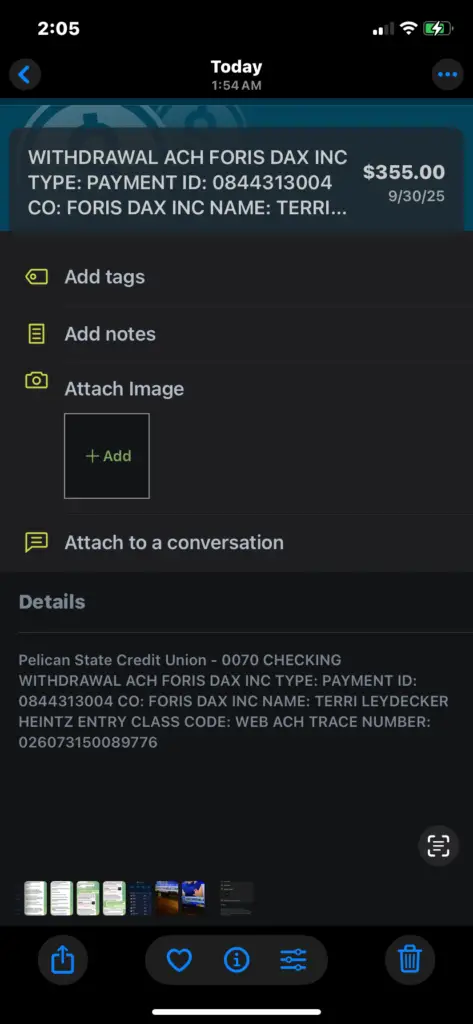
If you see a Foris Dax Inc charge, Foris Dax Inc payment, or Foris Dax charge on debit card, it is commonly connected to Crypto.com, cryptocurrency purchases, fiat deposits, card top-ups, crypto transfers, or other activity tied to a Crypto.com account. If you do not recognize the charge, review it quickly because crypto-related payments can be time-sensitive and may involve account security concerns.
Consumer Reports and Experiences
Consumers often search for Foris Dax Inc charge on debit card, Foris Dax Inc payment, Foris Dax payment, what is Foris Dax Inc payment, Foris Inc reviews, and Dax Inc unauthorized charge after seeing a transaction they do not immediately recognize.
Many cardholders later connect the charge to a Crypto.com account, a crypto purchase, a bank transfer, a debit card purchase of cryptocurrency, a Crypto.com Visa card top-up, or a transaction made by another person with access to the payment method. Others report confusion because the statement may show Foris Dax Inc instead of “Crypto.com,” the exact coin purchased, or the app transaction type.
If you use Crypto.com, check your app history before disputing the charge. If you do not use Crypto.com, cannot access the account, or believe the payment was unauthorized, contact your bank or card issuer right away and also try to contact Crypto.com support through official channels.
What Is the Foris Dax Inc Charge?
Foris Dax Inc is associated with Crypto.com and related Foris entities. A charge or payment under this descriptor may appear when money moves between your bank account, debit card, credit card, fiat wallet, Crypto.com account, or Crypto.com card.
In plain English, this charge usually means a payment method connected to you was used for a Crypto.com-related transaction. That may include buying cryptocurrency, funding an account, topping up a Crypto.com Visa card, paying a fee, or moving funds connected to a crypto account.
Important: Charge descriptors can be shortened by banks and payment processors. The descriptor alone may not show whether the charge was for a crypto purchase, debit card top-up, ACH transfer, card funding, wallet transaction, or account-related fee.
Why Foris Dax Inc May Appear on Your Statement
- Crypto.com purchase: You bought cryptocurrency through the Crypto.com app or a related Crypto.com platform.
- Debit card funding: A debit card may have been used to fund a Crypto.com account or purchase crypto.
- ACH or bank transfer: The payment may be tied to a bank transfer, fiat wallet deposit, or withdrawal.
- Crypto.com Visa card top-up: You may have added funds to a Crypto.com card or prepaid card account.
- Trading, transfer, or network fees: Certain crypto activity may involve platform, spread, network, or transaction fees.
- Recurring or saved payment method: A stored card or linked bank account may have been used again.
- Another user had access: A family member, partner, employee, or authorized user may have made the transaction.
- Unauthorized activity: If you did not use Crypto.com and do not recognize the charge, contact your bank immediately.
Common Foris Dax Statement Variations
The exact wording can vary by bank, card network, country, transaction type, and Crypto.com product. Possible statement variations include:
- FORIS DAX INC
- FORIS DAX INC PAYMENT
- FORIS DAX PAYMENT
- FORIS INC
- FORIS DAX
- DAX INC
- DAX INC UNAUTHORIZED CHARGE
- FORIS DAX INC CHARGE ON DEBIT CARD
- FORIS DAX INC CRYPTO.COM
- CRYPTO.COM
- CRYPTO COM
- CDC
- FORIS DAX CAN ULC
- FORIS DAX MT LIMITED
- FORIS SERVICES INC
How To Identify the Foris Dax Inc Payment
Before disputing the transaction, try to match it to activity in your Crypto.com account, bank account, debit card, or credit card history.
- Open the Crypto.com app: Review crypto purchases, fiat wallet activity, card top-ups, transfers, deposits, withdrawals, and fees.
- Check the exact amount: Compare the charge amount to a crypto purchase, funding transfer, or card top-up.
- Check the date and time: Crypto transactions may post at a different time than when you initiated them.
- Search your email: Look for Crypto.com, Foris Dax, account alerts, purchase confirmations, deposit notices, withdrawal notices, or card activity.
- Check multiple accounts: A household, business, or old Crypto.com account may be using the same payment method.
- Ask authorized users: Someone with access to your card, bank account, or device may have made the transaction.
- Ask your bank for merchant details: Request the merchant record, transaction ID, payment network, ACH originator, and whether it was a card payment or bank debit.
Is Foris Dax Inc the Same as Crypto.com?
Foris Dax Inc is commonly connected with Crypto.com and related Foris companies. Crypto.com uses different Foris entities depending on product, country, and service type, so your statement may show a Foris name rather than the Crypto.com brand.
If you have a Crypto.com account, the safest way to confirm the charge is to compare your bank statement with your in-app transaction history. If the amounts, dates, and activity match, the charge may be legitimate. If they do not match, contact Crypto.com support and your financial institution.
Foris Dax Inc Payment vs. Card Purchase
A Foris Dax Inc transaction may not always be a normal retail purchase. It may be a payment, transfer, ACH debit, card funding transaction, or crypto-related account movement.
If your statement says Foris Dax Inc payment, it may mean money was moved into or out of a Crypto.com-related account. If your statement says Foris Dax Inc charge on debit card, it may mean a debit card was used to buy crypto or fund an account.
What To Do If You Recognize the Crypto.com Account
If you use Crypto.com and the charge appears to match your account activity, take these steps:
- Save a screenshot of the matching Crypto.com transaction.
- Check whether the charge was for a purchase, transfer, top-up, or fee.
- Review any spread, network fee, card fee, or funding fee shown in the app.
- Check whether a pending charge later posts for a different amount.
- Contact Crypto.com support if the amount is incorrect or duplicated.
- Keep records in case your bank asks for proof that the transaction was recognized.
What To Do If the Foris Dax Inc Charge Is Unauthorized
If you do not recognize the Foris Dax Inc charge, take action quickly. Crypto and fintech account issues can escalate fast if someone has access to your payment method, email, phone number, or app account.
- Contact your bank or card issuer immediately.
- Ask whether the transaction was a debit card charge, ACH debit, credit card charge, or bank transfer.
- Ask your bank whether your card or bank account should be locked, replaced, or monitored.
- Check whether you have a Crypto.com account using the same email or phone number.
- Change your Crypto.com, email, and banking passwords if you suspect account access.
- Turn on or review two-factor authentication.
- Check for unfamiliar crypto purchases, withdrawals, wallet addresses, or transfers.
- Contact Crypto.com support through the app or official help channels.
- File a police report if required by your bank or if funds were stolen.
Crypto.com Support and Complaint Options
For account-specific help, use the Crypto.com app, official Crypto.com help center, or chat support. Avoid clicking support links from random texts, emails, ads, or social media messages claiming to help reverse a crypto charge.
- Crypto.com Help Center: help.crypto.com
- Crypto.com chat: chat.crypto.com
- Crypto.com complaint email: complaints@crypto.com
- Crypto.com official website: crypto.com
When contacting support, include the exact statement descriptor, amount, date, card or bank type, last four digits of the payment method, Crypto.com account email or phone number, and any screenshots from your bank and Crypto.com app.
Crypto.com Card Disputes and Chargebacks
If the issue involves a transaction made with a Crypto.com prepaid card, Crypto.com says disputes can be started inside the app from the card transaction history by selecting the relevant transaction and reporting an issue. This is different from disputing a charge with your outside bank or card issuer.
If the Foris Dax Inc charge is on your outside bank or debit card and you believe it is unauthorized, contact that bank or card issuer directly. If it is a Crypto.com card purchase dispute, use the Crypto.com app dispute process.
Crypto Scam and Recovery Warning
Be careful if anyone contacts you claiming they can recover crypto, reverse a Foris Dax charge, unlock a wallet, or refund your money for an upfront fee. Recovery scams often target people who are already worried about crypto charges.
- Do not share your Crypto.com password, passcode, seed phrase, recovery phrase, or two-factor authentication codes.
- Do not send crypto to someone claiming they can “verify” or “unlock” your refund.
- Do not install remote-access software for someone claiming to be support.
- Use only official Crypto.com support channels and your bank’s official phone number.
Is the Foris Dax Inc Charge a Scam?
The Foris Dax Inc descriptor itself is usually not a scam when it matches legitimate Crypto.com account activity. Many real Crypto.com transactions may show a Foris-related name because of the legal entities behind the platform.
However, if you do not have a Crypto.com account, did not authorize the transaction, cannot match the amount, or see crypto activity you did not initiate, treat it as a potential fraud or account-security issue. Contact your bank and Crypto.com immediately.
How To Prevent Future Unauthorized Crypto Charges
- Remove saved payment methods from accounts you no longer use.
- Turn on two-factor authentication for Crypto.com, email, and banking accounts.
- Use a strong, unique password for your crypto account.
- Review withdrawal whitelists and security settings.
- Set bank alerts for card purchases, ACH debits, and large transfers.
- Watch for phishing emails, fake support chats, and recovery scams.
- Monitor statements after any suspicious transaction.
Frequently Asked Questions
What is Foris Dax Inc on my debit card?
Foris Dax Inc on a debit card is commonly connected to Crypto.com or a related Foris entity. It may be a crypto purchase, fiat deposit, card top-up, bank transfer, or other Crypto.com-related transaction.
What is Foris Dax Inc payment?
A Foris Dax Inc payment usually means money was moved in connection with a Crypto.com account or related Foris service. Check your Crypto.com app, bank history, email confirmations, and payment method details.
Is Foris Dax Inc Crypto.com?
Foris Dax Inc is commonly associated with Crypto.com and related Foris companies. Because Crypto.com uses different legal entities depending on the service and location, your statement may show Foris Dax instead of Crypto.com.
Why did Foris Dax charge my bank account?
The most common reasons are a crypto purchase, account funding transfer, fiat wallet movement, card top-up, or fee. If you did not authorize it, contact your bank or card issuer right away.
How do I contact Foris Dax Inc?
Use Crypto.com’s official support channels, including the Crypto.com app, help.crypto.com, chat.crypto.com, or complaints@crypto.com. For security, avoid unofficial phone numbers or links from search ads, texts, or social media.
Can I dispute a Foris Dax Inc charge?
If the charge is on your outside bank card or bank account and was unauthorized, contact your bank or card issuer. If the issue involves a Crypto.com prepaid card purchase, use the dispute option inside the Crypto.com app.
What if I sent crypto to the wrong person?
Crypto transfers can be difficult or impossible to reverse once completed. Contact Crypto.com support immediately, but also be cautious of anyone claiming they can recover funds for an upfront fee.
Should I replace my card?
If the Foris Dax Inc charge was unauthorized or your bank believes your payment details may be compromised, replacing the card may be appropriate. Ask your card issuer what protection steps they recommend.
Related Credit Card and Bank Charges
Crypto, fintech, ACH, app, and digital-service descriptors can be confusing because statements may show a processor, legal entity, internal code, or service center instead of the app name consumers recognize.
- T5C1HB8RM5BJRC6 Cleo AI Charge
- CARDMEMBER SERV WEB PYMT Charge
- Google Enerjoy Charge on Credit Card
- Prime Video 888-802-3080 WA Charge
- Decline Defense Charge
- Shuttle Deals Charge
Why Trust ChargeOnMyCard.com?
ChargeOnMyCard.com helps consumers research confusing credit card, debit card, ACH, crypto, fintech, and bank-statement descriptors using available company information, official resources, payment clues, and reports from cardholders. Our goal is to help readers understand what a charge may be, how to verify it, and when to contact the merchant, app provider, financial institution, or card issuer.
Share Your Experience
Have you seen a Foris Dax Inc, Foris Dax payment, Foris Inc, Dax Inc, or Crypto.com-related charge on your credit card, debit card, or bank statement? Please share the exact descriptor, amount, whether it matched Crypto.com activity, and how you resolved it. Your report may help another reader identify a legitimate crypto transaction, card top-up, unauthorized charge, or account-security issue.
Disclaimer
ChargeOnMyCard.com is an independent consumer information website and is not affiliated with Foris Dax Inc, Crypto.com, Foris Companies, any crypto exchange, any bank, or any company mentioned. Information is provided for educational purposes only and is not financial, legal, tax, or investment advice. Always verify unfamiliar charges directly with the merchant shown on your transaction record, your app provider, your bank, or your card issuer before taking action.