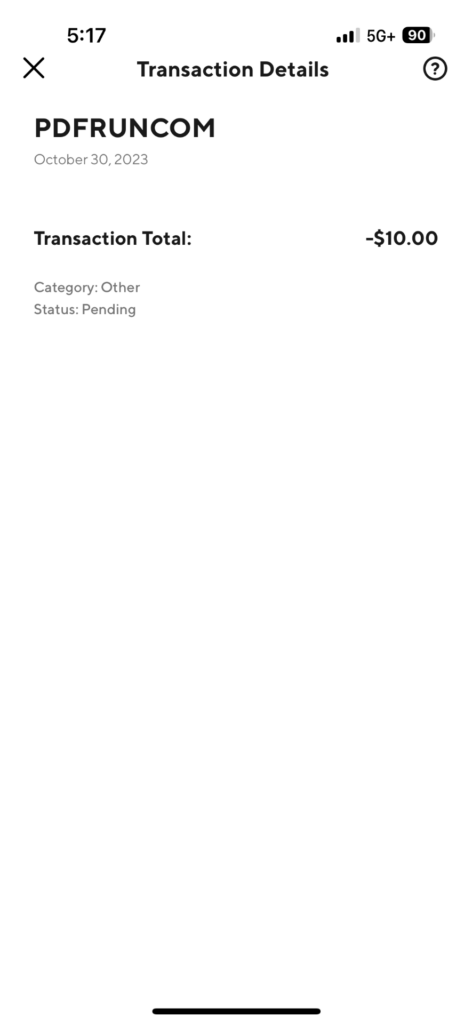
A PDFRUNCOM charge on your credit card, debit card, or bank statement is most likely connected to PDFRun.com, an online PDF editor, document form, e-signature, and file-conversion service. The charge may appear after you create an account, edit or download a document, start a trial, subscribe to a monthly or yearly plan, renew a subscription, or add a payment method.
Common statement wording may include PDFRUNCOM, PDFRUN, PDFRun.com charge, PDFRun charge on credit card, PDFRun.com on bank statement, pdfruncom charge on credit card, or a similar descriptor. If you recently filled out a PDF form, downloaded a legal, tax, business, real estate, employment, or government document, or used PDFRun to edit or sign a file, the charge may be legitimate. If you do not recognize it, check your PDFRun account, email receipts, trial status, subscription settings, and authorized card users.
What Is the PDFRUNCOM Charge?
PDFRUNCOM is a billing descriptor that may appear when PDFRun charges your card for an online PDF editing, document, form, e-signature, file-conversion, or subscription-related service. The wording can look unfamiliar because your bank may remove punctuation or spaces, showing pdfruncom instead of PDFRun.com.
PDFRun is a real online document service, but that does not automatically mean every PDFRUNCOM charge was authorized by you. A charge could be from your own account, a trial that converted, a subscription renewal, a family member or employee using your card, or unauthorized card use.
Common PDFRun Statement Variations
- PDFRUNCOM
- PDFRUN
- PDFRun.com
- PDFRun.com charge
- PDFRun charge on credit card
- PDFRun.com on bank statement
- pdfruncom charge on credit card
- PDFRun subscription
- PDFRun trial
- PDFRun document charge
- PDFRun authorization hold
The exact descriptor may vary by card issuer, payment processor, plan type, country, currency, pending status, and whether the charge is a subscription, one-time payment, renewal, or authorization hold.
Why PDFRun May Charge Your Card
- You created or edited a PDF document through PDFRun.
- You downloaded, printed, shared, or electronically signed a document.
- You started a PDFRun trial and it converted to a paid plan.
- You subscribed to a monthly or yearly PDFRun plan.
- Your PDFRun subscription automatically renewed.
- You upgraded from a free or trial account to a paid plan.
- You added a new payment method and saw a pending authorization hold.
- A spouse, family member, employee, bookkeeper, assistant, or authorized card user used PDFRun.
- Your card was saved in a PDFRun account and billed for renewal.
- Your card information may have been used without permission.
Is PDFRun Legit?
PDFRun is a real online PDF and document-editing service. It offers tools for editing, filling, signing, converting, merging, and managing PDF documents online. If you recently used PDFRun to complete a form, tax document, legal template, business form, or other PDF, the charge may match that activity.
However, users often search “is PDFRun legit” because they may remember using a document tool once but not expect a recurring charge. Before calling the charge fraud, check whether you agreed to a trial, monthly plan, annual plan, paid download, or subscription renewal.
PDFRun Trial and Subscription Billing
PDFRun offers subscription plans and may bill monthly or yearly depending on the plan selected. A PDFRUNCOM charge may appear soon after subscribing, when a trial ends, or when a monthly or yearly subscription renews.
If you only needed one document, check whether your account was placed on a recurring plan. Search for signup emails, receipts, trial confirmations, cancellation notices, and PDFRun billing messages.
PDFRun Authorization Holds
Some PDFRun-related statement activity may be an authorization hold rather than a completed charge. PDFRun’s FAQ says users may see an authorization hold after signing up or adding a new payment method. These holds may appear as pending transactions and may take several business days to disappear depending on the bank.
If the PDFRUNCOM item is still pending, wait to see whether it posts, reverses, or changes amount. If it posts as a completed charge and you do not recognize it, investigate it as a real transaction.
Why the PDFRun Amount May Look Different Than Expected
The charge amount may differ from what you expected because PDFRun may bill for a monthly plan, annual plan, upgraded plan, taxes, foreign exchange conversion, or a renewal instead of a one-time document. A small pending hold may also appear separately from the final subscription charge.
Compare the amount on your card statement with your PDFRun account, email receipt, plan type, billing date, and any cancellation confirmation.
PDFRun Official Contact Information
- Official Website: pdfrun.com
- Contact Page: PDFRun contact form
- Pricing and Billing Help: PDFRun plans, pricing, and billing
- FAQ: PDFRun FAQ
- Phone Number Listed by PDFRun: 1-888-245-8984
- Support Hours Listed on Contact Page: Monday-Friday, 8:00 AM-4:00 PM Pacific Time
The older address on some listings may not appear clearly on PDFRun’s current contact page. Use the official website, official contact form, account dashboard, and billing help page when checking a charge.
How to Verify a PDFRUNCOM Charge
- Check whether the charge is pending, posted, refunded, or reversed.
- Write down the exact descriptor, amount, date, and any phone number shown by your bank.
- Search your email for PDFRun, PDFRUNCOM, pdfrun, document, form, PDF, e-signature, trial, subscription, renewal, receipt, cancellation, refund, or the exact charge amount.
- Log in to your PDFRun account and review your plan, billing status, payment method, and account settings.
- Check whether you created, edited, downloaded, printed, signed, or shared a document recently.
- Ask authorized card users whether they used PDFRun for a document or form.
- Check whether the amount matches a monthly plan, yearly plan, trial conversion, or authorization hold.
- If you cannot identify the charge, contact PDFRun through official support and contact your card issuer.
How to Cancel PDFRun
PDFRun’s billing help says subscriptions can be canceled from the dashboard through account settings and subscription settings. PDFRun’s FAQ also describes canceling a trial by going to Account Setting, selecting Plan, choosing Update, and clicking Cancel.
After canceling, save the confirmation email or screenshot. If another PDFRUNCOM charge appears after cancellation, compare the cancellation date with the billing date and contact PDFRun support for review.
How to Ask PDFRun About a Refund
PDFRun says subscription-fee refunds are subject to its terms and conditions and undergo review. If you believe the charge was a mistake, duplicate, unexpected renewal, failed cancellation, or unauthorized transaction, contact PDFRun and provide the account email, charge date, amount, statement descriptor, and last four digits of the card.
If the charge came from a trial or renewal you did not expect, ask whether the account can be canceled immediately and whether a refund is available. Keep copies of all support messages.
What If You Used PDFRun One Time?
If you only used PDFRun for one document, check whether the checkout or account setup included a trial or subscription. Many online document tools allow users to create or edit a file first, then require an account, payment method, trial, or plan before downloading or saving the finished document.
Look for the original document you created and any receipt tied to that document. The charge may be legitimate even if you did not remember the billing name.
What If You Never Signed Up for PDFRun?
If you never signed up for PDFRun and no authorized card user recognizes the charge, treat the PDFRUNCOM transaction as suspicious. Check whether a family member, employee, assistant, or shared-device user created a document using your card.
If the charge still cannot be identified, contact PDFRun and your bank or credit card issuer. Ask your issuer whether the card should be locked, replaced, monitored, or disputed.
What To Do If You Recognize the Charge
If the PDFRUNCOM charge matches a document, trial, subscription, or renewal you authorized, save the receipt and account details. If you no longer need PDFRun, cancel the subscription and save the confirmation.
Also download or save any completed documents you still need before closing the account or losing access to paid features.
What To Do If You Do Not Recognize the Charge
- Ask all authorized card users whether they used PDFRun.
- Search email and spam folders for PDFRun receipts or account notices.
- Check whether the charge is an authorization hold, subscription renewal, or trial conversion.
- Contact PDFRun through the official website or phone number listed by PDFRun.
- Do not call random refund or cancellation numbers from search ads or pop-ups.
- Contact your bank or card issuer if PDFRun cannot identify an authorized account.
- For suspected fraud, ask whether to lock the card, replace the card number, and dispute the charge.
Could the PDFRUNCOM Charge Be Fraud?
A PDFRUNCOM charge is not automatically fraud. It may be a legitimate PDFRun document purchase, trial conversion, monthly subscription, annual subscription, account upgrade, renewal, or authorization hold.
However, treat it as potentially unauthorized if you never used PDFRun, cannot find a receipt, no authorized user recognizes it, PDFRun cannot match the charge to your account, or the charge repeats after cancellation.
Watch Out for Fake PDFRun Support Numbers
Use PDFRun’s official website, contact page, account dashboard, or the phone number listed on PDFRun’s own support pages. Avoid random support numbers, refund websites, cancellation services, search ads, or pop-ups that ask for sensitive information.
Do not share your full card number, PDFRun password, bank login, Social Security number, PIN, one-time security code, or remote computer access with anyone who contacts you unexpectedly.
Frequently Asked Questions About PDFRUNCOM Charges
What is PDFRUNCOM on my credit card?
PDFRUNCOM on your credit card is likely a PDFRun.com billing descriptor. It may be from a PDF document, trial, subscription, monthly or annual renewal, authorization hold, or account upgrade.
Is PDFRun legit?
PDFRun is a real online PDF editor and document service. Still, you should verify the charge if you do not recognize the account, document, trial, subscription, or billing amount.
Why did PDFRun charge me?
PDFRun may charge you for a subscription, trial conversion, renewal, document-related service, or paid account plan. Check your PDFRun account and email receipts to identify the reason.
Does PDFRun automatically renew?
PDFRun’s billing help says subscriptions renew automatically unless canceled. Check your plan settings to see whether you are on a monthly or yearly plan.
How do I cancel PDFRun?
Sign in to your PDFRun account, go to account settings, review your plan or subscription settings, and choose the cancellation option. Save the cancellation confirmation.
Can I get a refund from PDFRun?
PDFRun says refunds are subject to review and its terms and conditions. Contact PDFRun support with your account email, charge date, amount, and descriptor.
What is a PDFRun authorization hold?
A PDFRun authorization hold may appear as a pending transaction when you sign up or add a payment method. It may reverse after several business days depending on your bank.
Should I dispute a PDFRUNCOM charge?
First try to match the charge to a PDFRun account, document, trial, subscription, receipt, or authorized card user. If it remains unauthorized or PDFRun cannot identify it, contact your card issuer about a dispute or fraud claim.
Related Document, Subscription, and Online Billing Charge Guides
- Orange Street Charge on Credit Card Statement
- Little Falls Drive Charge on Credit Card Statement Explained
- TLG Shopper recurring charge
- ProBiller Charge on Credit Card
- USAT Media Co Charge on Credit Card or Bank Statement
- Paddle.net Charge on Credit Card
- 1 Infinite Loop CA Apple Charge
- 1600 Amphitheatre Parkway Google Billing Charge
Help Other Cardholders Identify This Charge
If you saw a PDFRUNCOM, PDFRUN, PDFRun.com charge, PDFRun charge on credit card, pdfruncom charge on credit card, or similar charge on your credit card, debit card, or bank statement, please share your experience in the comments.
Helpful details include the exact descriptor, amount, whether it was a document download, trial, monthly plan, yearly plan, subscription renewal, authorization hold, refund issue, cancellation issue, or unauthorized charge, and how you resolved it. Do not post full card numbers, account passwords, document details, addresses, phone numbers, email addresses, PINs, one-time codes, or other private information.
Why Rely on ChargeOnMyCard.com?
ChargeOnMyCard.com helps consumers identify confusing credit-card, debit-card, ACH, and bank-statement descriptors by researching merchant names, subscription billing patterns, trial renewals, payment processors, and official support options when available. Our goal is to help cardholders determine whether a charge is likely legitimate, mistaken, recurring, refunded, or potentially unauthorized.
Disclaimer
ChargeOnMyCard.com is not affiliated with PDFRun, PDFRun.com, Crystal Lake Media, any document service, payment processor, bank, or card issuer. This page is for informational purposes only and should not be treated as financial, legal, billing, refund, subscription, fraud-prevention, document-preparation, or banking advice. ChargeOnMyCard.com does not provide legal or tax advice. If you believe a charge is unauthorized, contact your bank or credit card issuer directly.