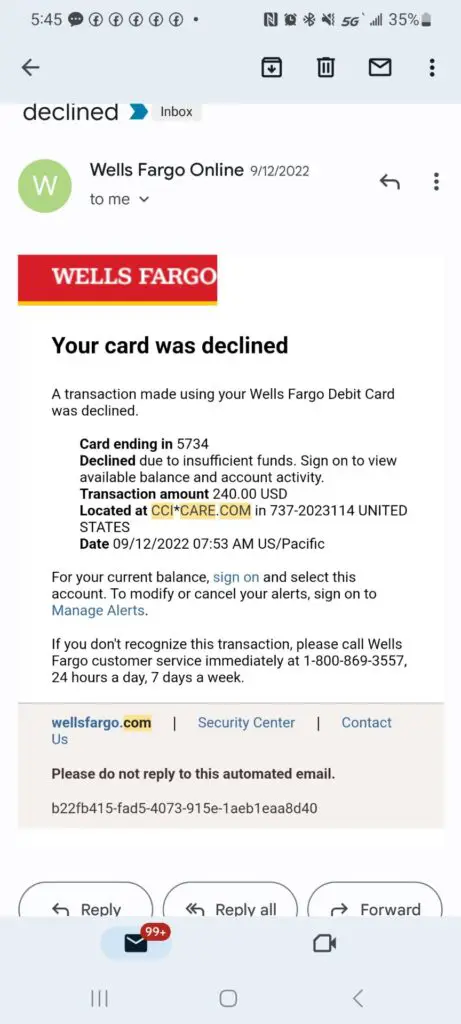
If you found a CCI Care.com, CCI*CARE.COM, cci care com charge, or ccicare.com transaction on your credit card, debit card, or bank statement, the charge is most often associated with Care.com billing. It may be connected to a paid membership, subscription renewal, account upgrade, background check, or another Care.com-related service. Because statement descriptors can be shortened or reformatted by banks and payment processors, verify the charge before assuming it is fraud.
Consumer Reports and Experiences
Consumers commonly report seeing CCI Care.com or CCI*CARE.COM after signing up for Care.com, upgrading to a paid plan, allowing a trial or membership to renew, or using a saved card on a family or caregiver account. Some cardholders only recognize the charge after searching for phrases such as cci care.com charge, cci care charge, ccicare.com, ccicarecom, or 877-227-3115.
Other reports involve people who no longer remember creating a Care.com account, had another household member use the card, thought a membership had already been canceled, or cannot connect the charge to any account. If you do not recognize the transaction, check your Care.com account and email receipts first, then contact your card issuer if the charge still appears unauthorized.
What Is the CCI Care.com Charge?
The CCI Care.com charge is usually a billing descriptor connected with Care.com. Care.com is an online platform used by families and caregivers for child care, senior care, pet care, tutoring, housekeeping, and other care-related services.
The “CCI” part of the descriptor may be part of the way the company, billing system, or payment processor formats the transaction. The “Care.com” part is the strongest clue. If the wording on your statement includes CCI Care, CCI*CARE.COM, cci care com, or ccicare.com, start by checking whether you or someone with access to your card has used Care.com.
Common CCI Care.com Statement Variations
This charge may appear in different ways depending on the bank, card issuer, payment network, or statement formatting. Reported and related variations include:
- CCI Care.com
- CCI CARE
- CCI CARE COM
- CCI Care.com charge
- CCI*CARE.COM
- CCI*CARE.COM charge
- CCI*CA.CARE.COM
- CCI*CARE.COM Waltham MA
- CCI*CARE.COM MA
- ccicare
- ccicare.com
- ccicarecom
- cci care.con
- 877-227-3115
- 8772273115
- CB/CCI PL CC credit card
Why CCI Care.com May Be Charging You
A CCI Care.com charge may appear for several possible reasons:
- A Care.com paid family membership
- A Care.com caregiver membership or account upgrade
- A recurring Care.com subscription renewal
- A trial or promotional plan that converted to paid billing
- A background check, screening, or account-related charge
- A saved card attached to a Care.com account
- A spouse, family member, employee, or authorized card user using the card
- An old Care.com account that was not fully canceled
- An unauthorized transaction if no one recognizes the charge
How to Identify the CCI Care.com Charge
Before disputing the transaction, try these steps:
- Search your email: Look for “Care.com,” “CCI,” “membership,” “Premium,” “renewal,” “receipt,” “subscription,” “background check,” and the charge amount.
- Check your Care.com account: Log in at Care.com and review your membership, plan, payment settings, and billing history.
- Check app subscriptions: If you signed up on a phone, review Apple App Store or Google Play subscriptions.
- Ask authorized card users: Another household member or business user may have used the card for a care-related account.
- Compare the date and amount: Match the charge to a renewal date, trial end date, account upgrade, or screening purchase.
- Look for descriptor clues: Wording such as CCI*CARE.COM, ccicare.com, Waltham MA, MA, or 8772273115 may help connect the charge to this billing path.
How to Contact Care.com About CCI Care.com Billing
For billing questions, cancellation help, or refund requests, start with official Care.com support resources:
- Care.com Website: Care.com
- Care.com Help Center: Care.com Help Center
- Care.com Cancellation Help: Cancel a family paid plan or membership
If your bank statement shows 877-227-3115 or 8772273115, treat it as a descriptor clue. Use Care.com’s official website or Help Center before sharing account information, card details, or personal information.
How to Cancel a Care.com Membership
If the charge is connected to an active Care.com membership, cancel the recurring billing through the account tied to the charge. The exact wording may vary by account type, but the general process is:
- Log in to the Care.com account that may have the paid membership.
- Open account settings, membership, plan, subscription, or billing settings.
- Choose the option to cancel, downgrade, or manage the subscription.
- Follow every confirmation step until the cancellation is complete.
- Save the cancellation email, confirmation screen, screenshots, chat transcript, or support ticket number.
If the subscription was started through Apple, Google Play, PayPal, or another third-party billing platform, you may need to cancel through that platform as well. Canceling inside one system may not stop billing handled by another payment provider.
Refunds, Billing Help, and Disputes
If you recognize the Care.com account but believe the amount is wrong, contact Care.com support first and ask for a billing review. Provide the charge date, charge amount, statement wording, account email address, and the last four digits of the card only when using official support channels.
If you canceled previously, include your cancellation confirmation, screenshots, emails, or support ticket details. Keep a written record of every request.
If you cannot identify the charge or believe it is unauthorized, contact your bank or card issuer. Ask whether the charge is pending or posted, whether the merchant descriptor has additional details, and whether you should file a billing dispute or fraud claim.
When to Treat CCI Care.com as Possible Fraud
Treat the charge as suspicious if:
- No one in your household recognizes Care.com
- You never created a Care.com account
- The charge amount does not match any membership, plan, or service you used
- You see multiple CCI Care.com charges you cannot explain
- The charge continues after you have written cancellation confirmation
- You receive suspicious emails, texts, or calls asking for card or account details
Do not provide your full card number, bank login, Social Security number, password, or one-time security code to anyone who contacts you unexpectedly. Go directly to Care.com or your bank’s official website or app instead of clicking suspicious links.
Related Subscription and Online Billing Charges
If you are reviewing unfamiliar online membership, app, or subscription charges, these related ChargeOnMyCard.com guides may also help:
Related Resources for Care.com Billing and Unfamiliar Charges
If you are trying to identify a CCI Care.com charge, cancel Care.com billing, report a questionable transaction, or research a company behind a statement descriptor, these related resources may help:
- Care.com customer service and support information
- ThinkItsAScam.com scam and fraud warning guides
- CorporateOfficeHeadquarters.com corporate office and complaint resources
- ZeroStars.org When One Star is Too Much
- WMT Plus charge on bank statement
- HEARST MEMBERSHIP charge on credit card
- Help.MAX.com charge on credit card
- FSPRG.COM charge and FastSpring billing
Frequently Asked Questions About CCI Care.com Charges
What is CCI Care.com on my credit card?
CCI Care.com is usually a billing descriptor connected to Care.com. It may appear for a membership, subscription renewal, account upgrade, background check, or another Care.com-related charge.
Is CCI Care.com the same as Care.com?
In many cardholder reports, CCI Care.com or CCI*CARE.COM points to Care.com billing. However, you should verify the charge by checking your Care.com account, email receipts, app subscriptions, authorized card users, and bank details.
Why does my statement show cci*care.com or ccicare.com?
Banks and payment processors often shorten or reformat merchant names. A Care.com charge may appear as CCI*CARE.COM, ccicare.com, ccicarecom, CCI CARE COM, or a similar variation.
How do I cancel a CCI Care.com charge?
Log in to the Care.com account connected to the charge and review the membership, plan, or subscription settings. If you subscribed through Apple, Google Play, PayPal, or another platform, check that platform’s subscription settings too.
Should I dispute a CCI Care.com charge?
If you cannot match the charge to a Care.com account, receipt, app subscription, or authorized user, contact your card issuer promptly. If the charge is legitimate but incorrect, contact Care.com support first and document your refund or cancellation request.
Why Trust ChargeOnMyCard.com?
ChargeOnMyCard.com helps consumers identify unfamiliar credit card, debit card, and bank statement charges. Our guides are based on available company information, official resources when available, payment clues, statement descriptors, and reports from cardholders. We focus on helping readers determine whether a charge may be legitimate, recurring, mistaken, or potentially unauthorized.
Share Your Experience
Did a CCI Care.com, CCI*CARE.COM, ccicare.com, cci care com, or 8772273115 charge appear on your statement? Share the amount, date, exact wording, card type, and whether you found it in a Care.com account. Do not post your full card number, account password, address, phone number, email address, or other private information.
Page Update Note
This CCI Care.com charge guide was reviewed and updated on July 7, 2026 with clearer descriptor variations, Care.com billing and cancellation guidance, refund and dispute steps, fraud warnings, and a related Care.com customer service resource.
ChargeOnMyCard.com Disclaimer
ChargeOnMyCard.com is not affiliated with Care.com. This page is for consumer information, reviews, and complaint discussion only. Always contact Care.com, your bank, or your card issuer directly for official help with billing, cancellations, refunds, disputes, and fraud claims.